EVV Onboarding Checklist
Your success is our priority. This checklist is tailored to keep you on track as you start using the Sandata Electronic Visit Verification (EVV) System.

-
Ensure emails from @Sandata.com are not going to your junk folder. Speak to your IT administrator if you need help.
-
Read all Sandataemails for important information.
-
Complete training for administrators via HHAeXchange University (required to get your Sandata EVV login credentials which will be sent as part of your Welcome Kit).
-
Choose your billing vendor (either Sandata if using Sandata’s EVV system or a third-party vendor if using an Alt EVV system). You must communicate new EVV Payer IDs to your billing vendor.
New EVV Payer ID: Services provided to members will be billed using newly-published EVV Payer ID values. These new values will route to the appropriate parties as needed and indicate the need for EVV Validation to occur.
Payer Name Current Payer ID New EVV Payer ID State of Nevada NVMED NVFFS Molina Health Plan MLNNV NVMOL Health Plan of Nevada UHC 76342 NVHPN Anthem BCBS of Nevada NVBCBS NVANT Silver Summit Health Plan - Centene 68069 NVSIL -
Review Sandata EVV learning pathways and have staff view the appropriate recorded training videos here.
-
Open the Welcome Kit you receive by email and download the included documents. In addition to your EVV system login information, the kit includes:
-
Welcome Letter
-
Telephonic Visit Verification (“TVV”) Call Reference Guide
-
Group Visit Call Reference Guide
-
Service and Task Lists
Remember that to get your Welcome Kit you must take the training for administrators.
-
-
If you will be using Sandata as your billing vendor, you must have selected Sandata’s EVV system – enroll in the Change Healthcare ConnectCenter and select your payer. Review Claim/Billing Setup Information.
-
If you are using an Alt EVV vendor, complete Sandata Aggregator training in HHAeXchange University.
-
Review Sandata EVV learning pathways and have staff view the appropriate recorded training videos here.
-
For those using Sandata as your billing vendor:
-
Review Claim/Billing Setup information.
-
Enroll in the Change Healthcare ConnectCenter and select your Payer. Complete special payer-specific instructions to begin receiving remittance files.
-
Begin using the ConnectCenter to access claim status information and to get information on claim corrections needed.
-
-
Review Sandata EVV learning pathways and have staff view the appropriate recorded training videos here.
-
Develop training for your caregivers on the Sandata Telephonic Visit Verification (TVV) IVR and Sandata Mobile Connect (SMC) visit data entry capture tools.
-
Check the system to see if your Employees are in the EVV system.
-
If an Employee is not there, create the Employee and check the box to allow employee access to the Sandata Mobile Connect app.
-
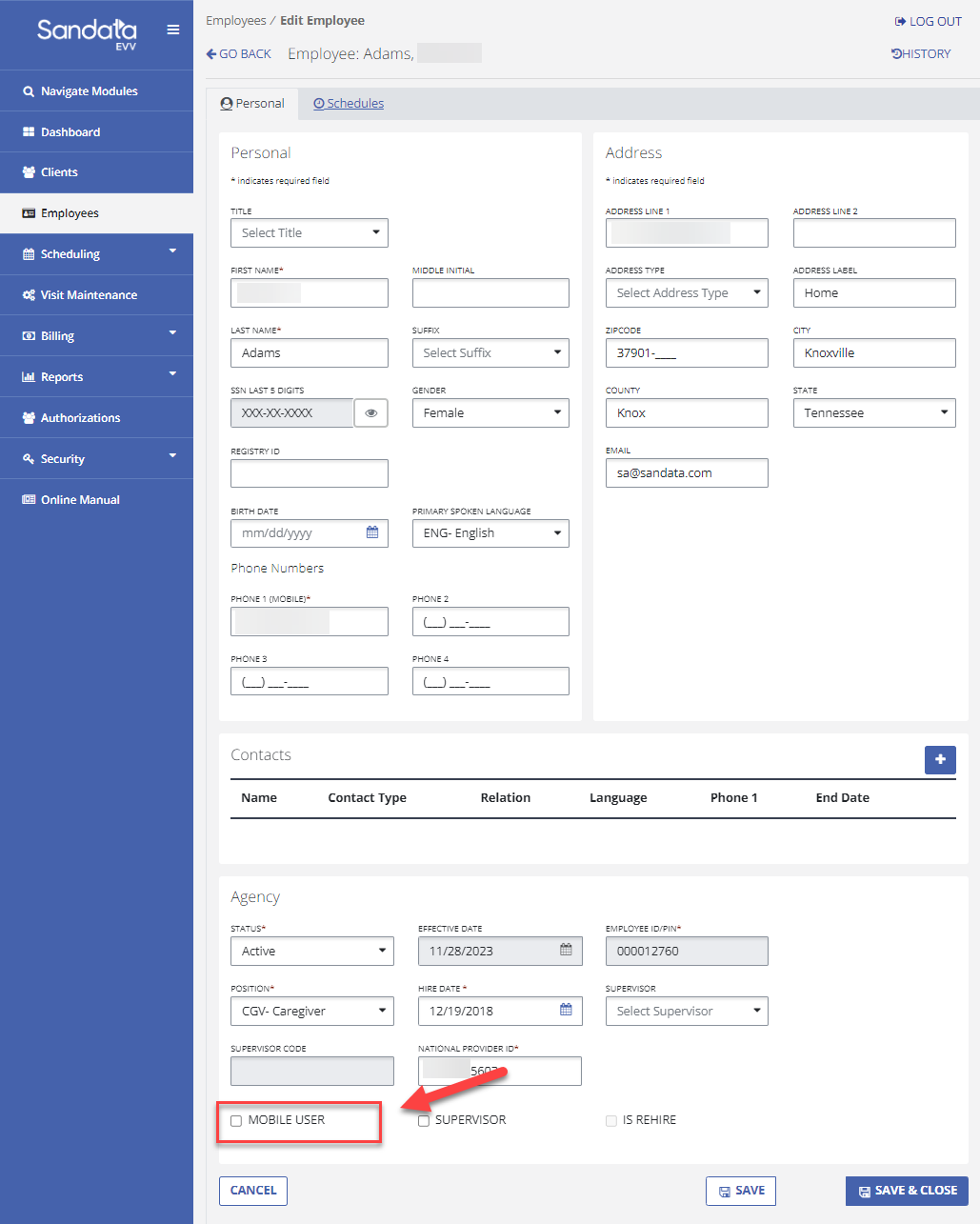
Grant Sandata Mobile Connect app access to all current employees who need it. In the EVV system, on the Employees screen, check the Mobile User box at the bottom left of the screen. This triggers an email to be sent to the Employee with a temporary password for them to sign into the app. Let Employees know that they will receive this email and should open it from their mobile device after they have downloaded the Sandata Mobile Connect app.
-
-
Download the Sandata Mobile Connect app through the Apple Store or Google Play Store. You will be able to log in once your employer has given you access.
-
Attend employer-led training for Caregivers on visit capture through the Sandata Telephonic Visit Verification (TVV) visit data entry system and Sandata Mobile Connect App.
-
Begin entering visit information through the Sandata Mobile Connect app. If you cannot use the app, use the alternative method (telephone) as approved by your employer.
-
If you do not have access to the Sandata Mobile Connect app, notify your agency and complete your scheduled visits using the alternate visit verification method chosen by your Agency.
-
Review the Call Reference Guides to become familiar with the information required during a visit and to understand how to access the TVV system.
-
Access the Mobile section of Sandata Knowledge Base to review help topics for the Sandata Mobile Connect app.
For technical assistance in using the DHCFP EVV system, please contact the Customer Support team at (833) 545-0394 or submit a ticket.
For technical assistance with Alternate EVV, please contact (833) 545-0395 or submit a ticket.