Ohio Agency Provider Checklist for Sandata Electronic Visit Verification
This checklist helps you:
-
Access required training.
-
Register in the Sandata EVV system.
-
Add EVV System Users.
-
Set up your Recipients.
-
Set up your Direct Care Workers.
-
Share training resources with your Direct Care Workers.

-
Go to https://university.hhaexchange.com/. Use the email you use for your OHID on the sign-up page. In the sign-up form, use 11111 for the Medicaid/Provider IDs if you do not know these IDs. Then select the following:
-
Choose Agency Admin/Manager.
-
Choose Ohio.
-
Choose Agency EVV.
-
Click on Submit.
-
-
You may need to refresh the HHAeXchange University dashboard. Take the ODM Agency course. This will prepare you to be successful in Sandata EVV. Upload your course completion certificate into the PNM portal using your OH|ID. Follow these instructions.
Upon receiving your Provider Medicaid ID via email, proceed to Step 2.
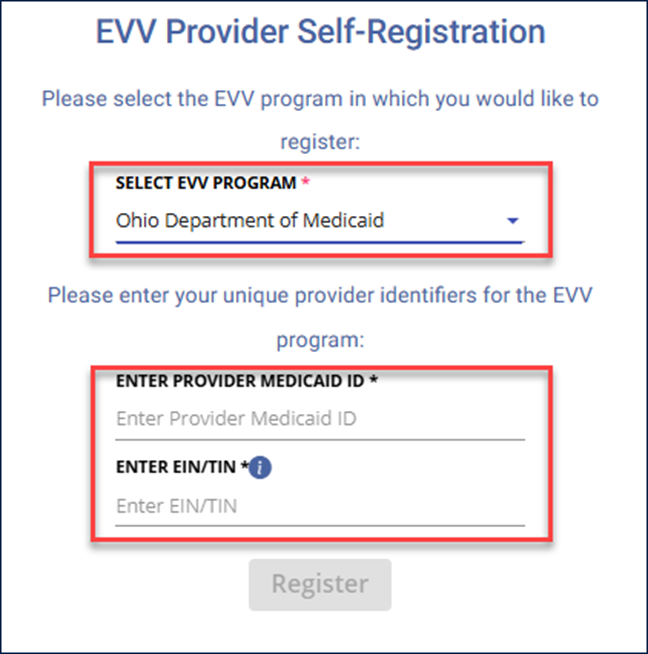
Register in the Sandata EVV Provider Registration Portal. Choose Ohio Department of Medicaid for the EVV Program, then enter your Provider Medicaid ID and EIN and select Register.
-
Register and log into eTRAC using these instructions.
-
Download your Welcome Kit Letter from eTRAC. In this letter you will receive your EVV Account number and log in instructions.
-
Go to the Sandata EVV login page.
-
Sign in using your OH|ID.
Once you are signed in, your EVV account number appears in the top right corner of the screen.

-
Begin adding Direct Care Workers. Follow these steps and be sure to enable mobile app access.
-
Train your Caregivers on using the Sandata Mobile Connect App to capture visits. Learn more here: Ohio Direct Care Worker Video Library