Sandata Ohio (ODM) Resources
In this help topic, we've collected resources to assist you with EVV in the state of Ohio. Click the dropdowns to learn more.
If you need assistance signing in or acquiring your OH|ID, contact the ODM Integrated Help Desk at (800) 686-1516 or email ihd@medicaid.ohio.gov.

Welcome to the Ohio Department of Medicaid’s (ODM) Electronic Visit Verification (EVV) Program. ODM contracts with Sandata to provide an EVV solution for Ohio providers.
-
Sandata EVV is accessible from the Ohio Department of Medicaid Portal:
-
Sign in with your OH | ID.
-
Click the Sandata EVV button.
-
Once you are signed in, you see your EVV account (STX) number in the upper righthand corner of the screen. It is important to document the STX number, especially if you provide or manage services under more than one account as an agency staff member or if you record visits both as an independent provider and as an agency employee.
-
-
The Ohio Department of Medicaid EVV Homepage is an excellent resource for EVV updates and tools.
-
You are currently on the Sandata Knowledge Base, which contains many support and education tools, including videos. Keep in mind that much of the Knowledge Base information is general to the Sandata EVV application. View Help Topics here.
-
Ask questions directly to ODM via email odmevv@sandata.com.
-
To open a support ticket, see Contact and Support.
Bring your questions to a Sandata trainer who can help you with Electronic Visit Verification (EVV). If you need information on how to avoid denials and to ensure you continue to receive claims payments, please attend any of the scheduled sessions for help.
Sign up for an office session here
Office hours are held every Tuesday through Thursday at 2:30 p.m. ET, excluding holidays.
This session does NOT fulfill any training requirements. For required EVV training, visit HHAeXchange University.
The following phone numbers, email addresses and websites are available to assist you:
-
ODM Provider Hotline: (800) 686-1516
-
EVV Technical Support:
-
1-855-805-3505
-
-
Alternate EVV Technical Support:
-
1-844-289-4246
-
-
Live in Caregiver Exemption Form
As it pertains to the Live-In Caregiver exemption process, please be aware that these exemptions are processed in the order that they are received.
If you have questions or want a status update regarding a Live In Caregiver exemption for that you have submitted, you can send an email to ODMEVV@sandata.com
-
Required Training: HHAeXchange University
Sandata EVV is designed to be compliant with the Americans with Disabilities (ADA). It is Job Access with Speech (JAWS) and Non-Visual Desktop Access (NVDA) compliant, meaning sections of the screen are read aloud for users who cannot see the screen. The color scheme and contrast ratio are designed to be accessible for users with color blindness or low vision. Each screen of the application is designed to be dynamic, so that if a user increases the size of the screen, fields shift automatically to accommodate the change.
For users who cannot operate a mouse, the system can be navigated using only a keyboard:
-
Press <Tab> to move through the system.
-
When using <Tab> to navigate, press <Enter> when a button or item is selected to jump to the indicated section of the system.
Click here to view the Sandata Electronic Visit Verification unit calculations.
Click here to download the job aid.
Table of Contents:
-
Creating an OHID
-
MFA Introduction and Enrollment
-
MFA Enrollment: SMS Text Message
-
MFA Enrollment: Email
-
MFA Enrollment: Phone Call
-
MFA Enrollment: IBM Verify App
-
MFA Troubleshooting
These guides provides step-by-step prompts for calling in and calling out for a visit using a telephone. Click the links in the dropdowns below to open the PDF in your selected language.
Click the links below to download the guides.
Do you need the Sandata EVV System User Guide translated into another language?
Use this form to request the guide in other languages offered: Translated User Guide Request Form
You may also explore using your browser settings to view ODM User Guides in the language of your choice:
-
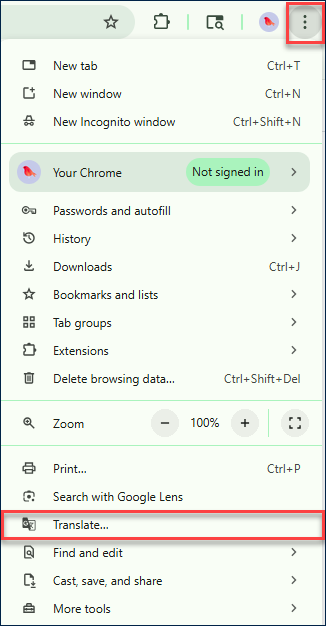
In Google Chrome, select the Ellipsis on the top right and select Translate...
-
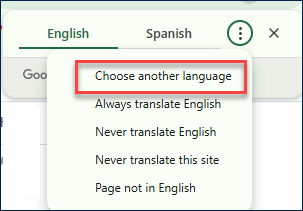
In the URL address window, click on the Google Translate icon.

-
Then choose your preferred language.
Click the dropdowns below to view the recordings.
Check back next month!
On March 19, 2026 there was an Alternate EVV Townhall that covered the below topics:
-
Electronic Visit Verification Background and Claims Validation
-
Alternate EVV Specifications and Services
-
Reason Code 99 Enforcement
-
Tips, Tricks and Friendly Reminders
Click here to download the slides.
These Ohio trainings cover the Recipient and DCW/Employee modules, focusing on how to manage records and information for both.
Click here to download the slides.
This Ohio Mastering Data Entry Q & A training covers how to get started in EVV, company IDs, managing visits, and logging into the SMC.
These Ohio training video assists providers with an overview of the Visit Maintenance module and how to resolve the top visit exceptions in Sandata EVV.
Click here to download the slides.
In these Ohio videos, trainers answer user's questions about using the Visit Maintenance module in Sandata EVV. Topics include: How to review all exceptions, How to adjust call in/call out times, and more.
These trainings provide an overview of the Sandata Aggregator for Alt EVV providers using an Alternate EVV system.
These webinars covers the top 4 EVV claim errors and show you how to fix them so you can get paid on time.
The following errors and how to resolve them are covered:
-
EVV – Provider ID does not match
-
EVV – Recipient ID does not match
-
EVV – Procedure code does not match
-
EVV – Unmatched Units
Click here to download the slides.
Watch this short video to help you get ready for Claims Validation by taking steps to prevent claim denials.