Sync Payroll Cost Centers
The Payroll Cost Centers that staff will select as they enter time in Time Clock or Time Tracking are synced from ProviderPro.
To sync payroll cost centers:
-
Log in to your ProviderPro live database.
-
Choose Employee Management > Payroll > Setup > Payroll Cost Centers.
-
In the window that opens, enter the code or description of the cost center in the Toolbar Lookup and press Enter to open it.
-
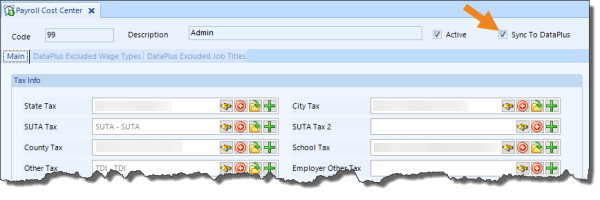
Make sure the Active check box and Sync To DataPlus check boxes selected are selected.
-
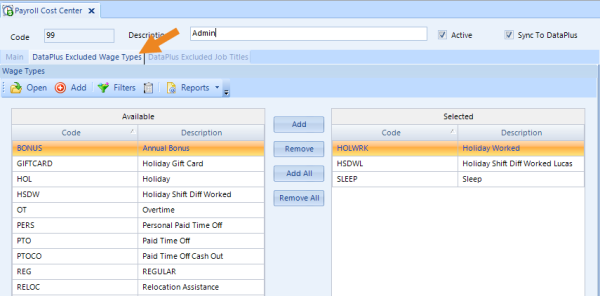
Select the DataPlus Excluded Wage Types tab to add (or remove) wage types that do not apply to this cost center.
-
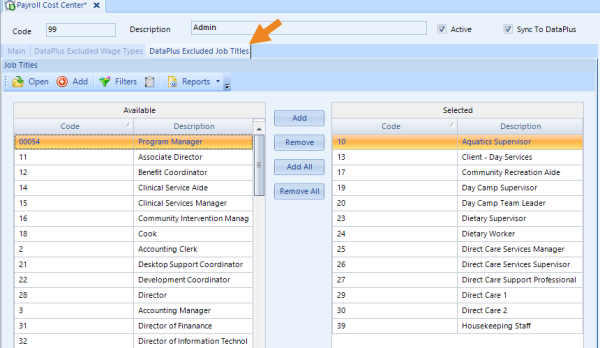
Select the DataPlus Excluded Job Titles tab to add or remove job titles that do not apply to this cost center.
-
Click Save on the toolbar to save changes.
The cost centers automatically sync to Time Clock or Time Tracking overnight, or you can Request a DataPlus Sync to force a sync.