Sandata EVV Vendor Solutions FAQ - Visits
The following information is not Payer specific.

Error Message: Client Not Found
Client must be successfully loaded before associated visits can be sent.
-
Provider confirm the client is in the Aggregator Active Clients report.
-
If no, confirm the vendor did not receive an error when client file sent. If error was received, send corrected file.
-
Check the EVV vendor specification/addendum for the format and ensure the correct value is in the correct field.
-
Work with the vendor to send the accurate client record and received a successful response.
-
Work with the vendor, to confirm the visit includes the accurate client unique identifier & matches client record.
-
Resend the corrected visit record.
Error Message: Worker Not Found.
Employee must be successfully loaded before associated visits can be sent.
-
Provider confirm the client is in the Aggregator Active Employees report.
-
If no, confirm the vendor did not receive an error when employee file sent. If error was received, send corrected file.
-
Check the EVV vendor specification/addendum for the format and ensure the correct value is in the correct field.
-
Work with the vendor to send the accurate employee record and received a successful response.
-
Work with the vendor, to confirm the visit includes the accurate employee unique identifier & matches employee record.
-
Resend the corrected visit record.
Error Message: Error during retrieving service service_id entered.
Check the EVV vendor specification/addendum Services appendix, for the valid service fields combinations and order.
-
The service combination includes the PayerID / PayerProgram / ProcedureCode / Modifier(s) if applies.
-
All services and modifiers are case sensitive and must use capital letters.
-
Confirm data includes correct values.
-
Send corrected file.
The VisitChanges segment is required when:
-
Updating an existing visit
-
Including a Manual CallType
-
Including Adjusted date/time fields
The Calls segment is expected on the first visit instance, to capture the electronically captured/manually entered Call In and Call Out, with the appropriate CallType.
-
When a date/time has been changed, it must be changed in the appropriate Adjusted time field.
-
The Call In and Call Out cannot be changed in the Calls segment.
-
When the Adjusted time field is sent, the corresponding Calls segment can be omitted.
-
The year cannot be changed.
-
The Adjusted time supersedes the Call time and is considered a manual call.
-
A visit must have an In and Out date/time to avoid a call exception.
-
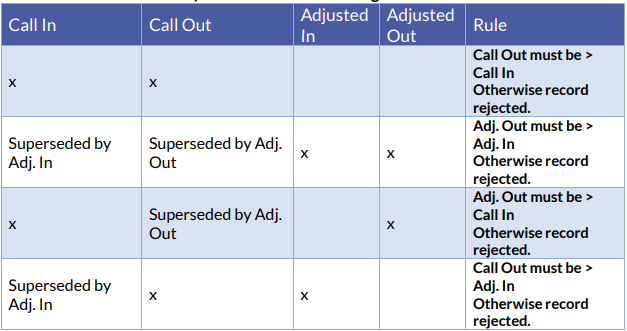
AdjInDateTime cannot be greater than the Call Out and AdjOutDateTime cannot be less than the Call In.
-
Utilize the below grid.
Error message: Version number is duplicated or older than current.
The Version Number is derived from the SequenceID. The SequenceID must be a higher value than previously submitted.
It is recommended to use the datetime, with seconds, as the SequenceID. This ensures it is a higher value than previous record. (i.e. YYYYMMDDHHMMSS) Then resend corrected file.
Error Message: A visit row exists in stx.visits table (by account/visit_id) and no changes are specified in current import of account/visit_id.
Resend the visit update with the VisitChanges segment.
Error Message: Visit_date field is empty, it is a required field.
Resend the visit with a completed Calls segment, with Call In date/time.
The Call In establishes the Visit Date. The Call Out must be after the Call In.
Error Message: Row in inbox.visits not found.
If attempting to cancel a visit, which was not previously sent, the visit is not required.
A billable visit must have VisitCancelledIndicator as false and BillVisit as true
If the visit is scheduled for the future, sent VisitCancelledIndicator as true.
If the visit was previously sent with Calls and/or Adjusted times, and it has been determined the visit will not be used for claims validation, send a visit update with BillVisit as false. This sets the visit to Omit status.
Error Message: The visit is past due, cannot be deleted.
When attempting to cancel an existing visit, send VisitCancelledIndicator and BillVisit as false. This sets the visit to Omit status.
VisitCancelledIndicator as true only applies to cancelling a visit with a future schedule and no In date/time exists.
Error message: The schedule past due.
Cannot update schedules in the past.
If the visit exists with Call and/or Adjusted date/time, the schedule cannot be changed.
Error message: Pay/Bill Hours exceed maximum hours allowed.
Visit In and Out times cannot exceed 24 hours.
-
Confirm not attempting to change a date/time in the Calls segment.
-
Time can only be changed using Adjusted fields.
-
Confirm the time between Calls and Adjusted In and Out do not exceed 24 hours.
-
Send corrected visit.
Error message: Unknown error
Usually occurs when attempting to change the year of an existing visit.
The Visit Date cannot be changed. If the Visit Date is wrong, the visit must be updated with BillVisit false, setting it to Omit status. Then submit a corrected visit, with a new unique VisitOtherID.
Error message: Schedule hours cannot exceed 24 hours.
Schedule Start and End cannot exceed 24 hours.
Error message: ERROR: Number of rows exceeds limit
Occurs when the file transmission exceeds 5000 records or a record has been updated more than 512 times.
Correct the file transmission to not exceed 5000 unique records.
If a visit has been updated 512 times, no further updates are allowed.
-
Submit a ticket request for Sandata Support to create a work item request to change the visit to BillVisit false, setting it to Omit status.
-
After the existing visit has been omitted, a corrected visit must be sent, with a new unique VisitOtherID.
Error message: Total visit time cannot exceed max visit hours
Visit duration cannot exceed 24 hours.
Error message: “ERROR: Visit Date out of range"
Visits must be submitted within the date range for the account.
-
Ensure the visit date is not more than 2 years after the date of service.
-
If the provider switched vendors, the account could have an End Date. Dates of the service, cannot be after the End Date.
-
The Visit Date cannot be changed. When the Visit Date is wrong, the visit must be updated with BillVisit false, setting it to Omit status. Then submit a corrected visit, with a new unique VisitOtherID.
Error Message: "Error during visits load"
Confirm all data is formatted compliant with the specifications. Resend the visit.
If issue persists, please submit a ticket request.