Return a Device Using eTRAC
An EVV Device is to be returned using the eTRAC Portal only if:
-
The Recipient is no longer receiving care from the agency provider
- The Recipient has expired
- The device is not needed because the provider is using an alternate EVV system
- The provider is using Sandata Mobile Connect, so the device is not needed.
To return a device using eTRAC:
-
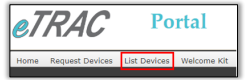
Log onto eTRAC and select List Devices.
-
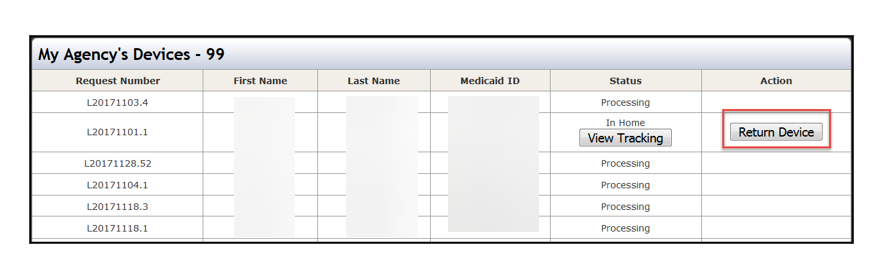
From the list, locate the Recipient for whom the EVV Device return is necessary. Select Return Device under the Action column on the right-hand side of the screen.
-
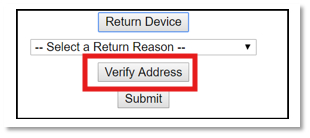
Select a Return Reason from the dropdown menu to show why the device is no longer to be used to record visits.
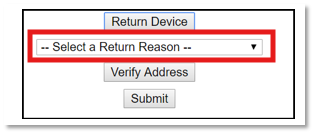
The list is an example of possible reasons and not necessarily all-inclusive. The EVV Device can be returned for any reason. If the EVV Device is being returned for a reason other than what’s listed, please call the EVV Provider Hotline.
-
Select Verify Address.
-
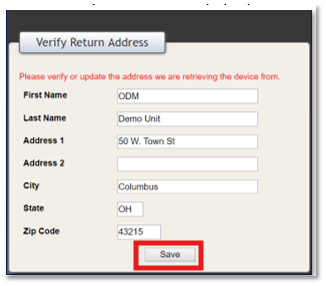
The Verify Return Address pop-up screen appears. Enter the address you are retrieving the device from and select Save.
-
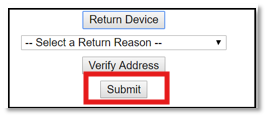
Select Submit to finish.