What's New for Ohio Department of Medicaid
Switching from Sandata EVV to Alt EVV for Ohio Department of Medicaid Independent Providers
ODM Independent Providers now have the option to use an Alternate EVV (Alt EVV) vendor instead of Sandata EVV. This topic outlines the steps for both new and existing providers to register for Alt EVV.
-
Existing Providers: If you are already registered as an ODM Independent Provider, you can choose to switch to an Alt EVV Vendor. Use the Sandata EVV Self-Registration Portal to request an Alt EVV account and identify the Alt EVV vendor who will submit your EVV data to the new EVV account. If you are self-directed, the Fiscal Management Service (FMS) is your designated alternate EVV. No action is needed.
-
New Providers: New Independent Providers that have not yet registered for EVV must first register as a Provider in the Sandata EVV Self-Registration Portal. Once registered as an independent provider, you must register a second time to identify the Alt EVV vendor responsible for transmitting your EVV data to the new EVV account.
To switch to an Alt EVV vendor after completing the steps above:
-
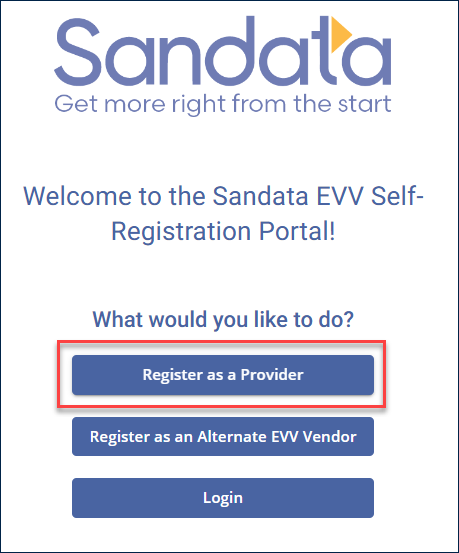
Select Register as a Provider.
-
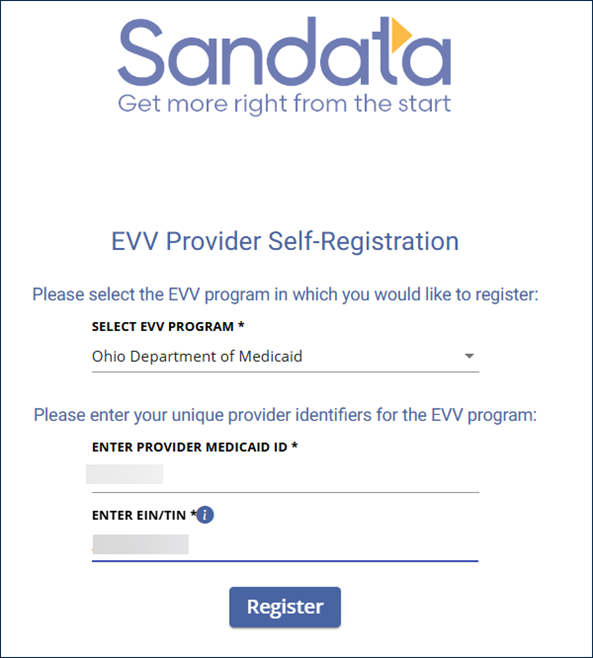
Select Ohio Department of Medicaid from the Select EVV Program dropdown. Enter your Provider Medicaid ID and Employee Identification Number or Tax Identification Number (EIN/TIN). Click on Register.
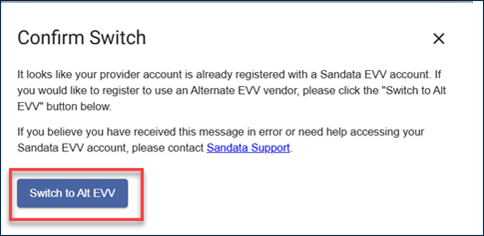
If the system finds you as a registered Sandata EVV Independent Provider, a Confirm Switch message displays: It looks like your provider organization is already registered with a Sandata EVV account. If you would like to register to use an Alternate EVV vendor, please click the Switch to Alt EVV button below.
If you are certain you want to switch, select Switch to Alt EVV.
-
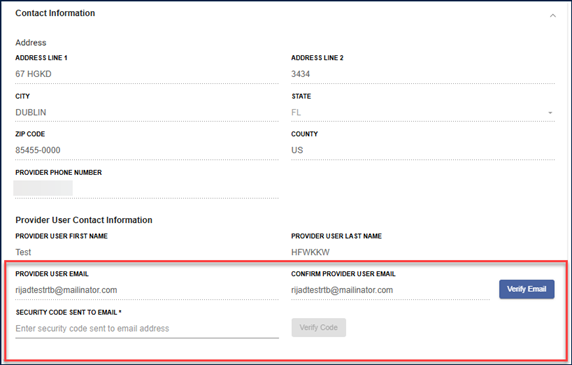
On the next screen, the registration form is prefilled with your provider information in read-only mode.
Check that your email address is correct and select Verify Email. This sends a code to your email address on file.
-
Enter the security code in the field and select Verify Code.
-
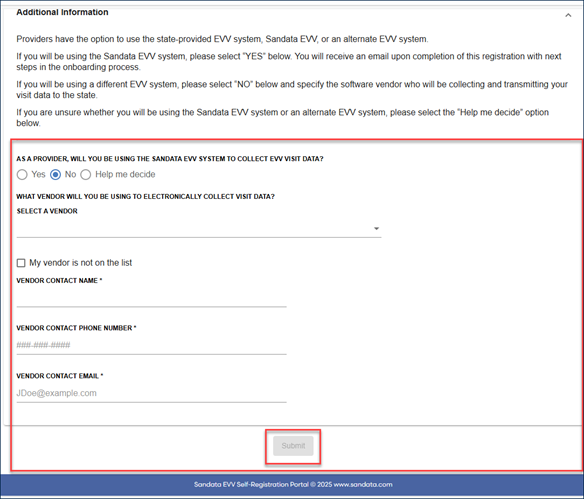
In the Additional Information section, designate your vendor choice.
-
Select Submit.
-
A message is sent stating that your account has been successfully switched from Sandata EVV to Alt EVV.
Click here to access Sandata Aggregator self-service training materials. Using Sandata Aggregator can help you confirm that your visits are being recorded correctly by your chosen Alt EVV system.