Start an Unknown Sandata Mobile Connect Visit
If the Medicaid ID or Recipient ID entered is not found when trying to start a visit, the DCW/Employee can start an unknown visit. Unknown visits appear in Sandata EVV as an Unknown Recipient Visit exception and must be fixed in Visit Maintenance.
-
Locate the EVV Device or the DCW/Employee’s personal device.
-
Log in to Sandata Mobile Connect.
-
Tap START UNKNOWN VISIT.
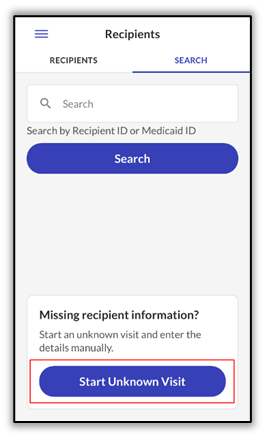
-
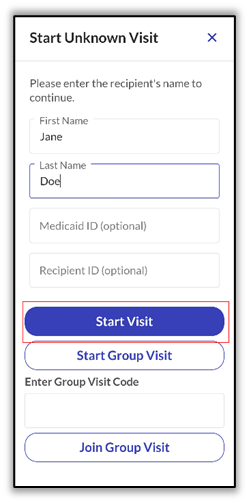
Enter the following information for the Recipient:
-
FIRST NAME (Required)
-
LAST NAME (Required)
-
Medicaid ID # (Optional – if available)
This information becomes available on the Memo screen of the Visit Details in the Visit Maintenance module.
-
-
Tap Start Visit.
-
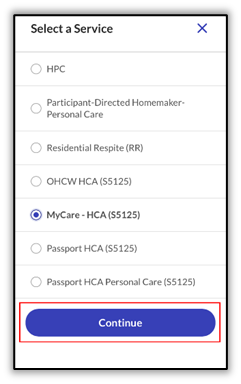
Select the Service from the dropdown list, then tap Continue.
-
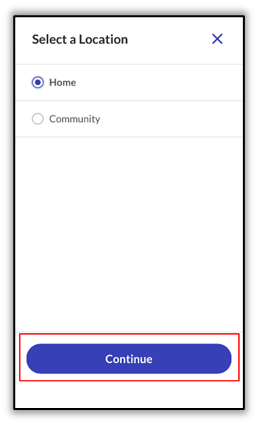
Select the starting location. Tap Home or Community and then tap Continue.
-
A pop-up display asks the DCW/Employee to confirm the start of visit. Tap YES.
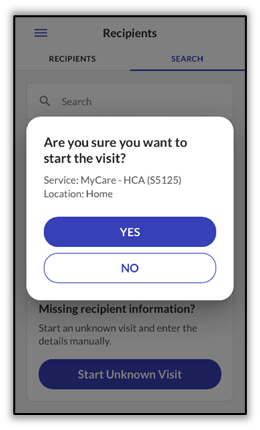
-
Log out of Sandata Mobile Connect. The visit is completed following the same process used when completing a visit for a known Recipient.