Find Account IDs for Live-In Caregiver Exemption Requests
If you need to complete the EVV Exemption Request Form, you need to locate the ID numbers in your EVV account. Log into your EVV account and follow the steps below to record these numbers before you complete the form.
-
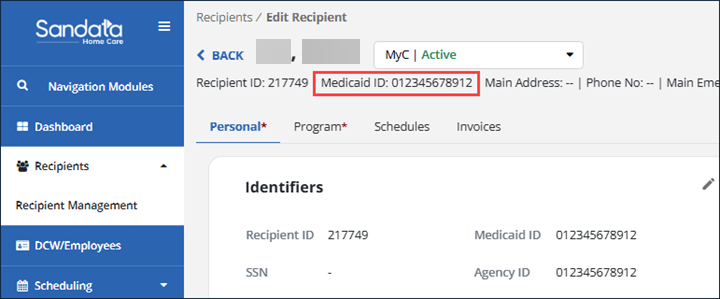
Recipient Medicaid ID: In the module menu, go to Recipients, then select Recipient Management. Find the Recipient’s name and go to their profile page. Just under the name, you will see the Medicaid ID, as shown below.
-
EVV Account Number: Look at the top line in the portal and record your account number.

-
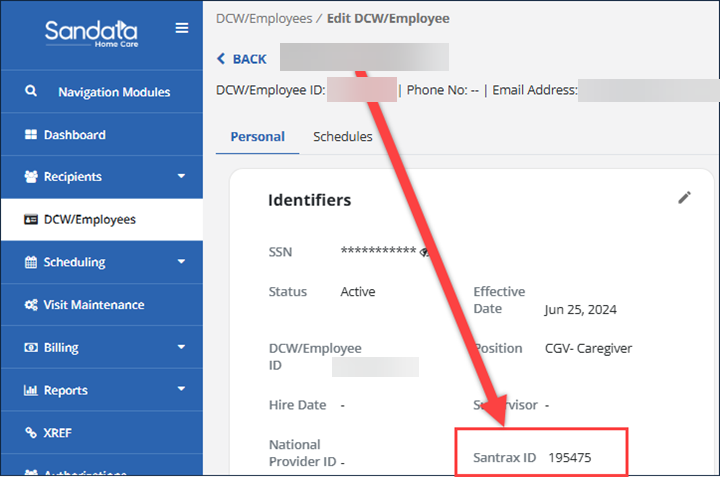
DCW Santrax ID: This is a 6-digit ID. Go to the DCW/Employees module, find the Direct Care Worker’s name and go to their profile page. Just under the name, the DCW/Employee ID is displayed, as shown below. This is the DCW Santrax ID.
-
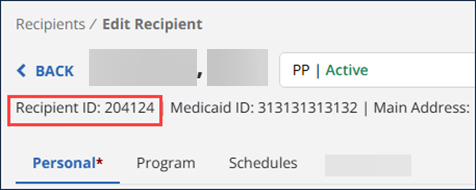
Recipient Santrax ID: This is a 6-digit ID. In the menu, choose Recipients, then Recipient Management. Find the Recipient’s name and go to their profile page. Just under the name, the Recipient ID is displayed, as shown below. This is the Recipient Santrax ID.