Create a Group Visit Code
If a visit is linked to an incorrect group visit or was supposed to be part of an existing group visit, you need to edit the group code in Visit Maintenance.
-
If a group visit took place but wasn't recorded at all, you can add the visit and create the code using Create Visit or Create Call.
-
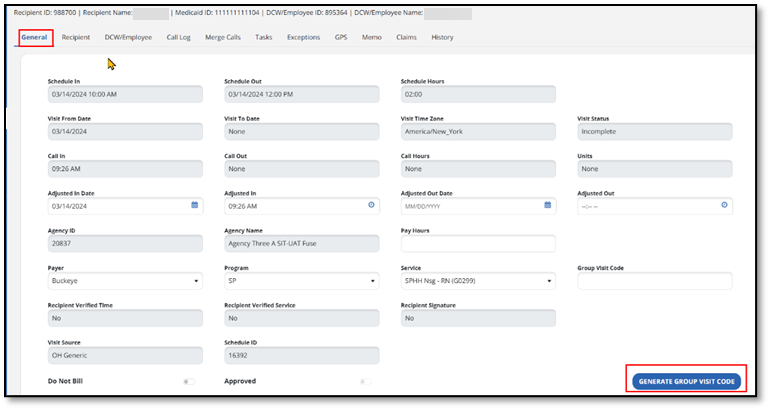
Once on the Visit Details screen, enter the visit details, then select the Generate Group Visit Code button to obtain a group visit number.
-
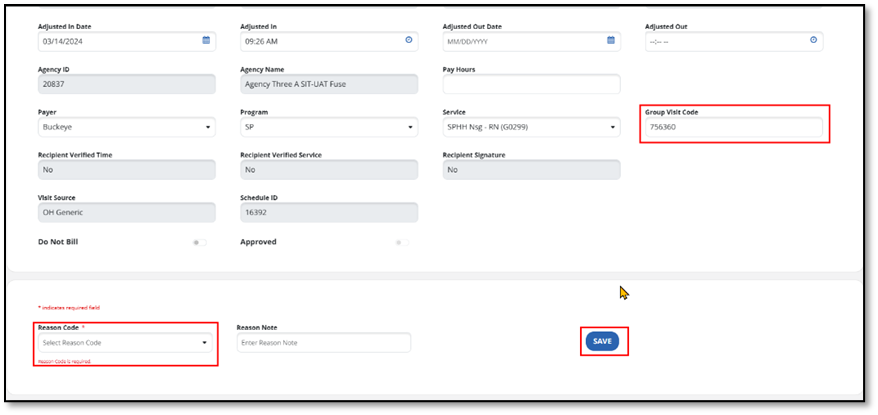
On the next screen, the Group Visit Code that was generated is displayed.
-
You may need to select a Reason Code and Reason Note, depending on your program requirement.