Massachusetts (EOHHS) Resources
In this help topic, we've collected resources to assist you with EVV in the state of Massachusetts. Click on any of the dropdowns to learn more.

Welcome to the Massachusetts Executive Office of Health and Human Services (EOHHS) Electronic Visit Verification (EVV) Program. EOHHS contracts with Sandata to provide an EVV solution for Massachusetts providers.
-
To access Sandata EVV:
-
If you have not already done so, download the Agency-based Electronic Visit Verification (EVV) System and Data Aggregator User Request Form (URF). Complete and send using the instructions on the form.
-
Log in to the Virtual Gateway.
-
Click Business Log In.
-
Click Create an Account.
-
Create your MyMassGov account and set up multifactor authentication (MFA).
-
Once you have created your MyMassGov account and set up your MFA, log in to the Virtual Gateway with your MyMassGov email and password.
-
Click Log In.
-
Click Sandata EVV.
-
Once you are signed into EVV, you see your EVV account (STX) number in the upper righthand corner of the screen. It is important to document the STX number, especially if you provide or manage services under more than one account as an agency staff member or if you record visits both as an independent provider and as an agency employee.
The Creating a Business Account on MyMassGov to Access Virtual Gateway Applications Reference Guide assists first-time provider users who need to create a MyMassGov account and set up multifactor authentication (MFA) to access their applications on the Virtual Gateway.
-
-
All agency users can access the training required to get started with the system through the self-enrollment link on SandataLearn. This training will guide you and your staff in managing client and employee records, scheduling and managing visits, and more.
Please share this link to the Sandata EVV Enhanced courses with all agency staff members to get started in training.
-
You are currently on the Sandata Knowledge Base, which contains many support and education tools, including video. Please keep in mind that the in-system and much of the Knowledge Base information is general to the Sandata EVV application.
-
Visit Electronic Visit Verification for Agency-based Providers to view updated information on the EOHHS program, including the full list of services that require EVV by service code.
-
If you have specific questions regarding the program policies, please contact EOHHS via email at EVVfeedback@Mass.gov.
-
To open a support ticket, see Contact and Support.
Massachusetts EOHHS Alternate EVV Technical Specification V1.9.3 Updates
The following Release Note is a companion to the Massachusetts EOHHS Alternate EVV Technical Solutions V1.9.3 update that was published on August 20, 2026. This Release Note outlines in greater detail the changes made to the V1.9.3 Specifications and provides information about effective change dates.
Outlined Changes: The changes outlined below are in the order they appear in the Specification document.
-
Segment: 6.4 Procedure Codes (HCPCS Codes)
Field: Several
Effective Date: 01/01/2026
Update: The below Payer, Program, and Service Code combinations were not included in the Procedure Codes (HCPCS) code table in the v1.9.2 update. These combinations have now been added in the v1.9.3. version. Net new Payer, Program, and Service combinations are listed below.
Payer Program Sandata Service Code HCPCS Code Modifier 1 Modifier 2 Service Description MAGBH HH 99509 99509 Emergency PCA by a Home Health Agency MASWH HH 99509 99509 Emergency PCA by a Home Health Agency MAGBS HH 99509 99509 Emergency PCA by a Home Health Agency MAHEA HH 99600 99600 Unlisted home services or procedures MAHEA HH 99600 99600 V1 Value Based Payment - Skilled Nursing MAHEA HH 99600 99600 V2 Value Based Payment - Medication Administration MAHEA HH 99600 99600 V3 Value Based Payment - Physical Therapy MAHEA HH 99600 99600 V4 Value Based Payment - Occupational Therapy MAHEA HH 99600 99600 V5 Value Based Payment - Speech Therapy MAHEA HH 99600 99600 V6 Value Based Payment - Medical Social Worker MAHEA HH 99600 99600 V7 Value Based Payment - Home Health Aide MASTF HH G0151 G0151 Physical Therapist in Home Health Setting MAGBH HH G0151 G0151 Physical Therapist in Home Health Setting MASWH HH G0151 G0151 Physical Therapist in Home Health Setting MAGBS HH G0151 G0151 Physical Therapist in Home Health Setting MASTF HH G0152 G0152 Occupational Therapist in Home Health Setting MAGBH HH G0152 G0152 Occupational Therapist in a Home Health Setting MASWH HH G0152 G0152 Occupational Therapist in a Home Health Setting MAGBS HH G0152 G0152 Occupational Therapist in a Home Health Setting MASTF HH G0153 G0153 Speech Language Pathologist in Home Health Setting MAGBH HH G0153 G0153 Speech Language Pathologist in Home Health Setting MASWH HH G0153 G0153 Speech Language Pathologist in Home Health Setting MAGBS HH G0153 G0153 Speech Language Pathologist in Home Health Setting MASTF HH G0156 G0156 Services of HH Aide in Home Health Setting MASTF SCBMC G0156 G0156 Services of HH Aide in Home Health Setting MASTF SCCCA G0156 G0156 Services of HH Aide in Home Health Setting MASTF SCFAL G0156 G0156 Services of HH Aide in Home Health Setting MASTF SCSWH G0156 G0156 Services of HH Aide in Home Health Setting MASTF SCTUF G0156 G0156 Services of HH Aide in Home Health Setting MASTF SCUNI G0156 G0156 Services of HH Aide in Home Health Setting MAGBH HH G0156 G0156 Services of HH Aide in Home Health Setting MASWH HH G0156 G0156 Services of HH Aide in Home Health Setting MAGBS HH G0156 G0156 Services of HH Aide in Home Health Setting MASTF HH G0156_UD G0156 UD HH - HH Aide ADL Only Support in Home Health Setting MAGBH HH G0156_UD G0156 UD HH - HH Aide ADL Only Support in Home Health Setting MASWH HH G0156_UD G0156 UD HH - HH Aide ADL Only Support in Home Health Setting MAGBS HH G0156_UD G0156 UD HH - HH Aide ADL Only Support in Home Health Setting MASTF HH G0299 G0299 Direct Skilled Nursing Services of an RN MAGBH HH G0299 G0299 Direct Skilled Nursing Services of an RN MASWH HH G0299 G0299 Direct Skilled Nursing Services of an RN MAGBS HH G0299 G0299 Direct Skilled Nursing Services of an RN MASTF HH G0299_GT G0299 GT Telehealth-Direct Skilled Nursing Services of an RN MAGBH HH G0299_GT G0299 GT Telehealth-Direct Skilled Nursing Services of an RN MASWH HH G0299_GT G0299 GT Telehealth-Direct Skilled Nursing Services of an RN MAGBS HH G0299_GT G0299 GT Telehealth-Direct Skilled Nursing Services of an RN MAGBS SCBMC G0299_UB G0299 UB Complex Care Training and Oversight by an RN MAGBS SCCCA G0299_UB G0299 UB Complex Care Training and Oversight by an RN MAGBS SCFAL G0299_UB G0299 UB Complex Care Training and Oversight by an RN MASFA SCGBS G0299_UB G0299 UB Complex Care Training and Oversight by an RN MASTU SCGBS G0299_UB G0299 UB Complex Care Training and Oversight by an RN MASHN SCGBS G0299_UB G0299 UB Complex Care Training and Oversight by an RN MASW SCGBS G0299_UB G0299 UB Complex Care Training and Oversight by an RN MASTF SCGBS G0299_UB G0299 UB Complex Care Training and Oversight by an RN MAGBS SCGBS G0299_UB G0299 UB Complex Care Training and Oversight by an RN MAGBS SCSWH G0299_UB G0299 UB Complex Care Training and Oversight by an RN MAGBS SCTUF G0299_UB G0299 UB Complex Care Training and Oversight by an RN MAGBS SCUNI G0299_UB G0299 UB Complex Care Training and Oversight by an RN MASCC SCGBS G0299_UB G0299 UB Complex Care Training and Oversight by an RN MASTF SCBMC G0299_UB G0299 UB Complex Care Training and Oversight by an RN MASTF SCCCA G0299_UB G0299 UB Complex Care Training and Oversight by an RN MASTF SCFAL G0299_UB G0299 UB Complex Care Training and Oversight by an RN MASTF SCSWH G0299_UB G0299 UB Complex Care Training and Oversight by an RN MASTF SCTUF G0299_UB G0299 UB Complex Care Training and Oversight by an RN MASTF SCUNI G0299_UB G0299 UB Complex Care Training and Oversight by an RN MASTF HH G0300 G0300 Direct Skilled Nursing Services of an LPN MAGBH HH G0300 G0300 Direct Skilled Nursing Services of an LPN MASWH HH G0300 G0300 Direct Skilled Nursing Services of an LPN MAGBS HH G0300 G0300 Direct Skilled Nursing Services of an LPN MASTF HH G0300_GT G0300 GT Telehealth-Direct skilled Nursing Services of an LPN MAGBH HH G0300_GT G0300 GT Telehealth-Direct skilled Nursing Services of an LPN MASWH HH G0300_GT G0300 GT Telehealth-Direct skilled Nursing Services of an LPN MAGBS HH G0300_GT G0300 GT Telehealth-Direct skilled Nursing Services of an LPN MAGBS SCBMC G0300_UB G0300 UB Complex Care Training and Oversight by an LPN MAGBS SCCCA G0300_UB G0300 UB Complex Care Training and Oversight by an LPN MAGBS SCFAL G0300_UB G0300 UB Complex Care Training and Oversight by an LPN MASFA SCGBS G0300_UB G0300 UB Complex Care Training and Oversight by an LPN MASTU SCGBS G0300_UB G0300 UB Complex Care Training and Oversight by an LPN MASHN SCGBS G0300_UB G0300 UB Complex Care Training and Oversight by an LPN MASW SCGBS G0300_UB G0300 UB Complex Care Training and Oversight by an LPN MASTF SCGBS G0300_UB G0300 UB Complex Care Training and Oversight by an LPN MAGBS SCGBS G0300_UB G0300 UB Complex Care Training and Oversight by an LPN MAGBS SCSWH G0300_UB G0300 UB Complex Care Training and Oversight by an LPN MAGBS SCTUF G0300_UB G0300 UB Complex Care Training and Oversight by an LPN MAGBS SCUNI G0300_UB G0300 UB Complex Care Training and Oversight by an LPN MASCC SCGBS G0300_UB G0300 UB Complex Care Training and Oversight by an LPN MASTF SCBMC G0300_UB G0300 UB Complex Care Training and Oversight by an LPN MASTF SCCCA G0300_UB G0300 UB Complex Care Training and Oversight by an LPN MASTF SCFAL G0300_UB G0300 UB Complex Care Training and Oversight by an LPN MASTF SCSWH G0300_UB G0300 UB Complex Care Training and Oversight by an LPN MASTF SCTUF G0300_UB G0300 UB Complex Care Training and Oversight by an LPN MASTF SCUNI G0300_UB G0300 UB Complex Care Training and Oversight by an LPN MASTF HH G0493 G0493 HH - RN Observation and Assessment Visit HH ADL Only MAGBH HH G0493 G0493 HH - RN Observation and Assessment Visit HH ADL Only MASWH HH G0493 G0493 HH - RN Observation and Assessment Visit HH ADL Only MAGBS HH G0493 G0493 HH - RN Observation and Assessment Visit HH ADL Only MAGBS GAFC H0043 H0043 GAFC - Per Diem Visit MASWH GAFC H0043 H0043 GAFC - Per Diem Visit MAGBH GAFC H0043 H0043 GAFC - Per Diem Visit MASTF GAFC H0043 T1502 GAFC - Per Diem Visit MAGBS SCBMC S5125_UB T1502 UB Supportive Home Care Aide, 15 min. MAGBS SCCCA S5125_UB T1502 UB Supportive Home Care Aide, 15 min. MAGBS SCFAL S5125_UB S5125 UB Supportive Home Care Aide, 15 min. MASFA SCGBS S5125_UB S5125 UB Supportive Home Care Aide, 15 min. MASTU SCGBS S5125_UB S5125 UB Supportive Home Care Aide, 15 min. MASHN SCGBS S5125_UB S5125 UB Supportive Home Care Aide, 15 min. MASW SCGBS S5125_UB S5125 UB Supportive Home Care Aide, 15 min. MASTF SCGBS S5125_UB S5125 UB Supportive Home Care Aide, 15 min. MAGBS SCGBS S5125_UB S5125 UB Supportive Home Care Aide, 15 min. MAGBS SCSWH S5125_UB S5125 UB Supportive Home Care Aide, 15 min. MAGBS SCTUF S5125_UB S5125 UB Supportive Home Care Aide, 15 min. MAGBS SCUNI S5125_UB S5125 UB Supportive Home Care Aide, 15 min. MASCC SCGBS S5125_UB S5125 UB Supportive Home Care Aide, 15 min. MASTF SCBMC S5125_UB S5125 UB Supportive Home Care Aide, 15 min. MASTF SCCCA S5125_UB S5125 UB Supportive Home Care Aide, 15 min. MASTF SCFAL S5125_UB S5125 UB Supportive Home Care Aide, 15 min. MASTF SCSWH S5125_UB S5125 UB Supportive Home Care Aide, 15 min. MASTF SCTUF S5125_UB S5125 UB Supportive Home Care Aide, 15 min. MASTF SCUNI S5125_UB S5125 UB Supportive Home Care Aide, 15 min. MAGBS SCBMC S5130_UB S5130 UB Homemaker, 15 min. MAGBS SCCCA S5130_UB S5130 UB Homemaker, 15 min. MAGBS SCFAL S5130_UB S5130 UB Homemaker, 15 min. MASHN SCGBS S5130_UB S5130 UB Homemaker, 15 min. MASW SCGBS S5130_UB S5130 UB Homemaker, 15 min. MASTU SCGBS S5130_UB S5130 UB Homemaker, 15 min. MASFA SCGBS S5130_UB S5130 UB Homemaker, 15 min. MASTF SCGBS S5130_UB S5130 UB Homemaker, 15 min. MAGBS SCGBS S5130_UB S5130 UB Homemaker, 15 min. MAGBS SCSWH S5130_UB S5130 UB Homemaker, 15 min. MAGBS SCTUF S5130_UB S5130 UB Homemaker, 15 min. MAGBS SCUNI S5130_UB S5130 UB Homemaker, 15 min. MASCC SCGBS S5130_UB S5130 UB Homemaker, 15 min. MASTF SCBMC S5130_UB S5130 UB Homemaker, 15 min. MASTF SCCCA S5130_UB S5130 UB Homemaker, 15 min. MASTF SCFAL S5130_UB S5130 UB Homemaker, 15 min. MASTF SCSWH S5130_UB S5130 UB Homemaker, 15 min. MASTF SCTUF S5130_UB S5130 UB Homemaker, 15 min. MASTF SCUNI S5130_UB S5130 UB Homemaker, 15 min. MASCC SCGBS S5135_UB S5130 UB Companion, 15 min. MAGBS SCBMC S5135_UB S5130 UB Companion, 15 min. MAGBS SCCCA S5135_UB S5130 UB Companion, 15 min. MAGBS SCFAL S5135_UB S5130 UB Companion, 15 min. MASHN SCGBS S5135_UB S5130 UB Companion, 15 min. MASW SCGBS S5135_UB S5130 UB Companion, 15 min. MASTU SCGBS S5135_UB S5130 UB Companion, 15 min. MASFA SCGBS S5135_UB S5130 UB Companion, 15 min. MASTF SCGBS S5135_UB S5130 UB Companion, 15 min. MAGBS SCGBS S5135_UB S5130 UB Companion, 15 min. MAGBS SCSWH S5135_UB S5130 UB Companion, 15 min. MAGBS SCTUF S5135_UB S5130 UB Companion, 15 min. MAGBS SCUNI S5135_UB S5130 UB Companion, 15 min. MASTF SCBMC S5135_UB S5130 UB Companion, 15 min. MASTF SCCCA S5135_UB S5130 UB Companion, 15 min. MASTF SCFAL S5135_UB S5130 UB Companion, 15 min. MASTF SCSWH S5135_UB S5130 UB Companion, 15 min. MASTF SCTUF S5135_UB S5130 UB Companion, 15 min. MASTF SCUNI S5135_UB S5130 UB Companion, 15 min. MASCC SCGBS S5135_UB_U1 S5135 UB U1 TeleHealth - Companion, 15 min. MAGBS SCBMC S5135_UB_U1 S5135 UB U1 TeleHealth - Companion, 15 min. MAGBS SCCCA S5135_UB_U1 S5135 UB U1 TeleHealth - Companion, 15 min. MAGBS SCFAL S5135_UB_U1 S5135 UB U1 TeleHealth - Companion, 15 min. MASHN SCGBS S5135_UB_U1 S5135 UB U1 TeleHealth - Companion, 15 min. MASW SCGBS S5135_UB_U1 S5135 UB U1 TeleHealth - Companion, 15 min. MASTU SCGBS S5135_UB_U1 S5135 UB U1 TeleHealth - Companion, 15 min. MASFA SCGBS S5135_UB_U1 S5135 UB U1 TeleHealth - Companion, 15 min. MASTF SCGBS S5135_UB_U1 S5135 UB U1 TeleHealth - Companion, 15 min. MAGBS SCGBS S5135_UB_U1 S5135 UB U1 TeleHealth - Companion, 15 min. MAGBS SCSWH S5135_UB_U1 S5135 UB U1 TeleHealth - Companion, 15 min. MAGBS SCTUF S5135_UB_U1 S5135 UB U1 TeleHealth - Companion, 15 min. MAGBS SCUNI S5135_UB_U1 S5135 UB U1 TeleHealth - Companion, 15 min. MASTF SCBMC S5135_UB_U1 S5135 UB U1 TeleHealth - Companion, 15 min. MASTF SCCCA S5135_UB_U1 S5135 UB U1 TeleHealth - Companion, 15 min. MASTF SCFAL S5135_UB_U1 S5135 UB U1 TeleHealth - Companion, 15 min. MASTF SCSWH S5135_UB_U1 S5135 UB U1 TeleHealth - Companion, 15 min. MASTF SCTUF S5135_UB_U1 S5135 UB U1 TeleHealth - Companion, 15 min. MASTF SCUNI S5135_UB_U1 S5135 UB U1 TeleHealth - Companion, 15 min. MASCC SCGBS S9129_UB S9129 UB Home Safety/Independence Evaluation by an OT MAGBS SCBMC S9129_UB S9129 UB Home Safety/Independence Evaluation by an OT MAGBS SCCCA S9129_UB S9129 UB Home Safety/Independence Evaluation by an OT MAGBS SCFAL S9129_UB S9129 UB Home Safety/Independence Evaluation by an OT MASHN SCGBS S9129_UB S9129 UB Home Safety/Independence Evaluation by an OT MASW SCGBS S9129_UB S9129 UB Home Safety/Independence Evaluation by an OT MASTU SCGBS S9129_UB S9129 UB Home Safety/Independence Evaluation by an OT MASFA SCGBS S9129_UB S9129 UB Home Safety/Independence Evaluation by an OT MASTF SCGBS S9129_UB S9129 UB Home Safety/Independence Evaluation by an OT MAGBS SCGBS S9129_UB S9129 UB Home Safety/Independence Evaluation by an OT MAGBS SCSWH S9129_UB S9129 UB Home Safety/Independence Evaluation by an OT MAGBS SCTUF S9129_UB S9129 UB Home Safety/Independence Evaluation by an OT MAGBS SCUNI S9129_UB S9129 UB Home Safety/Independence Evaluation by an OT MASTF SCBMC S9129_UB S9129 UB Home Safety/Independence Evaluation by an OT MASTF SCCCA S9129_UB S9129 UB Home Safety/Independence Evaluation by an OT MASTF SCFAL S9129_UB S9129 UB Home Safety/Independence Evaluation by an OT MASTF SCSWH S9129_UB S9129 UB Home Safety/Independence Evaluation by an OT MASTF SCTUF S9129_UB S9129 UB Home Safety/Independence Evaluation by an OT MASTF SCUNI S9129_UB S9129 UB Home Safety/Independence Evaluation by an OT MASCC SCGBS T1019 T1019 Personal Care, 15 Min. MAGBS SCBMC T1019 T1019 Personal Care, 15 Min. MAGBS SCCCA T1019 T1019 Personal Care, 15 Min. MAGBS SCFAL T1019 T1019 Personal Care, 15 Min. MASFA SCGBS T1019 T1019 Personal Care, 15 Min. MASHN SCGBS T1019 T1019 Personal Care, 15 Min. MASTU SCGBS T1019 T1019 Personal Care, 15 Min. MASTF SCGBS T1019 T1019 Personal Care, 15 Min. MASW SCGBS T1019 T1019 Personal Care, 15 Min. MAGBS SCGBS T1019 T1019 Personal Care, 15 Min. MAGBS SCSWH T1019 T1019 Personal Care, 15 Min. MAGBS SCTUF T1019 T1019 Personal Care, 15 Min. MAGBS SCUNI T1019 T1019 Personal Care, 15 Min. MASTF SCBMC T1019 T1019 Personal Care, 15 Min. MASTF SCCCA T1019 T1019 Personal Care, 15 Min. MASTF SCFAL T1019 T1019 Personal Care, 15 Min. MASTF SCSWH T1019 T1019 Personal Care, 15 Min. MASTF SCTUF T1019 T1019 Personal Care, 15 Min. MASTF SCUNI T1019 T1019 Personal Care, 15 Min. MASTF SDABI T1019 T1019 Personal Care, 15 Min. MASTF SDMFP T1019 T1019 Personal Care, 15 Min. MASTF HH T1502 T1502 Admin of Oral, Intramuscular, Subcutaneous Med Admin of Oral, Intramuscular, Subcutaneous Med MAGBH HH T1502 T1502 Admin of Oral, Intramuscular, Subcutaneous Med Admin of Oral, Intramuscular, Subcutaneous Med MASWH HH T1502 T1502 Admin of Oral, Intramuscular, Subcutaneous Med Admin of Oral, Intramuscular, Subcutaneous Med MAGBS HH T1502 T1502 Admin of Oral, Intramuscular, Subcutaneous Med Admin of Oral, Intramuscular, Subcutaneous Med MASTF HH T1502_GT T1502 GT Telehealth-Admin of Oral Med MAGBH HH T1502_GT T1502 GT Telehealth-Admin of Oral Med MASWH HH T1502_GT T1502 GT Telehealth-Admin of Oral Med MAGBS HH T1502_GT T1502 GT Telehealth-Admin of Oral Med MASTF HH T1503 T1503 Administration of Medication Other than Oral and/or Injectable MAGBH HH T1503 T1503 Administration of Medication Other than Oral and/or Injectable MASWH HH T1503 T1503 Administration of Medication Other than Oral and/or Injectable MAGBS HH T1503 T1503 Administration of Medication Other than Oral and/or Injectable
Massachusetts EOHHS Alternate EVV Technical Specification V1.9.2 Updates
The following Release Note is a companion to the Massachusetts EOHHS Alternate EVV Technical Solutions V1.9.2 update that was published on July 24, 2026. This Release Note outlines in greater detail the changes made to the V1.9.2 Specifications and provides information about effective change dates.
Outlined Changes: The changes outlined below are in the order they appear in the Specification document.
-
Segment: 6.2 Programs Table
Field: PayerProgram
Effective Date: 01/01/2026
Update: To accompany the new SCO Mass General Brigham Payer on 01/01/2026, SCGBS program code has been added to the Programs table.
-
Segment: 6.3 Payer Program Mapping
Field:Payer Type
Effective Date: 07/24/2026
Change: A Payer Type column has been added to provide additional details on the Payer. The Payer Program Mapping table has been organized first by Payer Type (alphabetically) then Payer Code (alphabetically).
-
Segment: 6.3 Payer Program Mapping
Field: Program Code
Effective Date: 01/01/2026
Change: To accompany the new SCO Mass General Brigham Payer on 1/01/2026, SCGBS program code has been added to the Payer Program Mapping table.
-
Segment: 6.3 Payer Program Mapping
Field: Program Code
Effective Date: 01/01/2026
Change: SDABI and SDMFP Program mapping have been removed from SCO & One Care Payers: MASCC, MASFA, MASTF, MASTU, MASW, MACCA, MATHU, MAUCT. These Programs have been removed from these Payers as they are not valid Payer-Program combinations.
-
Segment:6.3 Payer Program Mapping
Field: Program Code
Effective Date: 01/01/2026
Change: HH & GAFC Programs have been added as valid Programs to MAGBH and MASWH.
-
Segment:6.3 Payer Program Mapping
Field: Program Code
Effective Date: 01/01/2026
Change: HH, GAFC, SCBMC, SCCCA, SCFAL, SCSWH, SCTUF, SCUNI, SCGBS have been added as valid Programs for MAGBS.
-
Segment:6.3 Payer Program Mapping
Field: Program Code
Effective Date: 01/01/2026
Change: Added MAELD Payer and applicable Programs to Payer Program Mapping table as it was previously missing.
-
Segment:6.3 Payer Program Mapping
Field: Program Code
Effective Date: 01/01/2026
Change: Added PCA Program and removed SDABI and SDMFP Programs from Payers: MACCA, MATHU, MAUCT.
-
Segment:7. Massachusetts Program Special Notes
Field: N/A
Effective Date: 07/24/2026
Change: The Massachusetts Program Special Notes Section has been added to accommodate additional considerations for the Massachusetts EVV Program that apply to the Alternate EVV Provider and Vendor experience. In this specific AltEVV Spec update:
-
7.1 Billing-Only Modifiers: This language was removed from the beginning of the Procedure Code Table section and moved to the Massachusetts Program Special Notes section.
-
7.2 Overnight Split Shifts: This is net new supporting language that has been added to provide clarity on service visits that should be split overnight. For those service codes listed, AltEVV Providers and Vendors should import a visit on Day 1 and Visit on Day 2 when provided overnight.
-
-
Segment:6.4 Procedure Codes (HCPCS Codes)
Field: Several
Effective Date: 01/01/2026
Change: Added several Payer, Program, and Service combinations in alignment with the above Payer & Program mapping changes. Net new Payer, Program, and Service combinations are listed below.
Payer Program Sandata Service Code HCPCS Code Modifier 1 Modifier 2 Service Description MAGBH HH 99509 99509 Emergency PCA by a Home Health Agency MASWH HH 99509 99509 Emergency PCA by a Home Health Agency MAGBS HH 99509 99509 Emergency PCA by a Home Health Agency MAHEA HH 99600 99600 Unlisted home services or procedures MAHEA HH 99600 99600 V1 Value Based Payment - Skilled Nursing MAHEA HH 99600 99600 V2 Value Based Payment - Medication Administration MAHEA HH 99600 99600 V3 Value Based Payment - Physical Therapy MAHEA HH 99600 99600 V4 Value Based Payment - Occupational Therapy MAHEA HH 99600 99600 V5 Value Based Payment - Speech Therapy MAHEA HH 99600 99600 V6 Value Based Payment - Medical Social Worker MAHEA HH 99600 99600 V7 Value Based Payment - Home Health Aide MASTF HH G0151 G0151 Physical Therapist in Home Health Setting MAGBH HH G0151 G0151 Physical Therapist in Home Health Setting MASWH HH G0151 G0151 Physical Therapist in Home Health Setting MAGBS HH G0151 G0151 Physical Therapist in Home Health Setting MASTF HH G0152 G0152 Occupational Therapist in Home Health Setting MAGBH HH G0152 G0152 Occupational Therapist in a Home Health Setting MASWH HH G0152 G0152 Occupational Therapist in a Home Health Setting MAGBS HH G0152 G0152 Occupational Therapist in a Home Health Setting MASTF HH G0153 G0153 Speech Language Pathologist in Home Health Setting MAGBH HH G0153 G0153 Speech Language Pathologist in Home Health Setting MASWH HH G0153 G0153 Speech Language Pathologist in Home Health Setting MAGBS HH G0153 G0153 Speech Language Pathologist in Home Health Setting MASTF HH G0156 G0156 Services of HH Aide in Home Health Setting MASTF SCBMC G0156 G0156 Services of HH Aide in Home Health Setting MASTF SCCCA G0156 G0156 Services of HH Aide in Home Health Setting MASTF SCFAL G0156 G0156 Services of HH Aide in Home Health Setting MASTF SCSWH G0156 G0156 Services of HH Aide in Home Health Setting MASTF SCTUF G0156 G0156 Services of HH Aide in Home Health Setting MASTF SCUNI G0156 G0156 Services of HH Aide in Home Health Setting MAGBH HH G0156 G0156 Services of HH Aide in Home Health Setting MASWH HH G0156 G0156 Services of HH Aide in Home Health Setting MAGBS HH G0156 G0156 Services of HH Aide in Home Health Setting MASTF HH G0156_UD G0156 UD HH - HH Aide ADL Only Support in Home Health Setting MAGBH HH G0156_UD G0156 UD HH - HH Aide ADL Only Support in Home Health Setting MASWH HH G0156_UD G0156 UD HH - HH Aide ADL Only Support in Home Health Setting MAGBS HH G0156_UD G0156 UD HH - HH Aide ADL Only Support in Home Health Setting MASTF HH G0299 G0299 Direct Skilled Nursing Services of an RN MAGBH HH G0299 G0299 Direct Skilled Nursing Services of an RN MASWH HH G0299 G0299 Direct Skilled Nursing Services of an RN MAGBS HH G0299 G0299 Direct Skilled Nursing Services of an RN MASTF HH G0299_GT G0299 GT Telehealth-Direct Skilled Nursing Services of an RN MAGBH HH G0299_GT G0299 GT Telehealth-Direct Skilled Nursing Services of an RN MASWH HH G0299_GT G0299 GT Telehealth-Direct Skilled Nursing Services of an RN MAGBS HH G0299_GT G0299 GT Telehealth-Direct Skilled Nursing Services of an RN MAGBS SCBMC G0299_UB G0299 UB Complex Care Training and Oversight by an RN MAGBS SCCCA G0299_UB G0299 UB Complex Care Training and Oversight by an RN MAGBS SCFAL G0299_UB G0299 UB Complex Care Training and Oversight by an RN MASFA SCGBS G0299_UB G0299 UB Complex Care Training and Oversight by an RN MASTU SCGBS G0299_UB G0299 UB Complex Care Training and Oversight by an RN MASHN SCGBS G0299_UB G0299 UB Complex Care Training and Oversight by an RN MASW SCGBS G0299_UB G0299 UB Complex Care Training and Oversight by an RN MASTF SCGBS G0299_UB G0299 UB Complex Care Training and Oversight by an RN MAGBS SCGBS G0299_UB G0299 UB Complex Care Training and Oversight by an RN MAGBS SCSWH G0299_UB G0299 UB Complex Care Training and Oversight by an RN MAGBS SCTUF G0299_UB G0299 UB Complex Care Training and Oversight by an RN MAGBS SCUNI G0299_UB G0299 UB Complex Care Training and Oversight by an RN MASCC SCGBS G0299_UB G0299 UB Complex Care Training and Oversight by an RN MASTF SCBMC G0299_UB G0299 UB Complex Care Training and Oversight by an RN MASTF SCCCA G0299_UB G0299 UB Complex Care Training and Oversight by an RN MASTF SCFAL G0299_UB G0299 UB Complex Care Training and Oversight by an RN MASTF SCSWH G0299_UB G0299 UB Complex Care Training and Oversight by an RN MASTF SCTUF G0299_UB G0299 UB Complex Care Training and Oversight by an RN MASTF SCUNI G0299_UB G0299 UB Complex Care Training and Oversight by an RN MASTF HH G0300 G0300 Direct Skilled Nursing Services of an LPN MAGBH HH G0300 G0300 Direct Skilled Nursing Services of an LPN MASWH HH G0300 G0300 Direct Skilled Nursing Services of an LPN MAGBS HH G0300 G0300 Direct Skilled Nursing Services of an LPN MASTF HH G0300_GT G0300 GT Telehealth-Direct skilled Nursing Services of an LPN MAGBH HH G0300_GT G0300 GT Telehealth-Direct skilled Nursing Services of an LPN MASWH HH G0300_GT G0300 GT Telehealth-Direct skilled Nursing Services of an LPN MAGBS HH G0300_GT G0300 GT Telehealth-Direct skilled Nursing Services of an LPN MAGBS SCBMC G0300_UB G0300 UB Complex Care Training and Oversight by an LPN MAGBS SCCCA G0300_UB G0300 UB Complex Care Training and Oversight by an LPN MAGBS SCFAL G0300_UB G0300 UB Complex Care Training and Oversight by an LPN MASFA SCGBS G0300_UB G0300 UB Complex Care Training and Oversight by an LPN MASTU SCGBS G0300_UB G0300 UB Complex Care Training and Oversight by an LPN MASHN SCGBS G0300_UB G0300 UB Complex Care Training and Oversight by an LPN MASW SCGBS G0300_UB G0300 UB Complex Care Training and Oversight by an LPN MASTF SCGBS G0300_UB G0300 UB Complex Care Training and Oversight by an LPN MAGBS SCGBS G0300_UB G0300 UB Complex Care Training and Oversight by an LPN MAGBS SCSWH G0300_UB G0300 UB Complex Care Training and Oversight by an LPN MAGBS SCTUF G0300_UB G0300 UB Complex Care Training and Oversight by an LPN MAGBS SCUNI G0300_UB G0300 UB Complex Care Training and Oversight by an LPN MASCC SCGBS G0300_UB G0300 UB Complex Care Training and Oversight by an LPN MASTF SCBMC G0300_UB G0300 UB Complex Care Training and Oversight by an LPN MASTF SCCCA G0300_UB G0300 UB Complex Care Training and Oversight by an LPN MASTF SCFAL G0300_UB G0300 UB Complex Care Training and Oversight by an LPN MASTF SCSWH G0300_UB G0300 UB Complex Care Training and Oversight by an LPN MASTF SCTUF G0300_UB G0300 UB Complex Care Training and Oversight by an LPN MASTF SCUNI G0300_UB G0300 UB Complex Care Training and Oversight by an LPN MASTF HH G0493 G0493 HH - RN Observation and Assessment Visit HH ADL Only MAGBH HH G0493 G0493 HH - RN Observation and Assessment Visit HH ADL Only MASWH HH G0493 G0493 HH - RN Observation and Assessment Visit HH ADL Only MAGBS HH G0493 G0493 HH - RN Observation and Assessment Visit HH ADL Only MAGBS GAFC H0043 H0043 GAFC - Per Diem Visit MASWH GAFC H0043 H0043 GAFC - Per Diem Visit MAGBH GAFC H0043 H0043 GAFC - Per Diem Visit MASTF GAFC H0043 H0043 GAFC - Per Diem Visit MAGBS SCBMC S5125_UB T1502 UB Supportive Home Care Aide, 15 min. MAGBS SCCCA S5125_UB T1502 UB Supportive Home Care Aide, 15 min. MAGBS SCFAL S5125_UB S5125 UB Supportive Home Care Aide, 15 min. MASFA SCGBS S5125_UB S5125 UB Supportive Home Care Aide, 15 min. MASTU SCGBS S5125_UB S5125 UB Supportive Home Care Aide, 15 min. MASHN SCGBS S5125_UB S5125 UB Supportive Home Care Aide, 15 min. MASW SCGBS S5125_UB S5125 UB Supportive Home Care Aide, 15 min. MASTF SCGBS S5125_UB S5125 UB Supportive Home Care Aide, 15 min. MAGBS SCGBS S5125_UB S5125 UB Supportive Home Care Aide, 15 min. MAGBS SCSWH S5125_UB S5125 UB Supportive Home Care Aide, 15 min. MAGBS SCTUF S5125_UB S5125 UB Supportive Home Care Aide, 15 min. MAGBS SCUNI S5125_UB S5125 UB Supportive Home Care Aide, 15 min. MASCC SCGBS S5125_UB S5125 UB Supportive Home Care Aide, 15 min. MASTF SCBMC S5125_UB S5125 UB Supportive Home Care Aide, 15 min. MASTF SCCCA S5125_UB S5125 UB Supportive Home Care Aide, 15 min. MASTF SCFAL S5125_UB S5125 UB Supportive Home Care Aide, 15 min. MASTF SCSWH S5125_UB S5125 UB Supportive Home Care Aide, 15 min. MASTF SCTUF S5125_UB S5125 UB Supportive Home Care Aide, 15 min. MASTF SCUNI S5125_UB S5125 UB Supportive Home Care Aide, 15 min. MAGBS SCBMC S5130_UB S5130 UB Homemaker, 15 min. MAGBS SCCCA S5130_UB S5130 UB Homemaker, 15 min. MAGBS SCFAL S5130_UB S5130 UB Homemaker, 15 min. MASHN SCGBS S5130_UB S5130 UB Homemaker, 15 min. MASW SCGBS S5130_UB S5130 UB Homemaker, 15 min. MASTU SCGBS S5130_UB S5130 UB Homemaker, 15 min. MASFA SCGBS S5130_UB S5130 UB Homemaker, 15 min. MASTF SCGBS S5130_UB S5130 UB Homemaker, 15 min. MAGBS SCGBS S5130_UB S5130 UB Homemaker, 15 min. MAGBS SCSWH S5130_UB S5130 UB Homemaker, 15 min. MAGBS SCTUF S5130_UB S5130 UB Homemaker, 15 min. MAGBS SCUNI S5130_UB S5130 UB Homemaker, 15 min. MASCC SCGBS S5130_UB S5130 UB Homemaker, 15 min. MASTF SCBMC S5130_UB S5130 UB Homemaker, 15 min. MASTF SCCCA S5130_UB S5130 UB Homemaker, 15 min. MASTF SCFAL S5130_UB S5130 UB Homemaker, 15 min. MASTF SCSWH S5130_UB S5130 UB Homemaker, 15 min. MASTF SCTUF S5130_UB S5130 UB Homemaker, 15 min. MASTF SCUNI S5130_UB S5130 UB Homemaker, 15 min. MASCC SCGBS S5135_UB S5130 UB Companion, 15 min. MAGBS SCBMC S5135_UB S5130 UB Companion, 15 min. MAGBS SCCCA S5135_UB S5130 UB Companion, 15 min. MAGBS SCFAL S5135_UB S5130 UB Companion, 15 min. MASHN SCGBS S5135_UB S5130 UB Companion, 15 min. MASW SCGBS S5135_UB S5130 UB Companion, 15 min. MASTU SCGBS S5135_UB S5130 UB Companion, 15 min. MASFA SCGBS S5135_UB S5130 UB Companion, 15 min. MASTF SCGBS S5135_UB S5130 UB Companion, 15 min. MAGBS SCGBS S5135_UB S5130 UB Companion, 15 min. MAGBS SCSWH S5135_UB S5130 UB Companion, 15 min. MAGBS SCTUF S5135_UB S5130 UB Companion, 15 min. MAGBS SCUNI S5135_UB S5130 UB Companion, 15 min. MASTF SCBMC S5135_UB S5130 UB Companion, 15 min. MASTF SCCCA S5135_UB S5130 UB Companion, 15 min. MASTF SCFAL S5135_UB S5130 UB Companion, 15 min. MASTF SCSWH S5135_UB S5130 UB Companion, 15 min. MASTF SCTUF S5135_UB S5130 UB Companion, 15 min. MASTF SCUNI S5135_UB S5130 UB Companion, 15 min. MASCC SCGBS S5135_UB_U1 S5135 UB U1 TeleHealth - Companion, 15 min. MAGBS SCBMC S5135_UB_U1 S5135 UB U1 TeleHealth - Companion, 15 min. MAGBS SCCCA S5135_UB_U1 S5135 UB U1 TeleHealth - Companion, 15 min. MAGBS SCFAL S5135_UB_U1 S5135 UB U1 TeleHealth - Companion, 15 min. MASHN SCGBS S5135_UB_U1 S5135 UB U1 TeleHealth - Companion, 15 min. MASW SCGBS S5135_UB_U1 S5135 UB U1 TeleHealth - Companion, 15 min. MASTU SCGBS S5135_UB_U1 S5135 UB U1 TeleHealth - Companion, 15 min. MASFA SCGBS S5135_UB_U1 S5135 UB U1 TeleHealth - Companion, 15 min. MASTF SCGBS S5135_UB_U1 S5135 UB U1 TeleHealth - Companion, 15 min. MAGBS SCGBS S5135_UB_U1 S5135 UB U1 TeleHealth - Companion, 15 min. MAGBS SCSWH S5135_UB_U1 S5135 UB U1 TeleHealth - Companion, 15 min. MAGBS SCTUF S5135_UB_U1 S5135 UB U1 TeleHealth - Companion, 15 min. MAGBS SCUNI S5135_UB_U1 S5135 UB U1 TeleHealth - Companion, 15 min. MASTF SCBMC S5135_UB_U1 S5135 UB U1 TeleHealth - Companion, 15 min. MASTF SCCCA S5135_UB_U1 S5135 UB U1 TeleHealth - Companion, 15 min. MASTF SCFAL S5135_UB_U1 S5135 UB U1 TeleHealth - Companion, 15 min. MASTF SCSWH S5135_UB_U1 S5135 UB U1 TeleHealth - Companion, 15 min. MASTF SCTUF S5135_UB_U1 S5135 UB U1 TeleHealth - Companion, 15 min. MASTF SCUNI S5135_UB_U1 S5135 UB U1 TeleHealth - Companion, 15 min. MASCC SCGBS S9129_UB S9129 UB Home Safety/Independence Evaluation by an OT MAGBS SCBMC S9129_UB S9129 UB Home Safety/Independence Evaluation by an OT MAGBS SCCCA S9129_UB S9129 UB Home Safety/Independence Evaluation by an OT MAGBS SCFAL S9129_UB S9129 UB Home Safety/Independence Evaluation by an OT MASHN SCGBS S9129_UB S9129 UB Home Safety/Independence Evaluation by an OT MASW SCGBS S9129_UB S9129 UB Home Safety/Independence Evaluation by an OT MASTU SCGBS S9129_UB S9129 UB Home Safety/Independence Evaluation by an OT MASFA SCGBS S9129_UB S9129 UB Home Safety/Independence Evaluation by an OT MASTF SCGBS S9129_UB S9129 UB Home Safety/Independence Evaluation by an OT MAGBS SCGBS S9129_UB S9129 UB Home Safety/Independence Evaluation by an OT MAGBS SCSWH S9129_UB S9129 UB Home Safety/Independence Evaluation by an OT MAGBS SCTUF S9129_UB S9129 UB Home Safety/Independence Evaluation by an OT MAGBS SCUNI S9129_UB S9129 UB Home Safety/Independence Evaluation by an OT MASTF SCBMC S9129_UB S9129 UB Home Safety/Independence Evaluation by an OT MASTF SCCCA S9129_UB S9129 UB Home Safety/Independence Evaluation by an OT MASTF SCFAL S9129_UB S9129 UB Home Safety/Independence Evaluation by an OT MASTF SCSWH S9129_UB S9129 UB Home Safety/Independence Evaluation by an OT MASTF SCTUF S9129_UB S9129 UB Home Safety/Independence Evaluation by an OT MASTF SCUNI S9129_UB S9129 UB Home Safety/Independence Evaluation by an OT MASCC SCGBS T1019 T1019 Personal Care, 15 Min. MAGBS SCBMC T1019 T1019 Personal Care, 15 Min. MAGBS SCCCA T1019 T1019 Personal Care, 15 Min. MAGBS SCFAL T1019 T1019 Personal Care, 15 Min. MASFA SCGBS T1019 T1019 Personal Care, 15 Min. MASHN SCGBS T1019 T1019 Personal Care, 15 Min. MASTU SCGBS T1019 T1019 Personal Care, 15 Min. MASTF SCGBS T1019 T1019 Personal Care, 15 Min. MASW SCGBS T1019 T1019 Personal Care, 15 Min. MAGBS SCGBS T1019 T1019 Personal Care, 15 Min. MAGBS SCSWH T1019 T1019 Personal Care, 15 Min. MAGBS SCTUF T1019 T1019 Personal Care, 15 Min. MAGBS SCUNI T1019 T1019 Personal Care, 15 Min. MASTF SCBMC T1019 T1019 Personal Care, 15 Min. MASTF SCCCA T1019 T1019 Personal Care, 15 Min. MASTF SCFAL T1019 T1019 Personal Care, 15 Min. MASTF SCSWH T1019 T1019 Personal Care, 15 Min. MASTF SCTUF T1019 T1019 Personal Care, 15 Min. MASTF SCUNI T1019 T1019 Personal Care, 15 Min. MASTF SDABI T1019 T1019 Personal Care, 15 Min. MASTF SDMFP T1019 T1019 Admin of Oral, Intramuscular, Subcutaneous Med MASTF HH T1502 T1502 Admin of Oral, Intramuscular, Subcutaneous Med Admin of Oral, Intramuscular, Subcutaneous Med MAGBH HH T1502 T1502 Admin of Oral, Intramuscular, Subcutaneous Med Admin of Oral, Intramuscular, Subcutaneous Med MASWH HH T1502 T1502 Admin of Oral, Intramuscular, Subcutaneous Med Admin of Oral, Intramuscular, Subcutaneous Med MAGBS HH T1502 T1502 Admin of Oral, Intramuscular, Subcutaneous Med Admin of Oral, Intramuscular, Subcutaneous Med MASTF HH T1502_GT T1502 GT Telehealth-Admin of Oral Med MAGBH HH T1502_GT T1502 GT Telehealth-Admin of Oral Med MASWH HH T1502_GT T1502 GT Telehealth-Admin of Oral Med MAGBS HH T1502_GT T1502 GT Telehealth-Admin of Oral Med MASTF HH T1503 T1503 Administration of Medication Other than Oral and/or Injectable MAGBH HH T1503 T1503 Administration of Medication Other than Oral and/or Injectable MASWH HH T1503 T1503 Administration of Medication Other than Oral and/or Injectable MAGBS HH T1503 T1503 Administration of Medication Other than Oral and/or Injectable
Massachusetts EOHHS Alternate EVV Technical Specification V1.9.1 Updates
The following Release Note is a companion to the Massachusetts EOHHS Alternate EVV Technical Solutions V1.9.1 update that was published on November 7, 2025. This Release Note outlines in greater detail the changes made to the V1.9.1 Specifications and provides information about effective change dates.
Outlined Changes: The changes outlined below are in the order they appear in the Specification document.
-
Segment: BypassReason Guidance
Field: BypassReason
Effective Date: N/A
Update: Update guidance has been provided about the expected rules and values for BypassReasons. The table provides a clear outline of which BypassReason to send for all possible scenarios.
-
Segment: Procedure Codes (HCPCS Codes)
Field: Introductory Text
Effective Date: 06/01/2026
Change: The state of Massachusetts has provided clarifying language on the use and import of billing-only modifiers.
-
Segment: Procedure Codes (HCPCS Codes)
Field: Multiple
Effective Date: 06/01/2026
Change: Duplicate Payer, Program, and Service combinations for Payer, MASTU, were corrected to MASTF. This change reflects a simple typo fix where MASTU combinations were duplicated and MASTF was excluded. MASTF was always and in in scope for EVV for the programs and services now listed.
-
Segment: Procedure Codes (HCPCS Codes)
Field: Multiple
Effective Date: 08/01/2026
Change: Additional Payer, Program, and Service Combinations have been added to reflect the Value Based Payment services from Home Health. Exact service code + modifier combination must be included for EVV service tracking purposes. Providers will submit claims to MMIS with just the 99600 service code (no modifiers).
Payer Program Sandata Service Code Modifier 1 Service Description MAHEA HH 99600 V1 Value Based Payment - Skilled Nursing MAHEA HH 99600 V2 Value Based Payment - Medication Administration MAHEA HH 99600 V3 Value Based Payment - Physical Therapy MAHEA HH 99600 V4 Value Based Payment - Occupational Therapy MAHEA HH 99600 V5 Value Based Payment - Speech Therapy MAHEA HH 99600 V6 Value Based Payment - Medical Social Worker MAHEA HH 99600 V7 Value Based Payment - Home Health Aide -
Section:Procedure Codes (HCPCS Codes)
Field: Multiple
Effective Date: 06/01/2026
Change: OneCare Payers (MACCA, MATHU, & MAUCT) have been removed as applicable payers for the SDABI and SDMFP Programs. It is not possible for clients to be in the SDABI and SDMFP Program with a OneCare Payer.
Payer Program Sandata Service Code Service Description MACCA SDABI T1019 Personal Care, 15 Min. MACCA SDMFP T1019 Personal Care, 15 Min. MATHU SDABI T1019 Personal Care, 15 Min. MATHU SDMFP T1019 Personal Care, 15 Min. MAUCT SDABI T1019 Personal Care, 15 Min. MAUCT SDMFP T1019 Personal Care, 15 Min.
Massachusetts EOHHS Alternate EVV Technical Specification V1.9 Updates
The following Release Note is a companion to the Massachusetts EOHHS Alternate EVV Technical Solutions V1.9 update that was published on November 7, 2025. This Release Note outlines in greater detail the changes made to the V1.9 Specifications and provides information about effective change dates.
Outlined Changes: The changes outlined below are in the order they appear in the Specification document.
-
Segment: Multiple
Field: Multiple
Effective Date: 11/07/2025
Change: Replacing references to Executive Office on Aging & Independence of EOEA to AGE.
-
Segment: Multiple
Field: Multiple
Effective Date: 11/07/2025
Change: Clarifying language for the use of Client Medicaid ID or Client AGE Consumer ID was added throughout the document to provide precise direction to AltEVV Providers and Vendors as to the format and expected use for both client identifiers.
-
Segment: VisitGeneralInformation – Required
Field: BypassReason
Effective Date: 8/28/2025
Change: Clarifying language was added to the Expected Value and Rules column for the BypassReason field. Previously, when conditional rules were met indicating BypassReason was required, visits meeting conditional criteria were being imported successfully without a BypassReason provided. Effective 8/28/2025, when conditional criteria are met as outlined in the Expected Value and Rules column, and BypassReason is not provided, the visit will be rejected.
-
Segment: Calls – Conditional
Field: ClientIdentifierOnCall
Effective Date: 12/17/2025
Change: ClientIdentifierOnCall field will no longer be a required field effective 12/16/2025. Prior to this date, AltEVV Providers and Vendors may send any 10-digit value in this field.
-
Section: 6.1 Payers (Table 4: Payers)
Effective Date: 1/1/2026
Change: Two (2) new One Care Health Plans are added. One (1) new Senior Care Options (SCO) Health Plans are added. Visits containing the below Payer IDs will not be accepted for dates of service 12/31/2025 and earlier.
Plan Type New PayerID Payer Name One Care MAGBH Mass General Brigham Health One Care One Care MASWH Molina One Care SCO MAGBS Mass General Brigham Health SCO -
Section: 6.1 Payers (Table 4: Payers)
Effective Date: 12/31/2025
Change: End-date added for one Senior Care Option Health Plan. Visits for dates of service 1/1/2026 and later will not be accepted for this Payer for any Program and Service combination.
Plan Type PayerID Payer Name SCO MASHN Wellsense Senior Care Options -
Section: 6.3 Payer Program Mapping (Table 6: Programs)
Effective Date: 1/1/2026
Change: Three new Payers were added to the PCA (Consumer Directed Only) Program. Visits for dates of service 12/31/2025 and earlier will not be accepted for this Payer and Program combination.
Payer ID Program MAGBH PCA (Consumer Directed Only) MASWH PCA (Consumer Directed Only) MAGBS PCA (Consumer Directed Only) -
Section: 6.3 Payer Program Mapping (Table 6: Programs)
Effective Date: 12/31/2025
Change: End-date added for one Senior Care Option Health Plan. Visits for dates of service 1/1/2026 and later will not be accepted for this Payer for any Program and Service combination.
Payer ID Program MASHN HH, GAFC, SCBMC, SCCCA, SCFAL, SCSWH, SCTUF, SCUNI, SDABI (Consumer Directed Only), SDMFP (Consumer Directed Only) -
Section: 6.3 Payer Program Mapping (Table 6: Programs)
Effective Date: 11/30/2024
Change: ASAP Payers were previously missing from and therefore added to the Payer Program Mapping section.
-
Section: 6.4 Procedure Codes (HCPCS Codes) (Table 7: Procedure Code Listing)
Effective Date: 1/1/2026
Change: Added 3 New One Care and SCO Payers to PCA Program and T1019 service code in the Procedure Code Table.
Payer ID Program HCPC Code Modifier Service Description MAGBH PCA T1019 Personal Care 15 min MASWH PCA T1019 Personal Care 15 min MAGBS PCA T1019 Personal Care 15 min -
Section: 6.4 Procedure Codes (HCPCS Codes) (Table 7: Procedure Code Listing)
Effective Date: 1/1/2026
Change: Added 5 new service codes to SDABI and SDMFP Programs
Payer IDs Programs HCPC Code Modifier Service Description MAFAH, MABFH, MAFAC, MAWGB, MABHP, MABNH, MATCH, MATUM, MAWBI, MAWBC, MAWCR, MAWCA, MAWMA, MAWSA, MAWSC, MATFT, MAWEM SDABI, SDMFP H0038 UB SDABI-SDMFP – Peer Support MAFAH, MABFH, MAFAC, MAWGB, MABHP, MABNH, MATCH, MATUM, MAWBI, MAWBC, MAWCR, MAWCA, MAWMA, MAWSA, MAWSC, MATFT, MAWEM SDABI, SDMFP H2014 UB SDABI-SDMFP – ISCH MAFAH, MABFH, MAFAC, MAWGB, MABHP, MABNH, MATCH, MATUM, MAWBI, MAWBC, MAWCR, MAWCA, MAWMA, MAWSA, MAWSC, MATFT, MAWEM SDABI, SDMFP S5120 UB SDABI-SDMFP - Chore MAFAH, MABFH, MAFAC, MAWGB, MABHP, MABNH, MATCH, MATUM, MAWBI, MAWBC, MAWCR, MAWCA, MAWMA, MAWSA, MAWSC, MATFT, MAWEM SDABI S5125 U4 SDABI – Adult Companion MAFAH, MABFH, MAFAC, MAWGB, MABHP, MABNH, MATCH, MATUM, MAWBI, MAWBC, MAWCR, MAWCA, MAWMA, MAWSA, MAWSC, MATFT, MAWEM SDMFP S5125 U8 SDMFP – Adult Companion -
Section: 6.4 Procedure Codes (HCPCS Codes) (Table 7: Procedure Code Listing)
Effective Date: 12/31/2025
Change: Payer MASHN is not available for visits with dates of 1/1/2026 and later for any programs or services.
-
Section: 6.4 Procedure Codes (HCPCS Codes) (Table 7: Procedure Code Listing)
Effective Date: 10/01/2024
Change: Added additional Payers below to PCA Program and T1019 service code for consumer-directed only. Visits with dates of service will be accepted 10/01/2024 and later.
Payer IDs Programs HCPC Code Modifier Service Description MACCA, MASCC, MASFA, MASTF, MASTU, MASW, MATHU, MAUCT PCA T1019 Personal Care 15 min (Consumer-Directed only)
Learn about the updates that were made to the MA EVV program for the October 22 release.
-
In Visit Maintenance, four reason code descriptions were updated, and one was added.
Reason Code Existing Description New Description 100 Employee did not check in/out Employee did not check in/out or check in/out incorrect 130 Member considerations Member considerations – more or less time needed 170 Service was incorrect Program, Payer, or Service incorrect 1130 Other Other - No Signature 1140 n/a Member Verification not required for this service -
In Scheduling, three reason codes were removed from all MA Accounts. Any historical records utilizing the three visit codes below, will have the code updated to 888 – Other.
Reason Code Description 70 Blended Services Correction 11 Client Emergency during scheduled visit 29 Extended Shift -
In Scheduling, when canceling a schedule, reason code 210 was updated from Worker Cancelled to Employee Cancelled.
-
For Visit Maintenance Reason Codes, an additional category now identifies where each specific reason code applies. Reason codes are now listed by category in Visit Maintenance, like this:
Reason Code Category Description 100 MA Standard Reason Codes Employee did not check in/out 110 MA Standard Reason Codes Mobile device not available 120 MA Standard Reason Codes Emergency 130 MA Standard Reason Codes Member considerations 140 MA Standard Reason Codes Technology Issue / EVV System Unavailable 150 MA Standard Reason Codes Member ID was not available or incorrect 160 MA Standard Reason Codes Employee ID was not available or incorrect 170 MA Standard Reason Codes Service was incorrect 180 MA Standard Reason Codes Location was incorrect 190 MA Standard Reason Codes Services provided without Authorization 200 MA Standard Reason Codes Group Visit 210 MA Standard Reason Codes Overnight Visit 220 MA Standard Reason Codes Other 1100 No Signature Member Refused Verification 1110 No Signature Member Unable to Verify 1120 No Signature Employee Did Not Request Verification 1130 No Signature Other 1140 No Signature Member Verification not required for this service 2100 Visit Did Not Occur Member Cancelled, No Show, or Refused Service 2110 Visit Did Not Occur Employee Cancelled 2120 Visit Did Not Occur Provider Organization Cancelled 2130 Visit Did Not Occur Member is Displaced 2140 Visit Did Not Occur Visit Did Not Occur 3100 Reschedule Member is Unavailable or Displaced 3110 Reschedule Employee is Unavailable
This specification is intended to document the requirements for using the Sandata Real Time Interface (part of the Open EVV Series of Interface) for receiving information from 3rd party EVV Vendors into the Sandata Aggregator. This interface is also referred to as the EVV Vendor Solutions Data Interface. A Third Party EVV Data Collection System will build one data pipe to the Aggregator and send synchronous data packages per defined provider agency.
This interface includes clients, employees, visits, and their associated calls as well as the ability to send data related to visit modifications.
Reason codes are required when changing schedules in Sandata EVV. In the scheduling module, several reason codes are listed, but only certain codes require your attention.
When changing a schedule in the Scheduling module, you have the following MA-specific options:
-
240 Employee Added or Changed
-
250 Schedule Date/Time Change
-
260 Program/Payer/Service Change
-
270 Member Address or Information Change
-
280 Other
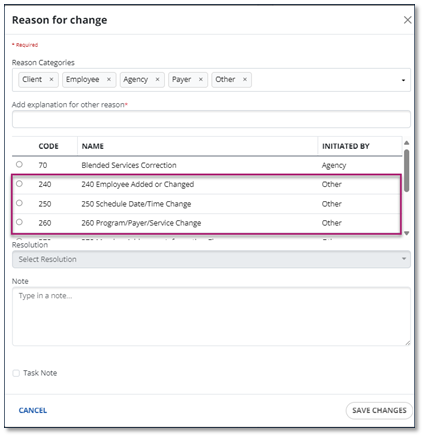
There are also other reason codes that are formatted differently. These are standard Sandata EVV codes and do not require your attention. Here’s a tip: look for the reason codes with the Code number included in the Name. Those are the codes should use.
Sandata's EVV training teaches you and your staff how to use EVV, which helps you comply with the 21st Century Cures Act. If your agency is not compliant, your Medicaid reimbursements could be affected, so please get started today.
What training should my team take? Streamline your training with Sandata's Learning Pathways and EVV webinar courses. These courses can be accessed via HHAeXchange University. Watch Webinar replays for a great opportunity to follow along with an expert trainer to guide you through key workflows and Sandata EVV system functionality.
See the Learning Pathways table below to learn which courses you'll need to take based on your job duties.
| Role | Data Entry | Visit Capture | Visit Maintenance | Scheduling | Security | Aggregator | Mobile App | |
|---|---|---|---|---|---|---|---|---|
| Provider Agency Administrator | ✔ | ✔ | ✔ | ✔ | ✔ | |||
| Staff - Intake | ✔ | |||||||
| Staff - Maintaining Visits | ✔ | ✔ | ||||||
| Staff Scheduler | ✔ | ✔ | ||||||
| Agency Trainer | ✔ | ✔ | ✔ | ✔ | ✔ | ✔ | ✔ | |
| Employee | ✔ | |||||||
| Alternate EVV Agency | ✔ | |||||||
| State Sponsors | ✔ |
For general questions about the MA EOHHS EVV program, please email EVVfeedback@Mass.gov.
Use the following links to watch training recordings or review the slide decks for the following topics:
The Massachusetts EVV session provided an overview of provider expectations and key details related to the Hard Edits transition. The State guided providers through the end-to-end claims-to-visit matching workflow, highlighting common matching challenges and how to address them. The session also covered the claims suspension process and associated timelines, along with a review of remittance advice and available reporting tools to monitor matching performance and compliance.
Click here to view the slide deck.
The Massachusetts EVV session provided an overview of provider expectations and key details related to the Hard Edits transition. The State guided providers through the end-to-end claims-to-visit matching workflow, highlighting common matching challenges and how to address them. The session also covered the claims suspension process and associated timelines, along with a review of remittance advice and available reporting tools to monitor matching performance and compliance.
Click here to view the slide deck.
MA-EOHHS reviewed the EVV compliance timeline and key phases leading up to full adoption, including important reminders about the upcoming hard edit transition. This session highlighted the claims-to-visit matching workflow, emphasizing how providers can ensure alignment between EVV data and submitted claims. Attendees also learned strategies for researching and resolving claim mismatches, with a focus on the AltEVV provider workflow and the appropriate use of billing-only modifiers to reduce errors and prevent denials.
Click here to view the slide deck.
MA-EOHHS has teamed up with Sandata Technologies as the Commonwealth-sponsored Electronic Visit Verification (EVV) provider. This session covers the EVV compliance timeline, soft vs. hard edits, and key provider expectations to ensure visits are accurately captured and aligned with claims prior to submission. Attendees will learn best practices for resolving mismatches, managing visit data, and avoiding future claim denials as Massachusetts transitions to hard edits.
Click here to view the Q&A from all town halls for additional helpful information. Questions and answers about the Massachusetts EVV policy can be viewed on the Massachusetts EVV website.
Click here to view the slide deck.
MA-EOHHS is partnering with SandataTechnologies for the state-sponsored EVV solution. The following are discussed in this town hall:
-
EOHHS Program Updates
-
EVV Onboarding Steps
-
Alternate EVV Best Practices for Registration and Onboarding
-
Available Provider & Alt EVV Training
-
Next Steps
Click here to view the slide deck.
MA-EOHHS is partnering with Sandata Technologies for the state-sponsored EVV solution. The following are discussed in this town hall:
-
EOHHS Program Updates
-
EVV Onboarding Steps
-
Alternate EVV Specification Updates
-
Provider & Alt EVV Training
-
Next Steps
Click here to view the slide deck.
MA-EOHHS is partnering with Sandata Technologies for the state-sponsored EVV solution. The following are discussed in this town hall:
-
EVV Program requirements
-
Provider and Vendor Portal registration
-
Training opportunities
-
EVV onboarding requirements
-
Early Adopter Focus Group expectations
-
Q&A session
Click here to view the slide deck.
MA-EOHHS has teamed up with Sandata Technologies as the Commonwealth-sponsored Electronic Visit Verification (EVV) provider. This online Town Hall will focus on the provider self-registration process, the Alternate EVV technical specifications, provider training opportunities and the available customer support channels for the EVV program implementation.
Click here to view the Q&A from all town halls for additional helpful information. Questions and answers about the Massachusetts EVV policy can be viewed on the Massachusetts EVV website.
Click here to view the slide deck.
MA-EOHHS has teamed up with Sandata Technologies as the Commonwealth-sponsored Electronic Visit Verification (EVV) provider. This online Town Hall introduces the Sandata EVV system and provides more information on the upcoming EVV implementation.
Click here to view the Q&A from all town halls for additional helpful information. Questions and answers about the Massachusetts EVV policy can be viewed on the Massachusetts EVV website.
Click here to view the slide deck.
Click here to view the Town Hall transcript.
The MA-EOHHS EVV Focus Group kickoff meeting outlined initial launch expectations for provider agencies. It focused on outlining key areas where feedback is needed: onboarding process, training opportunities, customer support experience, Sandata Mobile Connect user experience, and insights on Sandata EVV and Aggregator. This input helps Sandata and MA-EOHHS improve the EVV program as we approach full launch later this year.
Click here to download the slides.