Sandata Mobile Connect Troubleshoot Device

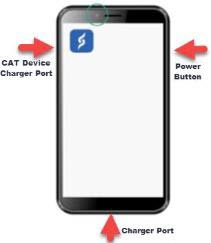
Do you have an Electronic Visit Verification (EVV) smart device from your state program? Your provider may have discussed this device with you. It's used to verify, check in, and check out of home and community services visits. Here are some tips on how to use it effectively.

The charging port is located at the bottom of the device. For CAT devices, it's on the left side at the top. Insert the cable into the port and plug it into the wall. Allow at least 10 minutes for the device to charge. Be sure to use the charging cable that came with your device.
Ensure the device is charged. Connect the device to the charger, after a few minutes of charging, power on the device. If the device still doesn't turn on, call the telephone number on the device label.
Open the Sandata Mobile Connect app on the device. Log in using your Santrax ID (i.e., 2-88888), your username and password (sent to your email address).
Tap Forgot Password on the device screen of the app, follow the prompts and answer the security questions.
When you don’t have enough signal, an Offline Banner displays at the top of your screen. Record your visit as usual, the EVV device stores visit information until there is a connection.
After your device finds a signal, the banner disappears to show your device is connected and transfers your EVV visit information.