Manage Time Off Reasons
Setup managers can manage the time off reasons staff select when requesting time off. Paid time off reasons will match up to a ProviderPro Payroll Wage Type.
To add/edit or delete a time off reason:
-
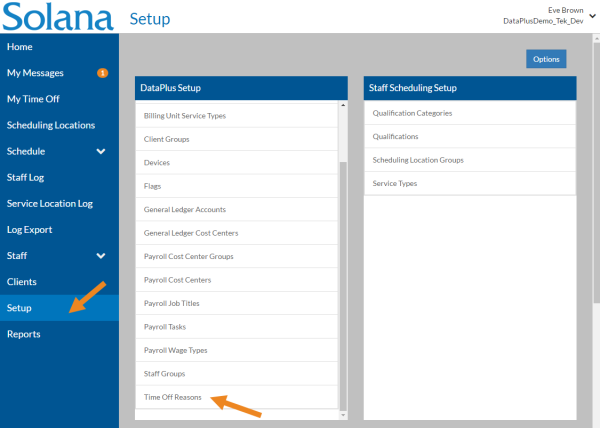
Select Setup from the menu and then select Time Off Reasons on the DataPlus Setup card.
-
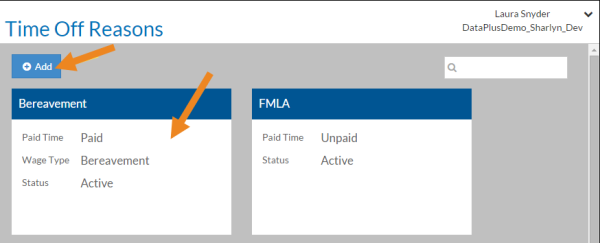
Select Add or select the Time Off Reason card you want to update or delete.
-
Complete the following information and select Save:
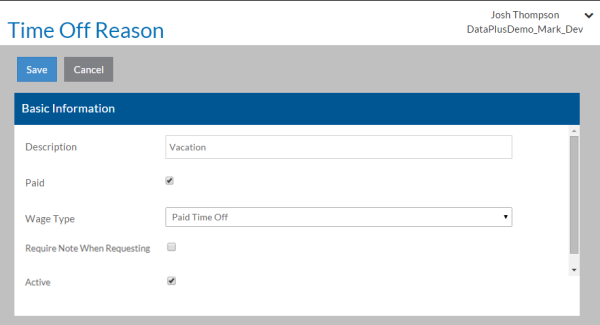
In This Field:
Enter:
Description
A Description of the Time Off Reason Paid If the employee gets paid for the time off. Wage Type If Paid is selected, then select the ProviderPro Wage Type associated with the time off reason. Require Note When Requesting If selected, staff will be required to enter a note when submitting a time off request. Active The time off reason is in use.