General Ledger Accounts
You can view the information about the ProviderPro General Ledger Accounts that were synced to Time Tracking.
If you are syncing General Ledger Account from ProviderPro, do not add, delete, or make changes to the General Ledger Account settings within Time Tracking . The changes will be overwritten the next time the sync runs. Make all changes to General Ledger Accounts in ProviderPro. To make General Ledger Account settings read only in Time Tracking turn on the Disable Synced Properties Default setting in Options.
General Ledger Accounts are assigned to Data Collection Type Staff Miscellaneous Reimbursement Types and Staff Mileage Reimbursements. When a staff logs expenses or staff mileage, the associated General Ledger Account is included in the export file to be imported into ProviderPro Payroll Reimbursements.
To view your General Ledger accounts:
-
Log in with your full login.
-
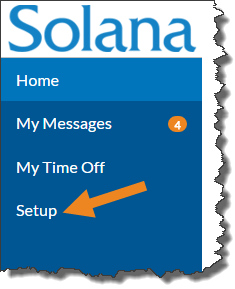
Select Setup from the menu.
-
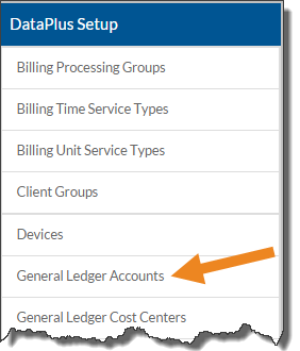
Select General Ledger Accounts on the DataPlus Setup card.
-
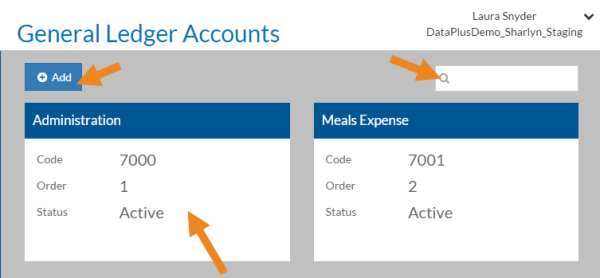
Select a General Ledger Account card from the list or enter a General Ledger Account in the Search box to search for a specific General Ledger Account. If you do not sync General Ledger Accounts from ProviderPro, select Add to create a new one.
-
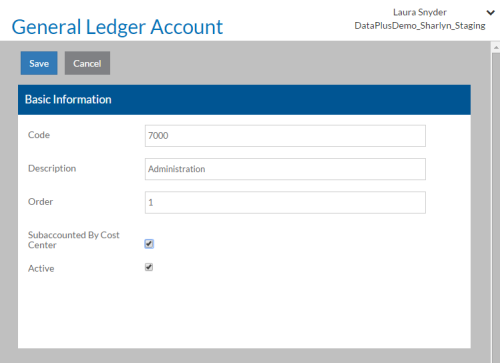
Complete or modify the information below as needed and select Save when finished:
Field:
Description:
Code
The Code or Account Number of the General Ledger Account to be used in export files.
Description Enter a description of the General Ledger Account. Order The order you want the General Ledger Account to be sorted in lists. Subaccounted By Cost Center Select if this General Ledger Account has cost center subaccounts. Active Select if the General Ledger Account is "in use" and will appear in the list of choices.