Log Unpaid Breaks
If your agency has enabled unpaid breaks in Options, you can log the time you were out to an unpaid break in one of four ways:
-
From the Time Clock card (Real-Time Users Only) on the Home screen (See Using the Time Clock Card) (Staff only)
-
From the Time Logging card (Combination or After-the-Fact Users only) on the Home screen, if you enter begin/end times (Staff only)
-
From the Hours graph on the My Log or Staff Log screen, if you enter begin/end times (Staff and Managers)
-
From the Other Hours/Amounts grid on the My Log or Staff Log screen, if you enter total hours (Staff and Managers)

If you are not a real-time user and are logging your own unpaid break that requires begin/end times, you can do so from the Time Logging card on the Home screen. Review Log and Approve Log Managers can only add unpaid breaks that require begin/end times for their staff from the Hours graph on the Staff Log screen. See From the Hours Graph below.
To Log an Unpaid Break from the Time Logging card:
-
Click Home in the menu.
If you do not see the Time Logging card you are either a real-time mode user or you are not required to enter begin and end times.
-
Select the time you are going to an unpaid break on the Time Logging card.
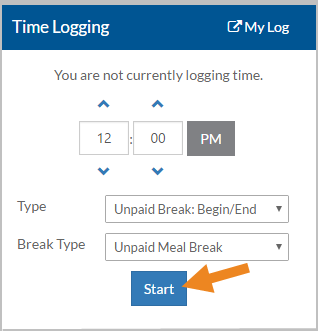
Minutes increment is based on your agency's rounding rules: 15, 10, 5 or 1.
-
Select the appropriate Unpaid Break log transaction type from the Type list.
You may also see Non-Worked Time and Worked Time with or without Clients log transaction types in the Type list, if they require begin/end times. The names that appear will vary depending on your agency's setup.
-
Select the appropriate Break Type from the list.
-
Select Start or Switch (if you are already logging Staff Worked Time).
-
Enter any notes or select a pre-defined note from the Insert Template list and then select Save. Notes may or may not be required depending on your agency setup.
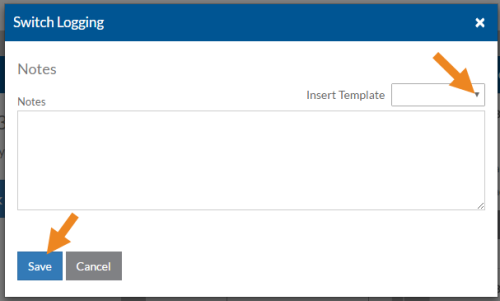
The Start or Switch Logging pop-up closes. The Status on the Time Logging card changes to show when you left for an unpaid break. An open (meaning only the begin time was recorded) Unpaid Break Log Transaction is created. You can view it by going to My Log.
The Log transaction appears in a yellow block. The ragged edge and error flag indicate that the transaction is open and does not have an end time recorded yet.
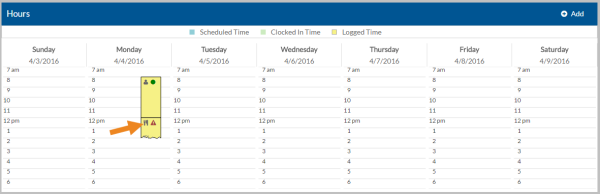
Mouse over the block or press and hold a block to view more details in or click or tap on it to open it for editing, etc.
If the Log transaction is less than one hour in duration you will not see any icons on the block in the condensed view. Select the + magnifying glass icon on the title bar to expand the Hours graph to make all icons visible. Select the - magnifying glass icon to condense the Hours graph again.
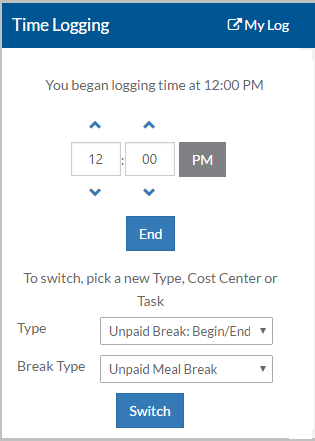
The End and Switch buttons now appear on the Time Logging card.
-
Once you have started an Unpaid Break Log transaction, then from the Time Logging card you can:
Select:
To Record the Time when:
End (also select the time the unpaid break ended)
You ended the unpaid break.
The open Unpaid Break Log transaction is closed and the Status on the Time Logging card is updated.
Switch (also select the time that you are switching from the Unpaid Break to another activity along with the new Type, Cost Center or Location or Break Type, Task or Service and/or Client mix) You ended your unpaid break and began working again.
The open Unpaid Break Log Transaction is closed and a new open Staff Time Worked Log transaction is created. You can view them by going to My Log.
You are also prompted and may be required to enter a note.
Record Unpaid Break Log transactions that require a begin and end time from the Hours graph.
To Log an Unpaid Break from the Hours graph:
-
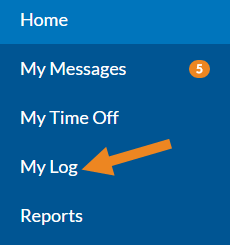
If you are logging your own unpaid break, click My Log in the menu.
-
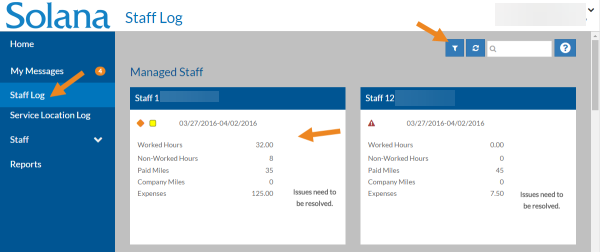
If you are a Review Log or Approve Log Manager and want to create an unpaid break log transaction for your staff, click Staff Log in the menu, set any needed filters and then select the appropriate Staff card instead.
-
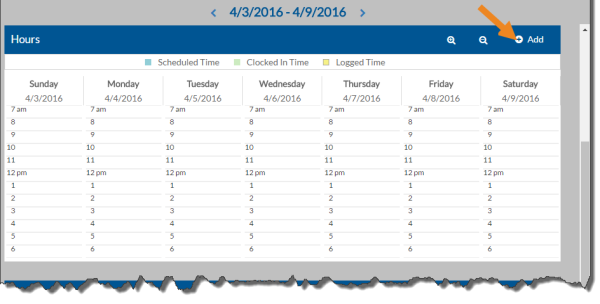
Select Add on the Hours graph.
-
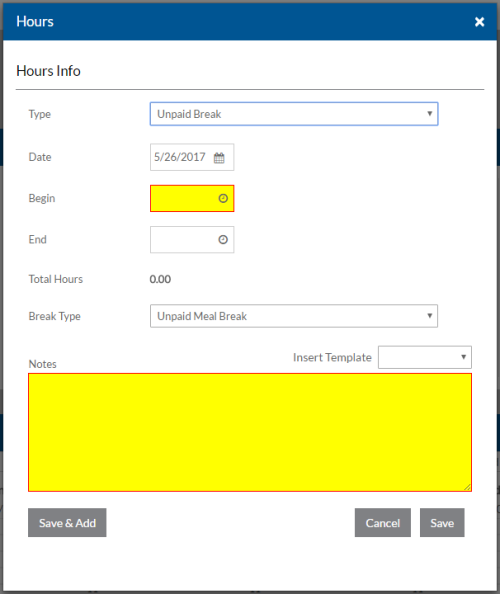
Complete the following information and click Save:
In this field:
Enter:
Type
The appropriate Unpaid Break log transaction type.
You may also see Non-Worked Time and Worked Time with or without Client log transaction types in the Type list, if they require begin and end times. The names that appear will vary depending on your agency's setup.
Date The date you started this Unpaid Break Log transaction.
Depending on your agency's settings, you may be restricted from entering a date a specified number of days in the past or future. If so, you will see an error message when you try to save.
Begin Time The time you started this Unpaid Break Log transaction. The Begin Time is required.
The minutes increment is based on your agency's rounding rules: 15, 10, 5 or 1 minute.
End Time The time you ended this Unpaid Break Log transaction.
You cannot enter an End Time that is before the Begin Time.
Total Hours The total number of hours on unpaid break is automatically calculated based on the Begin/End Times and is read-only. Break Type The break type for this Unpaid Break Log transaction. Notes Any notes related to this Unpaid Break Log transaction. The Log transaction appears on the Hours graph in a yellow block. The knife and fork icon indicates that it is an Unpaid Break Log transaction. The bottom edge of the block will be ragged if no end time was entered (open), and solid if an end time was entered (closed). If the Log transaction is open you will also see the error flag. This is because the end time is currently missing and it is required to approve the log transaction.
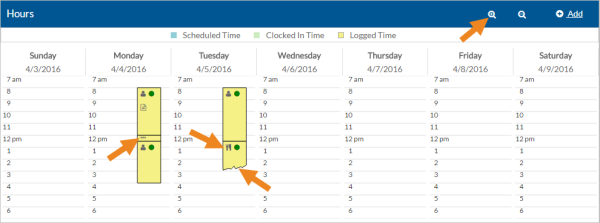
Mouse over the block to view more details or click on it to open it.
If the Log transaction is less than one hour in duration you will not see any icons on the block in the condensed view. Select the + magnifying glass icon on the title bar to expand the Hours graph to make all icons visible. Select the - magnifying glass icon to condense the Hours graph again.
Record an Unpaid Break Log transaction that does not require a begin and end time, but instead requires the total number of hours on break from the Other Hours/Amounts grid.
To Log an Unpaid Break from the Other Hours/Amounts grid:
-
If you are logging your own unpaid break, click My Log in the menu.
-
If you are a Review Log or Approve Log Manager and want to create an unpaid break log transaction for your staff, click Staff Log in the menu, set any needed filters and then select the appropriate Staff card instead.
-
Select Add on the Other Hours/Amounts grid.

-
Complete the following information and click Save:
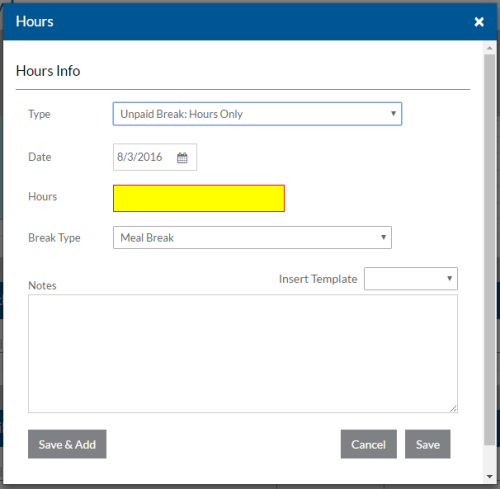
In this field:
Enter:
Type
The appropriate Unpaid Break log transaction type.
You may also see Non-Worked Time and Worked Time with or without Client log transaction types in the Type list, if they require begin and end times. The names that appear will vary depending on your agency's setup.
Date The date you started this Unpaid Break Log transaction.
Depending on your agency's settings, you may be restricted from entering a date a specified number of days in the past or future. If so, you will see an error message when you try to save.
Hours The number of hours on unpaid break. Hours are required. Break Type The break type for this Unpaid Break Log transaction. Notes Any notes related to this Unpaid Break Log transaction. The Unpaid Break Log transaction appears in the Other Hours/Amounts grid. The fork and knife icon indicates that it is an Unpaid Break Log transaction.
