Employees Unpublish a Schedule
You can unpublish the schedule for one or more scheduling locations.
Complete the following steps to unpublish a schedule:
-
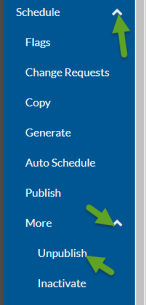
Select the arrowhead next to the Schedule option, then select the arrowhead next to the More option in the menu pane.
-
Select the Unpublish option.
-
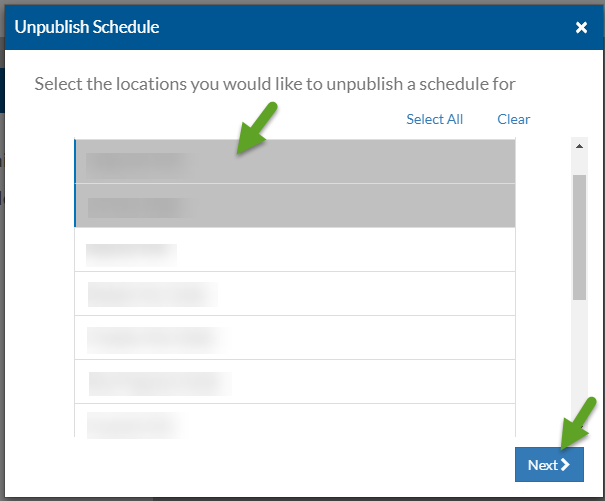
Select the scheduling location(s) that you want to unpublish shifts for, then select the Next button.
-
Select the timeframe you want to unpublish from the Week dropdown and select the Unpublish button.
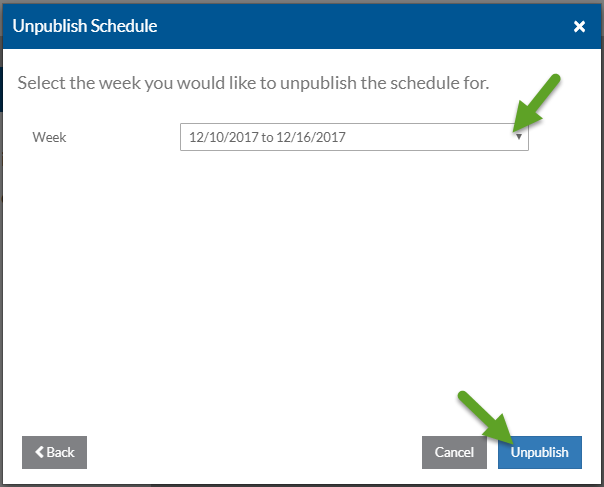
The schedule for the selected locations and week are unpublished. You see a blue toast message appear when it finishes. You can now inactivate shifts, regenerate shifts, make any needed changes and publish the schedule again.