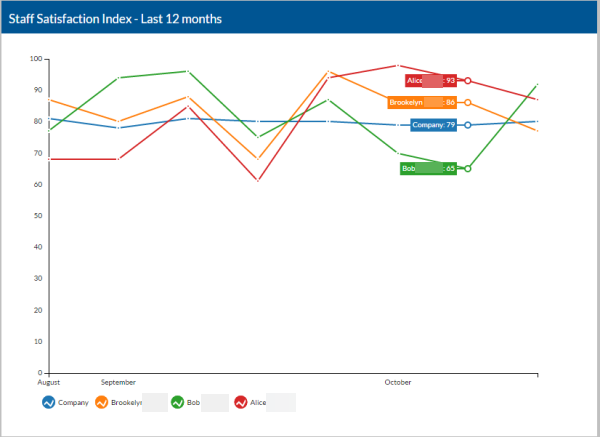
Employees Monitor Staff Satisfaction
As a staff manager, you can monitor the Staff Satisfaction Index for your staff.
The overall Index number is based on the total numbers for each of the three factors listed below that are then weighted based on the settings in Options. The actual is based on the original published schedule. The blue line is the Company average.
Availability vs Actual - A points value is assigned to each increment of each day and then averaged.
| Criteria | Points |
|---|---|
| Preferred availability and scheduled | 1 |
| Available and scheduled | .8 |
| Preferred availability and was not scheduled | .2 |
| Not available or preferred and scheduled | 0 |
Preferred Number of Hours/Week Minimum and Maximum vs Actual - Points are assigned based on the percentage away from preferred.
| % of Hours for Preferred Minimum | Points |
|---|---|
| 0 | 0 |
| 50 | .5 |
| 80 | .8 |
| 90 | .9 |
| 100 | 1 |
| % of Hours for Preferred Maximum | Points |
|---|---|
| 100 | 1 |
| 115 | .9 |
| 125 | .8 |
| 150 | .5 |
Location Preference vs Actual - A points value is assigned to each shift and then averaged.
| Criteria | Points |
|---|---|
| Scheduled for a shift at a preferred location | 1 |
| Scheduled for shift at an unpreferred location | -.5 |
Complete the following steps to view the staff satisfaction index.
-
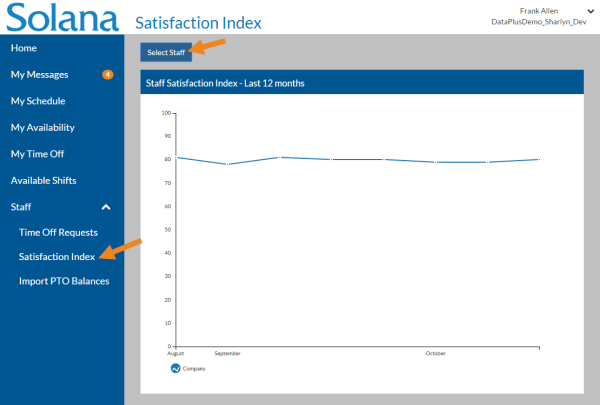
Select Satisfaction Index under Staff in the menu and then select Select Staff.
-
Select the staff you want to view sanctification index for and select the Save button.
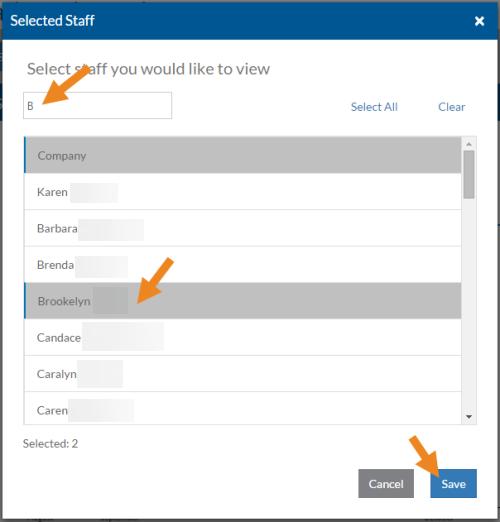
Each staff appears with a different colored line.