Employees Import Staff Qualifications
If your staff qualifications do not sync from ProviderPro, you can import them from an Excel spreadsheet directly to Staff Scheduling to add new qualifications and to update the expiration date of existing qualifications.
The qualification in Staff Scheduling must have a Qualification Category assigned to it with the type User Defined. You cannot import staff qualification for qualification with a category type of training, position, or third-party.
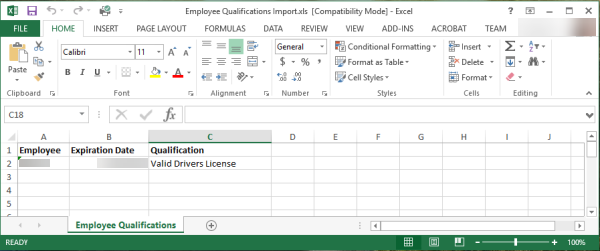
The columns in the spreadsheet should be as follows:
-
Column A: Employee (Staff) Code
-
Column B: Expiration Date
-
Column C: Qualification Description
Here is an example file:
Complete the following steps to import staff qualifications:
-
Select Import from the Staff menu and then select Qualifications.
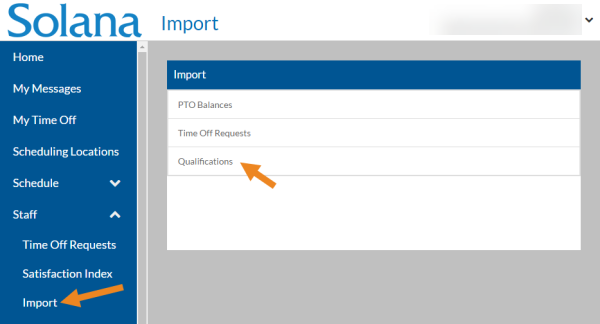
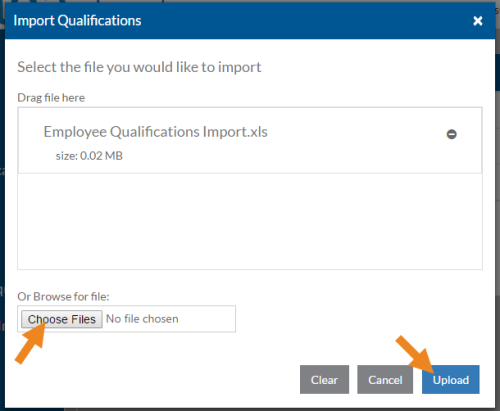
The Qualifications pop-up opens.
-
Drag the Microsoft Excel file(s) you want to import onto the card or select the Choose Files button to browse for the file, and select the Upload button.
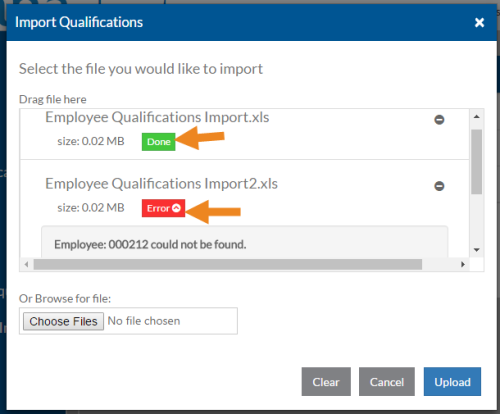
When the file has been processed Done will appear beneath it if the import was successful. Otherwise, Errors will appear beneath it. If you click on Errors you can see what caused the import to fail (such as a Staff or Qualification that doesn't exist or is inactive).