Assign Target Staff Hours to Scheduling Locations
Agencies that have also licensed Time Tracking can use Target Staff Hours to budget how many staff hours they want to budget for a particular service at a location for Worked Time with Clients and how many hours should be Time without Clients. This information is then used in the Scheduled Staff Hours Vs Served Hours report.
To assign target staff hours to a scheduling location:
-
Select Scheduling Locations from the menu and then enter the name of the scheduling location in the Search box.
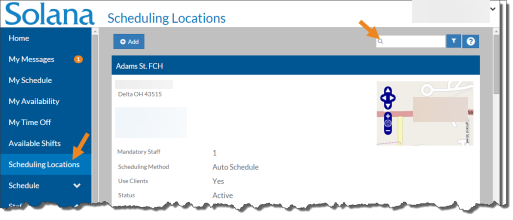
-
Select the card of the scheduling location you want to assign target staff hours.
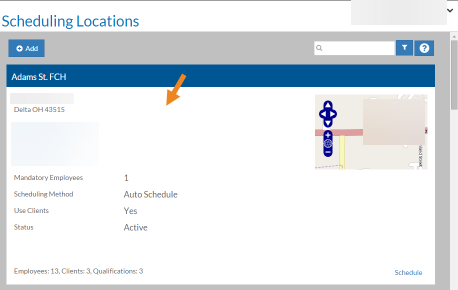
The scheduling location's card opens.
-
Select Add on the Target Staff Hours card.
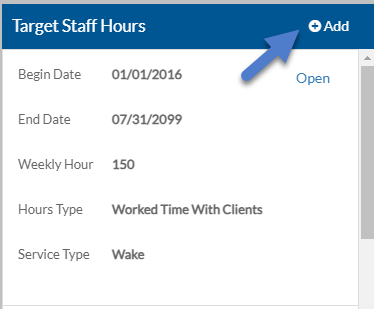
The Target Staff Hours pop-up opens.
-
Complete the following information and click Save.
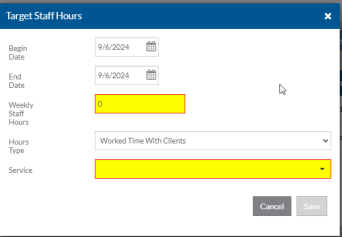
Begin Date The first date these target staff hours take effect End Date The last date these target staff hours are in effect Weekly Staff Hours The target number of staff hours for this scheduling location for the selected log entry type and service for a week. Hours Type Worked Time With Clients or Worked Time Without Clients Service If the Hours Type is Worked Time With Clients, the Service Type the Staff will be providing the clients.