Employees Staff Scheduling/Time Tracking Sync Information Tab

If you have licensed DataPlusTime Tracking or Staff Scheduling and it is set to be visible in Employee Care, sync-related information about the employee on the Staff Scheduling/Time Tracking Sync tab.
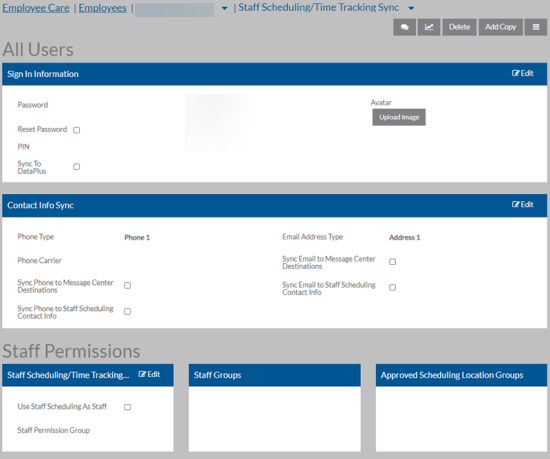
On this Card Available Fields
Sign In Information
  • Password

  • Password Reset

  • PIN

  • Sync to DataPlus

  • Prox Card ID

  • Card ID

  • Avatar

Contact Info Sync
  • Phone Type

  • Phone Carrier (Phone Carrier is no longer required for texting.)

  • Sync Phone to Message Center Destinations

  • Sync Phone to Staff Scheduling Contact Info

  • Email Address Type

  • Sync Email to Message Center Destinations

  • Sync Email to Staff Scheduling Contact Info

Staff Permissions
  • Use Staff Scheduling As Staff

  • Staff Permission Groups

  • One or more Staff Groups

  • One or more Approved Scheduling Locations

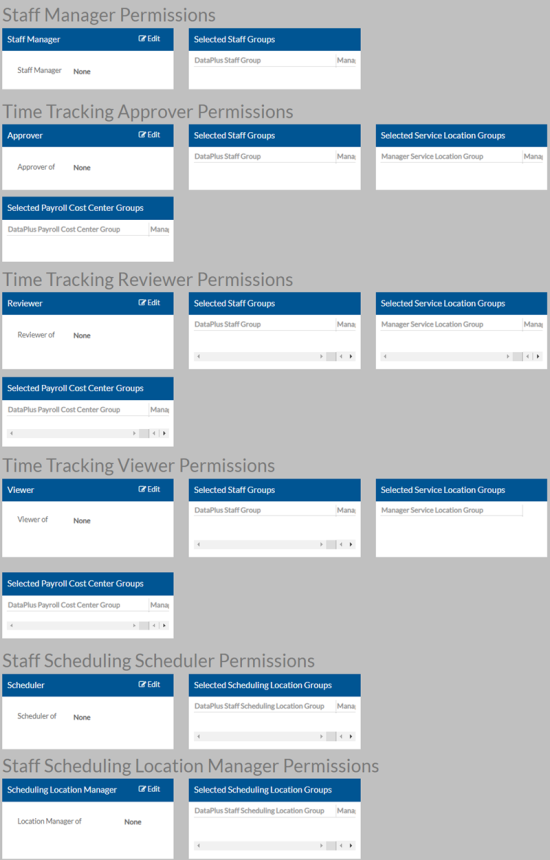
Manage Permissions

On this Card Available Fields
Staff Manager Permissions
  • Staff Manager

  • One or more Selected Staff Groups

Time Tracking Approver Permissions

Approver of:

  • One or more Selected Staff Groups

  • One or more Selected Service Location Groups

  • One or more Selected Payroll Cost Center Groups

Time Tracking Reviewer Permissions

Reviewer of:

  • One or more Selected Staff Groups

  • One or more Selected Service Location Group

  • One or more Selected Payroll Cost Center Groups

Time Tracking Viewer Permissions

Viewer of:

  • One or more Selected Staff Groups

  • One or more Selected Service Location Group

  • One or more Selected Payroll Cost Center Groups

Staff Scheduling Scheduler Permissions

Scheduler of:

  • One or more Selected Scheduling Location Groups

Staff Scheduling Location Manager Permissions

Location Manager of:

  • One or more Selected Scheduling Location Groups