Employees Employment Setup Lists
To manage the employment related setup lists:
-
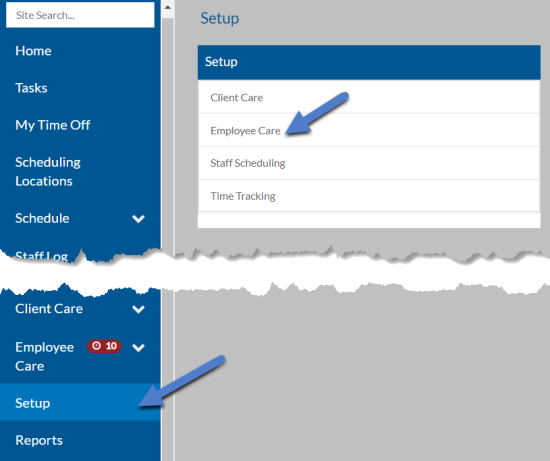
Select Setup from the navigation pane and then select Employee Care.
-
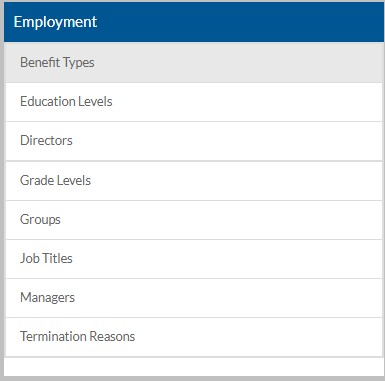
Scroll down to the Employment Information card.
-
Select the setup list you want to manage:
This Setup List Used Here For Benefit Types Employees: Employment The employee's benefit types for reporting purposed only. Education Levels Employees:
Employment: Education
Applicants
The position type is a way to group together the job titles that are applicable to a position. When filling or transferring positions, the job title selected for the employee in that position must be set as a job title in the associated position type. Directors Employees: Employment Directors are assigned to employees for filtering, sorting and reporting purposes Grade Levels Job Titles Grade levels are assigned to job titles to describe the minimum, mid-level and maximum pay ranges for that job title. Groups Employees: Employment Positions Groups are assigned to positions and employees for filtering, sorting and reporting purposes. Job Titles Employees: Employment Positions
EEO-1 Reporting
Each employee has at least one job title (primary). Along with allowing hours and wage reports to be broken down by job title, job titles are also one part of the equation for properly distributing all payroll related expenses such as wages, employer taxes (Social Security, Medicare, FUTA, SUTA, Worker’s Compensation, etc.) and benefits.
The job title also determines which EEOC Job Category and grade level to use.
In order to run the EEO-1 report, make sure you assign each job title to one of the designated job categories are as follows:
1. Executive/Senior Level Officials and Managers
2. First/Mid-Level Officials and Managers
3. Professionals
4. Technicians
5. Sales Workers
6. Administrative Support Workers
7. Craft Workers
8. Operatives
9. Laborers and Helpers
10. Service Workers
For details on how job titles work on the payroll-side, refer the ProviderPro Payroll Guide.
Managers Employees: Employment Managers are assigned to employees for filtering, sorting and reporting purposes. Termination Reasons Employees: Employment: Hire/Rehire/Term Info
Positions
Termination reasons are used to categorize the reasons why an employee left such as moved, absenteeism, insubordination, theft, etc. -
Select anywhere on an existing card to open to view and edit or select the + to add a new one.
-
Enter the Code and/or Description and select Save.