Employees Overview
You can record and track a wide variety of information about the employees you manage. Each Employee is only entered into Sandata's Employee Care software suite once. You can then select the same employee whether you are entering Incidents in Client Care, adding a workplace injury in Employee Care, logging time in Time Tracking or processing payroll in ProviderPro Payroll.
You can only view a card for the employees that you have security permissions to access. The information you view and can record for each employee varies by the products your agency has licensed and your security permissions.
If a user has read access to an employee, they can view the employee's:
-
Complete list of job requirements (including any that are marked Not Visible to Beneficiary) even if the user is not that employee's manager (i.e. they have employee look up access) unless Visibility Not Based On Security is set in the requirement.
-
History link on a Job Requirement.
-
They can see the More Info link under history, and get a security error unless they are also an Approver or a Watcher.
-
If they are looking at their own Job Requirements via the employee screen, they can see job requirements that are marked Not Visible to Beneficiary and the More Info link under History.
If a user has changes access to an employee, can they can:
-
Do all of the above And
-
If they are not looking at their own job requirements, see the Current Details link and manually fulfill or disregard a job requirement.
If a user is an Approver of the requirement, they can do all of the above, even if it is their own job requirement.
You may see more employees than you actually manage. This happens when you have lookup access to employees to be able to select any employee when entering an incident, for example. However, you are only be able to view the Code, First Name, Middle Name, Last Name and Nick Name of the employee. You can select the Managed By Me filter to see only those employees that you actually manage.

The Employees index screen gives you access to information about the employees you manage.
The screen example below along with the table beneath it describes the various functions available from the Employees index screen.
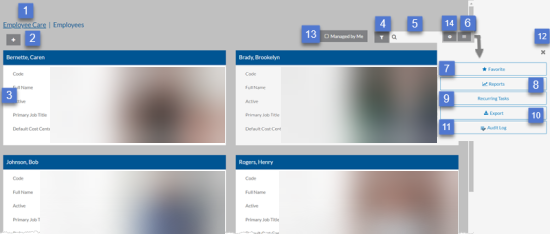
| Function | |
|---|---|
| 1 | Return to the Employee Care navigation screen. |
| 2 | Add a new employee. |
| 3 | Select anywhere on an Employee card to open the Employee detail screen. |
| 4 |
Open the Filters tray to adjust settings. This is where you would go to set the Manager filter. The Employee has special filters you can use such a Primary Job Title, Last Hire/Rehire Date and Client Care Placements. Client Care Placements is a special child filter that you can use to find employees based on their security access to employees. |
| 5 | Search for an employee. |
| 6 | Open the Options tray. |
| 7 | Add or remove Employees from your Favorites menu. |
| 8 | Run a report. |
| 9 | Import employees from MS Excel. |
| 10 | Export employees to MS Excel. |
| 11 | Open the Audit Log to view the change history for all employees. |
| 12 | Close the Options tray. |
| 13 | Select Managed by Me to further filter the list of employee cards to only those managed by the employee that is logged in. An employee is considered to be managed by the employee if that employee is filling a position directly beneath that employee's position or the employee is selected on the Managed Employees card or part of an Employee Group that is selected on the Managed Employee Groups card of the logged in employee's position. |
| 14 | Set the sort order for the list of cards. |
Select anywhere on an Employee card to open the Employee Detail screen or select the + to add a new employee. The Employee Detail screen is organized into cards and tabs.
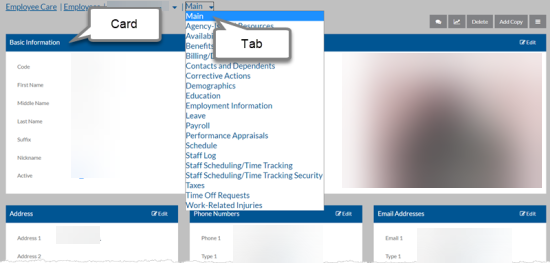
The information you can view and change is based on security settings. The screen example below along with the table beneath it describes the various functions available from the Employee detail screen.
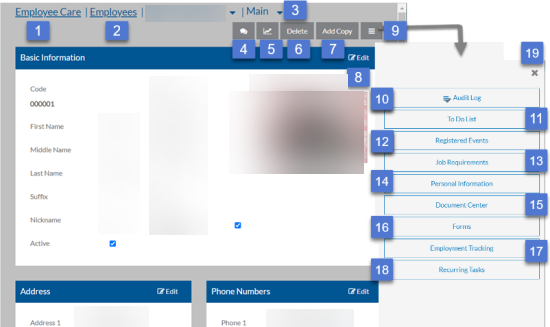
| Function | |
|---|---|
| 1 | Return to the Employee Care navigation screen. |
| 2 | Return to the Employees index screen. |
| 3 | Change to a different tab of information. |
| 4 | Enter and view the employee's notebooks and notes. |
| 5 | Run a report. |
| 6 | Delete an employee. |
| 7 | Create a copy of the employee. |
| 8 | Edit the employee's information. |
| 9 | Open the Options tray. |
| 10 | View the change history of the selected employee. |
| 11 | Open the Audit Log to view the change history for all employees. |
| 12 | View the employee's to-do list. |
| 13 |
View the employee's job requirements history. The user must be an approver or a watcher of the requirement to view More information which includes the details and notes related to the fulfilled requirement. Only approvers can see information about when the current requirement is due, manually mark it as completed for the employee or disregard it. |
| 14 | View the employee's personal information links. |
| 15 | View the documents and links the employee has access to in the Document Center. |
| 16 | View the forms the employee has access to. |
| 17 | Launch the Employment Tracking Wizard to hire/rehire, make an employment change or terminate employment for the employee. |
| 18 | View, edit or set up any recurring task for the employee. |
| 19 | Close the Options tray. |