Schedule Save
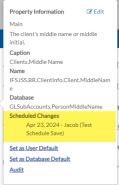
The Scheduled Save feature lets you add or make changes to a record and set a future date and time to save those changes. After you have scheduled the save, you can click on the caption of the property that you changed the value of, and a pop-up appears showing the new value and the scheduled date for the change. You can also go to the Scheduled Save Viewer to review upcoming and previous scheduled saves, as well as delete any pending scheduled saves as needed.

To schedule a save:
-
Open the record you want to schedule changes for, or add a new record.
-
Make any edits, or complete the information in the new record, as needed.
-
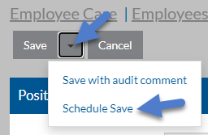
Click the arrow next to Save and then select Schedule Save.
-
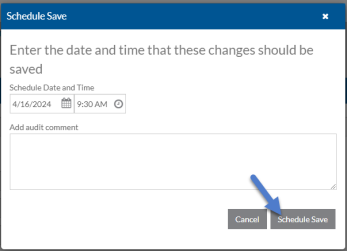
Select the date and time the save should occur, and enter any comments about the reason for the change. These comments will appear in the audit log viewer.
Click Schedule Save.
-
The Schedule Save window closes and the original values appear. Click on the caption of any field that you edited to view the pending new value and the date the change will occur.
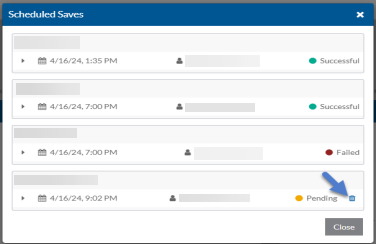
The Scheduled Save also appears in the Scheduled Change Viewer with a status of Pending.
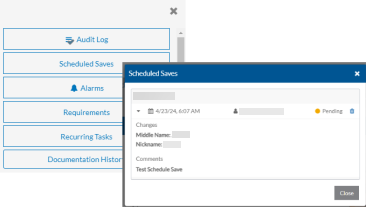
-
The record is added or updated on the scheduled date and time. A pending banner shows when you open the record that has a scheduled save.
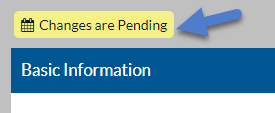
Click on the calendar icon to open the Scheduled Saves window.
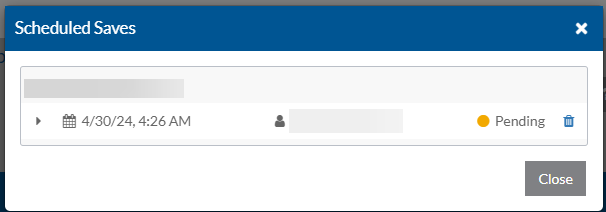
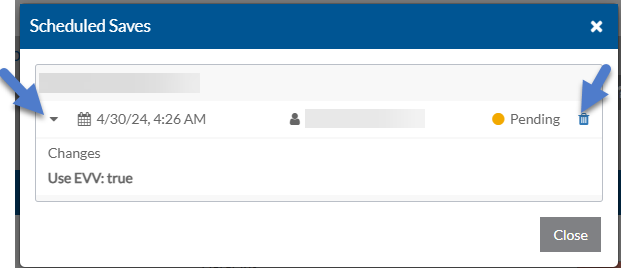
Click the arrow to view the pending changes or the trash can icon to delete them.
-
If any errors occur when the scheduled save happens, the current user logged in that scheduled the change receives a message in the Message Center.
Use the Scheduled Change Viewer to review all scheduled saves that are pending for all the records or for an individual record of a particular list.
From the viewer you can verify the status of the scheduled save, as well as delete the pending changes to prevent them from occurring.
To review or delete scheduled saves:
-
Navigate to the index screen of the list with the scheduled saves.
-
To view the schedule saves for multiple records: Select the Options menu on the index screen and then select Scheduled Saves.
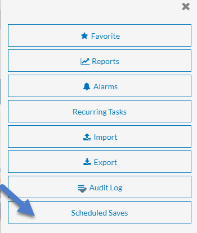
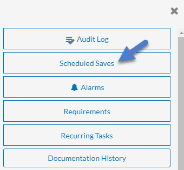
To view the scheduled saves for an individual record: Select the card of the record you want to view and then select the Options menu and click Scheduled Saves.
-
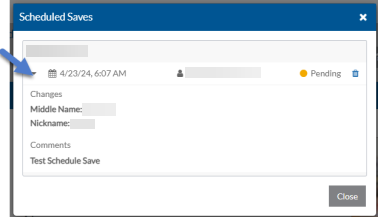
To view additional information about the pending change, click the arrow next to the entry.
-
To delete any pending changes to prevent them from occurring, click the trash can icon next to the entry.