Manage Saved Report Layouts
Once you have saved your layout you can make a copy of it, change permissions, rename it, delete it, etc.
To manage a saved layout:
-
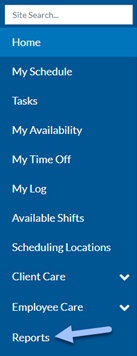
Select Reports in the menu panel.
-
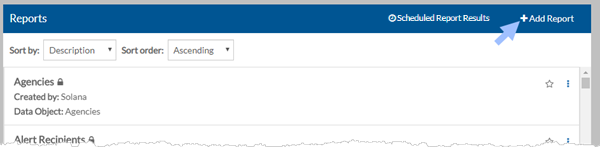
Select + Add Report.
-
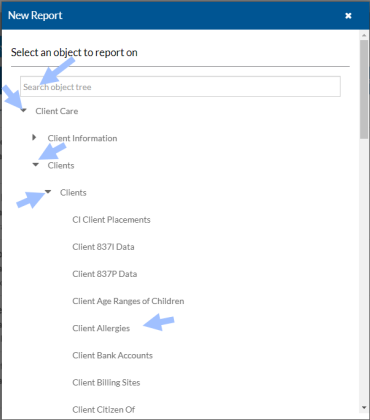
Select the object that you want to manage the layouts for. You may need to clear the search box to find the object you want.
-
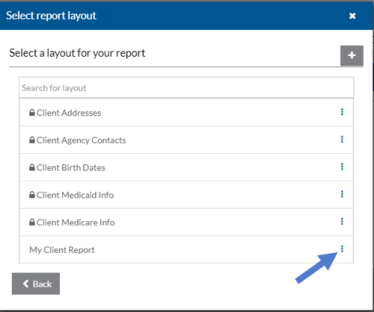
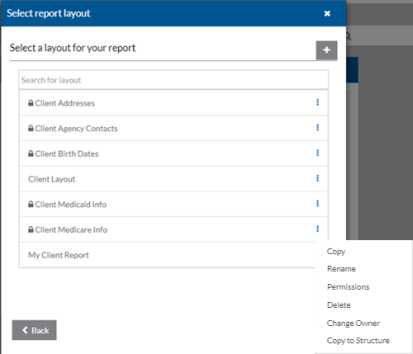
Select the Ellipsis next to the report layout you want to manage.
-
Depending on your security permissions to the report layout you can:
-
Copy: Always available for any layout.
-
Rename: Allowed if it's not a Standard layout (has no lock icon), and you’re the owner or have Change/Delete permissions.
-
Change Permissions: Only the owner can update permissions to restrict viewing or editing.
-
Delete: Allowed if it's not a Standard layout, you’re the owner or have Change/Delete permissions, and it’s not saved with a report.
-
Change Owner: If you have Change Ownership permissions, you can assign a new owner.
-
Copy to Structure: For agencies with multiple databases — copies the layout to the structure database so it can be used in others after an update.
-