Client Care California-Violent Incidents Log
The Violent Incidents Log is available to those agencies that have licensed the additional Employee Care California feature set.
The Violent Incidents Log includes the information that California Employers who fall within the scope of California Labor Code LC 6401.9 are required to record as a result of California Senate Bill 553 (SB 553) when a workplace violence incident occurs in their workplace.
The information that is recorded should be based on:
-
Information provided by the employees who experienced the incident of violence.
-
Witness statements.
-
All other investigation findings.
All information that personally identifies the individual(s) involved is omitted from this log, such as: Names, Addresses (physical and electronic), Telephone numbers, and Social Security Number.
Users need security permissions to the Violent Incident Log itself as well as to these related setup lists:
-
Violent Incident Locations
-
Violent Incident Committed By Classifications

-
Select Employee Care from the menu and then select from the Other card.
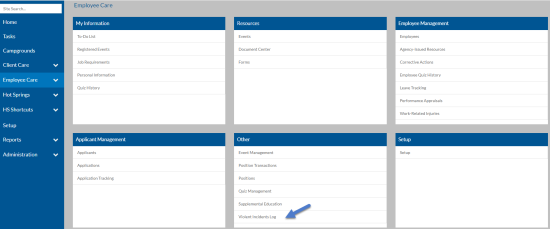
The Violent Incident Log grid appears.
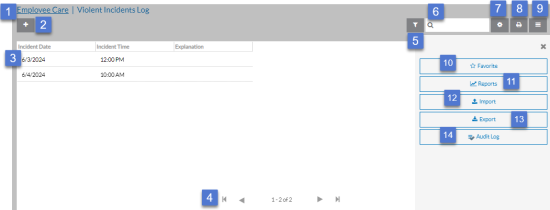
From here you can:
1 Return to the Employee Care navigation screen. 2 Add a new Violent Incident Log Entry 3 Open a violent incident log entry to view, modify or delete. 4 Use the outer left arrow to go to the first violent incident log entry or the outer right arrow to go to the last violent incident log entry in the grid. Use the inner arrows to go to the next or previous set of violent incident log entries in the log. 5 Open the Filters tray to adjust your filter settings. 6 Search for a violent incident log entry based on key words. 7 Add, remove, reorder and sort columns in the grid. 8 Print the current rows and columns that appear in the grid. 9 Open the Options tray to view additional functions. 10 Add or remove the Violent Incidents Log from your Favorites menu. 11 Run or create a Violent Incident Log report. 12 Import violent incident log entries from MS Excel. 13 Export violent incident log entries to MS Excel. 14 Open the audit log to view the change history for all violent incident log entries. -
You may see a message similar to the one below. This message means additional violent incident log entries match your filter settings, but there are too many to show. If this happens you either need to adjust your filters or use the search to find the inventory item you are looking for.

-
Select a Violent Incident Log entry to Open, and Edit or select the + icon to add a new incident.
-
Complete or modify the required Violent Incident information and click Save:
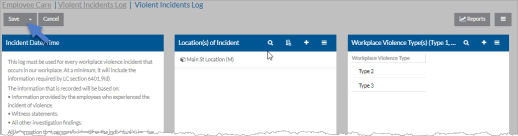
On this Card Fields Available Incident Date/Time Incident Date
Incident Time
Location(s) of Incident The location(s) of incident. The locations that appear here are setup in the Violent Incident Locations setup list. Workplace Violence Type(s) Type 1 - Workplace violence committed by a person who has no legitimate business at the work site, and includes violent acts by anyone who enters the workplace or approaches employees with the intent to commit a crime.
Type 2 - Workplace violence directed at employees by customers, clients, patients, students, inmates, or visitors.
Type 3 - Workplace violence against an employee by a present or former employee, supervisor, or manager.
Type 4 - Workplace violence committed in the workplace by a person who does not work there, but has or is known to have had a personal relationship with an employee.
Incident Type It’s important to understand that Workplace Violence Type and Type of Incident have separate requirements.
For this part of the log, Type of Incident specifically refers to the nature or characteristics of the incident being logged. It does not refer to the type of workplace violence:
-
Physical attack without a weapon, including but not limited to. biting, choking, grabbing, pulling hair, kicking, punching, slapping, pushing, pulling, scratching or spitting.
-
Attack with a weapon or object, including, but not limited to a firearm, knife or other object.
-
Animal Attack
-
Sexual assault or threat, including but not limited to rape, attempted rape, physical display or unwanted verbal or physical contact.
-
Threat of physical force or threat of the use of a weapon or other object.
-
Other and Description if Other
-
Explanation - detailed description of the incid
Workplace Violence Committed By Classification
-
The classifications that appear here are setup in the Violent Incident Commit By Classifications setup list.
For confidentiality
-
Only include the classification of who committed the violence, including whether the perpetrator was a client or customer, family or friend of a client or customer, stranger with criminal intent, coworker, supervisor or manager, partner or spouse, parent or relative, or other perpetrator.
Circumstances Enter what was happening at the time of the incident, including, but not limited to, whether the employee was completing usual job duties, working in poorly lit areas, rushed, working during a low staffing level, isolated or alone, unable to get help or assistance, working in a community setting, or working in an unfamiliar or new location?
Where the incident occurred This is a narrative and could include information such as in the workplace, parking lot or other area outside the workplace, or other area
Consequences Include information on what the consequences of the incident were including, but not limited to:
-
Whether security or law enforcement was contacted and their response.
-
Actions taken to protect employees from a continuing threat or from any other hazards identified as a result of the incident.
Injuries Were there any injuries? Yes, No or No selected.
-
If: Yes describe the injuries
Were emergency medical responders other than law enforcement contacted. such as a Fire Department, Paramedics, On-site First-aid certified personnel? Yes, No or No selected.
-
If: Yes describe who was contacted
Did the severity of the injuries require reporting to Cal/OSHA? Yes, No or No selected.
-
If: Yes when was Cal/OSHA contacted?
-
Who was contacted at Cal
Copy Provided Completed By - The employee who completed the violent incident log entry.
Job Title - The job title of the employee who completed the entry.
Date Violent Log Completed - The date the violent incident log entry was completed
To use Computer Signatures in the Violent Incident Log, a Signature Profile and Electronic Signature must be configured for the Violent Incident Log data object in system configuration. -
-
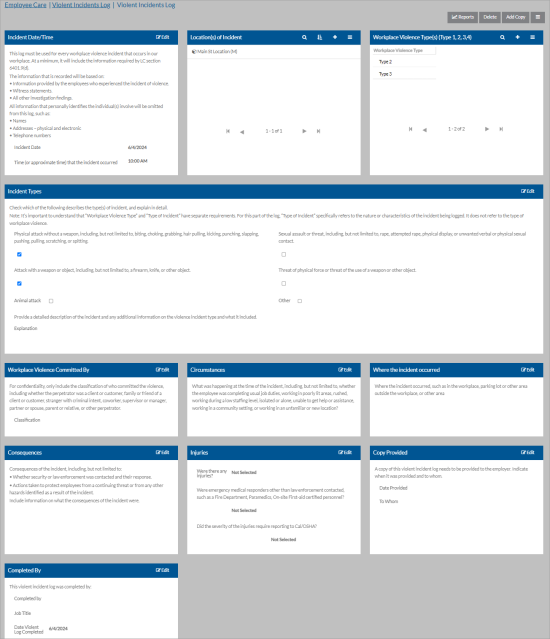
From here, additional functions are available:
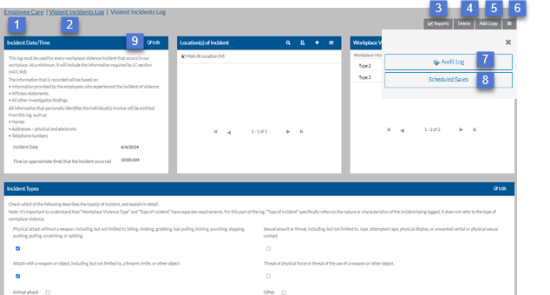
1 Return to the Employee Care navigation screen. 2 Return to the Violent Incident Log grid. 3 Run a report. 4 Delete a Violent Incident Log entry. 5 Create a copy of a Violent Incident Log entry. 6 Open the Options tray to view additional functions. 7 View the change history of the Violent Incident Log entry. 8 View any scheduled changes for this Violent Incident Log Entry 9 Edit the Violent Incident Log entry.
When finished editing, select Save (or Cancel to discard changes).