Client Care Client Agency
The Agency tab provides information about the clients related to your Agency.
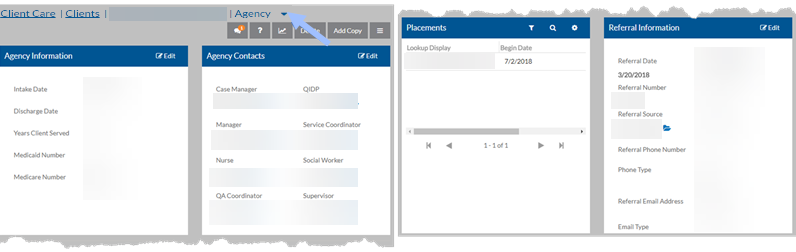

The Agency Information section provides the following:
-
Intake Date
-
Discharge Date
-
Years Served (Calculated/Read Only)
(Based on the Intake Date and the Current Date or the Discharge Date)
-
Medicaid Number
-
Medicare Number
The Agency Contacts section provides contact information for the following:
-
Case Manager
-
Manager
-
Nurse
-
QA Coordinator
-
QIDP
-
Service Coordinator
-
Social Worker
-
Supervisor
Select the  next to the Agency Contact to view the contact information.
Client placements can be added, viewed, and edited in the Client Placements section.
When adding a new placement, select the Department and Program to locate the correct placement. Enter the Begin Date and End Date and mark as the Primary Placement for This Type.
Only one Residential and one Vocational Placement can be marked as primary.
Run the Active Clients Not Currently in a Placement report to locate any clients that are not assigned to a placement.
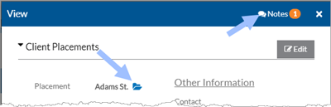
Once the placement is saved, you can open to view or modify the following information:
-
Placement
Select the Next to the Placement Location to View the Physical Location
Select the Next to the Physical Location to View the address and contact information.
-
Begin Date
-
End Date Primary Placement for this Type
-
Years in Placement
Calculated/Read Only based on the Start Date and the Current Date or the End Date
-
Reason for Leaving
-
Reason for Leaving Notes
-
Placement Contact
-
Vocational Position
-
Vocation Hourly Rate
-
Level of Staffing
-
Transportation Notes Use for EVV
If selected, and you are using global locations with a combined database, the service location linked to this placement’s global location can sync with the client’s EVV addresses. To enable this sync, submit a support ticket.
Additionally, you can access the client’s Notebooks and Notes related to the placement.
The Referral Information section provides the client's referral information:
-
Referral Date
-
Referral Number
-
Referral Source
-
Referral Source Phone Number/Type
-
Referral Source Email Address/Type
-
Referred By Name
-
Referred By Address 1 & 2
-
Referred By City, State, Zip Code