Sandata FVV Reports

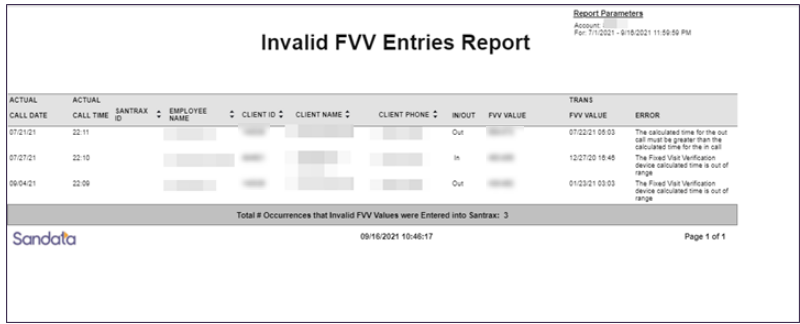
This report shows all invalid FVV entries for the selected date range. The report includes general information visits for which an invalid FVV entry was made. Invalid FVV entries are caused when a user selects FVV when making the TVV call, but the FVV value was not translated into a valid call time for the client. This report also includes information about the cause of the invalid entry. The maximum date range for this report is 730 days.
Use this report to review invalid FVV entries and identify patterns and trends in making FVV entries. These may help identify Employees requiring additional training or device registration issues.
Use the following fields to limit the report output:
| Field | Description |
|---|---|
| Payer | The selected payer(s) |
| Program | The selected program(s) |
| Service | The selected service(s) |
| Client |
Client by name (last name, first name) or Sandata Client ID. When a partial name is entered the report displays results that begin with the entered characters. |
| Client AR# | The Client's AR# |
| Client Medicaid ID |
Clients with the entered Medicaid ID. The entered value must be an exact match to a Client’s Medicaid ID. |
| Supervisor | The Supervisor code for the Client(s) at the Provider agency |
| Department | The selected department |
| Employee |
Employee by name (last name, first name) or Santrax ID. When a partial name is entered the report displays results that begin with the entered characters |
Each column of the report lists the following information:
| Columns | Description |
|---|---|
| Actual Call Date | the actual date the call was received |
| Actual Call Time | the actual time the call was received |
| Santrax ID | the employee's Santrax ID |
| Client ID | the client's Sandata ID |
| Client Name | the client's name |
| Client Phone | the client's primary phone number |
| IN/OUT | indicates whether the FVV call that triggered an error was identified as a call in or a call out |
| FVV Value | the value entered from the FVV device |
| Error | indicates what caused the invalid FVV entry |
Sample Report
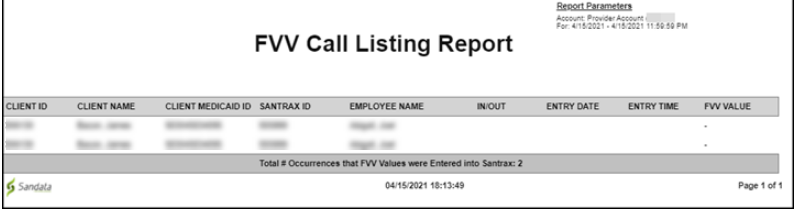
This report displays a list of all FVV calls that occurred within the selected 7-day date range based on the date and time the FVV call was registered in the system. The report includes information about each FVV call including the FVV value, whether the entry was a call in or a call out, and information about the client and employee for each call.
Use this report to quickly review FVV activity for the account.
Use the following fields to limit the report output:
| Field | Description |
|---|---|
| Payer | The selected Payer(s) |
| Program | The selected program(s) |
| Service | The selected service(s) |
| Client |
Client by name (last name, first name) or Sandata Client ID. When a partial name is entered the report displays results that begin with the entered characters. |
| Client AR# | The Client's AR# |
| Supervisor | The Supervisor code for the Client(s) at the provider agency |
| Department | The selected department |
| Employee |
Employee by name (last name, first name) or Santrax ID. When a partial name is entered the report displays the results that begin with the entered characters. |
Each column of the report lists the following information:
| Columns | Description |
|---|---|
| Client ID | The Sandata Client ID |
| Client Name |
The Client's name. Blank if unknown |
| Client Medicaid ID | The Client's ID number |
| Santrax ID | The Employee's Santrax ID |
| Employee Name | The Employee's name |
| IN/OUT | Indicates if the call entered was assigned as the call in or the call out |
| Entry Date | The date the FVV value from the FVV device was entered into the system |
| Entry Time | The time the FVV value from the FVV Device was entered into the system |
| FVV Value | The reading from the FVV device |
Sample Report