Sandata Alert Reports

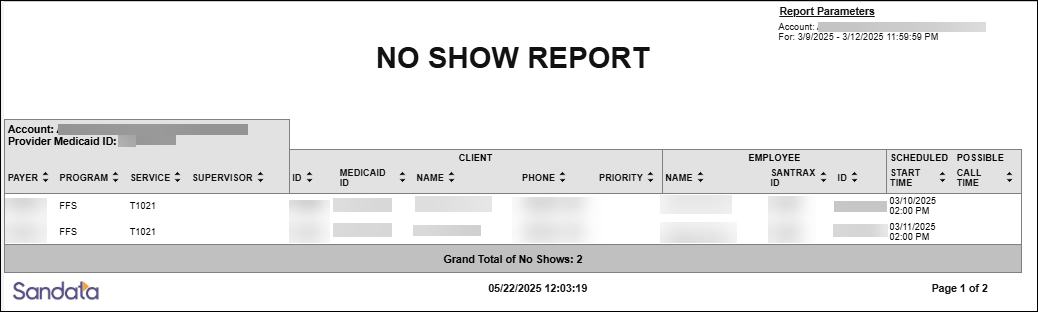
This report shows all missed scheduled visits occurring during a selected date range. The report provides the visit information including the client’s name and contact information, the field staff member and their employee information. The maximum date range for this report is 730 days.
This operational report can be used throughout the day by agency employees to monitor field activity. Use this report to review any missed visits (no shows), occurring during a specific time frame. Use this report as an alternative to no show alerts to view current day activity and visits that need attention. The report can be filtered for a specific client or employee to identify trends. This report can be run for a single day.
Use the following fields to limit the report output:
| Field | Description |
|---|---|
| Payer | the selected payer(s) |
| Program | the selected program(s) |
| Service | the selected service(s) |
| Client |
client by name (last name, first name) or Sandata client ID When a partial name is entered the report displays results that begin with the entered characters. |
| Client Medicaid ID |
clients with the entered Medicaid ID The entered value must be an exact match to a client’s Medicaid ID. |
| Supervisor | the supervisor code for the client(s) at the provider agency |
| Employee |
employee by name (last name, first name) or Santrax ID When a partial name is entered the report displays results that begin with the entered characters. |
Each column of the report displays:
| Columns | Description |
|---|---|
| Payer | the payer for the visit |
| Program | the program(s) for the visit |
| Service | the service performed for the visit |
| Supervisor | the client's supervisor at the provider agency |
| Client: ID | the Sandata client ID |
| Client: Medicaid ID |
the client’s Medicaid ID and/or Alternate Medicaid ID If not available, Payer ID. If newborn support is enabled and the client is flagged as a newborn, is shown as "N". |
| Client: Name | the client's name |
| Client: Phone | the client's primary phone number |
| Client: Priority | the client's priority, indicated by a numeric value if it has been established for the program |
| Employee: Name | the employee's name |
| Employee: Sandata ID | the employee's SandataID |
| Employee: ID | the employee ID |
| Scheduled Start Time | the scheduled start time for the visit |
| Possible Call Time | a system identified call (telephony) that could be associated with the visit |
| Grand Total of No Shows | the grand total of no shows |
Sample Report
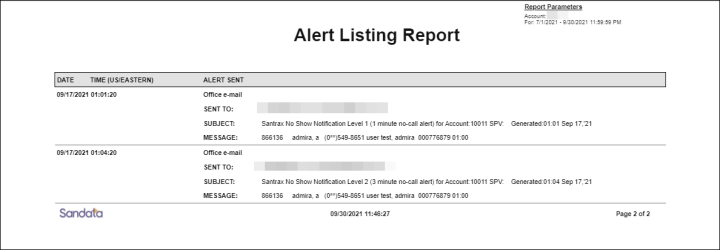
This report shows a listing of all alerts sent during the selected date range. The report includes information about each alert sent, including the message sent, the recipient, and the date and time of the report.
Use this report to audit alerts sent and understand whether appropriate processes are in place within an agency when services are not delivered as scheduled.
This report has no parameters.
Each column of the report displays:
| Columns | Description |
|---|---|
| Date | the date the alert was sent |
| Time (Time Zone) | the time the alert was sent |
| Alert Sent: (type) Email | indicates the type of contact the alert was sent to (Home or Office) |
| Alert Sent: Sent to | the email address of the contact the alert was sent to |
| Alert Sent: Subject | the subject line of the alert that was sent |
| Alert Sent: Message | the body of the message sent for the alert |
Sample Report
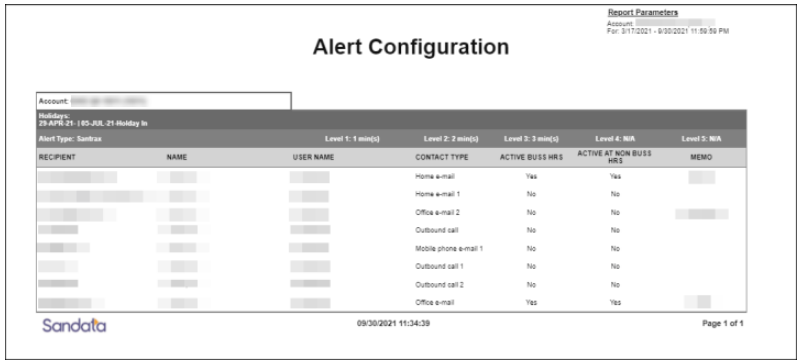
This report displays the alert configuration for the account. The report includes information about the type of alert, the thresholds for the when the alerts are sent for each level and information about who the alerts are sent to. If holidays are configured for the account, they are included in the report output. Alert behavior may vary for configured holidays.
This report can be used to audit the alerts configured to be sent and review the contact the alert is sent to when an in-call for a scheduled visit is not received in a timely manner.
This report has no parameters.
Reports are grouped by the following fields. Each change in these fields results in a page break.
| Field | Description |
|---|---|
| Account | The provider agency. |
Each column of the report displays:
| Columns | Description |
|---|---|
| Holidays | A list of holidays configured for the account. |
| Alert Type | The type of alert. |
| Level x: x min(s) | The alert levels and thresholds for the alert. |
| Recipient | The email address of the contact the alert is sent to. |
| Name | The name of the contact the alert is sent to. |
| Username | The username/email address of the contact the alert is sent to. |
| Contact Type | The type of contact the alert is sent to (e.g. Home e-mail). |
| Active Buss Hours | Whether the alert should be sent during business hours. |
| Active Non-Buss Hours | Whether the alert should be sent during non-business hours. |
| Memo | Any memos for the alert. |
Sample Report