Update an Unknown Employee
To update an unknown Employee:
-
Go to Visit Maintenance and search for and open a Visit.
Click the Edit
 icon, and then click the EMPLOYEE button.
 -
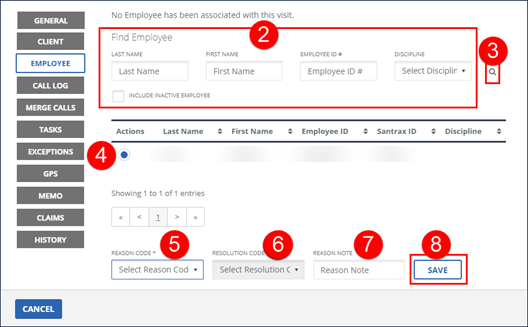
Enter all applicable search criteria in the Find Employee section of the screen. Select the INCLUDE INACTIVE EMPLOYEES checkbox to include employees with a status of Inactive in the search results.
-
Click the magnifying glass icon to search for an employee.
-
Select an employee.
-
Select the REASON CODE.
-
Select the RESOLUTION CODE.
-
Enter a REASON NOTE, if applicable. Use the REASON NOTE field to add additional information about the visit. Some REASON CODES require a REASON NOTE.
-
Click SAVE.
-
A notification of confirmation or error displays at the top of the screen.