Create a Manual Call
Use this functionality to create a manual call. When no calls or schedules exist, this functionality is used to create a visit with a call in. For example, if the employee forgot to call in, the call in is created with the CREATE CALL functionality and the call out is added using the CALL LOG section of the Visit Details screen.
To create a manual call:
-
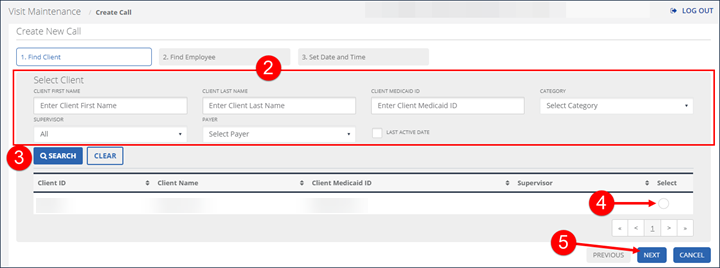
Go to Visit Maintenance and click CREATE CALL.
-
Enter the search criteria in the Select Client section and then select SEARCH.
-
Select a client to add to the visit and then select NEXT.
-
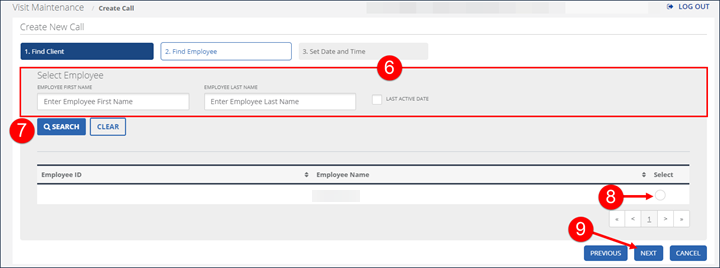
Enter the search criteria in the Select Employee section and then select Search. In certain circumstances, the employee is pre-filled and this screen is skipped.
-
Select an employee to add to the visit and the select NEXT.
-
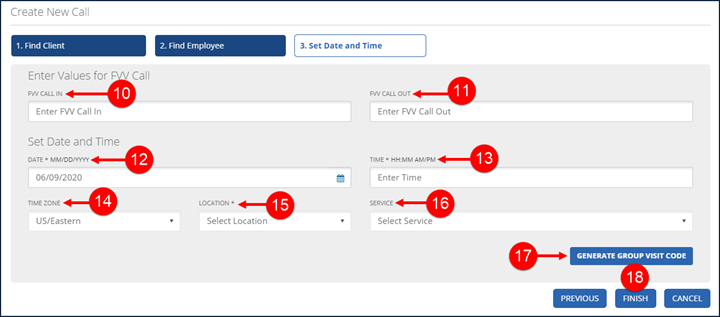
Enter the FVV CALL IN reading, if applicable. This field only displays if the client has a registered FVV device. FVV values are always 6 digits.
-
Enter the FVV Call OUT reading, if applicable. This field only displays if the client has a registered FVV device. FVV Values are always 6 digits.
-
Enter the DATE, TIME, and select the TIME ZONE. Time Zone should default based on the client’s configured time zone.
-
Select a LOCATION, if applicable. This field only displays if the account is configured to a require a location when calling in for a visit. The value is this field is Home or Community.
-
Select the SERVICE.
-
Click GENERATE GROUP VISIT CODE, if applicable. This button only displays for accounts configured to use advanced Group Visit functionality.
The GENERATE GROUP VISIT CODE button is only used to create a new group visit code. For example, if a group visit was performed but not captured by the system, users should use this functionality to create a group visit code and add this code to each visit that was part of the group. Use the Visit Details screen to add a visit to an existing group visit.
-
Click FINISH.
-
Click OK on the Save Confirmation popup.
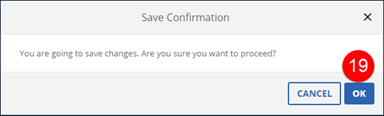
A notification of confirmation or error displays at the top of the screen.
