Add/Edit an Incorrect or Missing Service
A service is the type of care provided to a Client during a visit. Services are sourced from the authorization, the schedule or the visit. Services entered on the visit should match the service to be billed, especially if EVV validation occurs during claims processing. This process is also used to resolve service related exceptions. Example: missing service.
To add or edit a service:
-
Go to Visit Maintenance and search for and open a Visit.
Click the Edit
 icon, and then click the GENERAL button.
 -
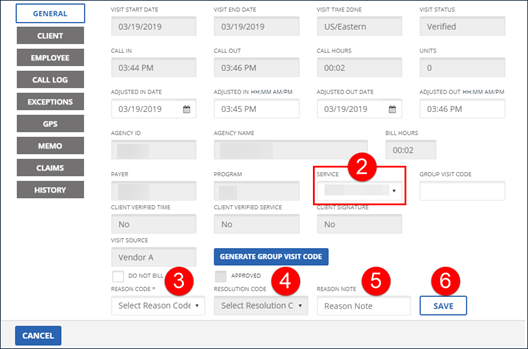
Enter/Select the SERVICE.
-
Select the REASON CODE.
-
Select the RESOLUTION CODE.
-
Enter a REASON NOTE, if applicable. Use the REASON NOTE field to add additional information about the visit. Some REASON CODES require a REASON NOTE.
-
Click SAVE.
-
A notification of confirmation or error displays at the top of the screen.