Visit Verification Exception Report
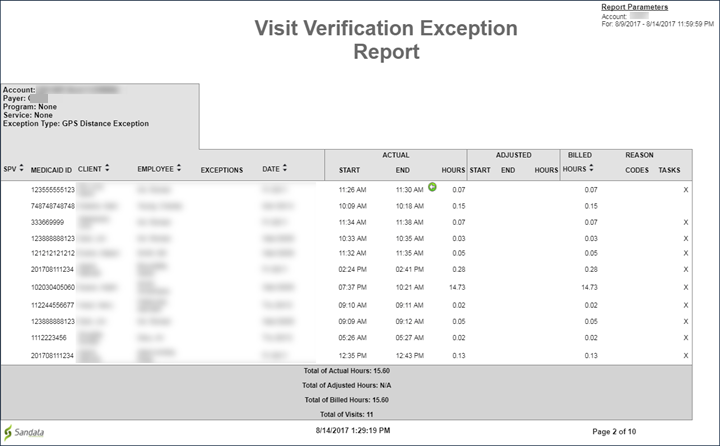
Description: This report details the various exceptions found in Visit Verification and lists each exception type page by page. Example: GPS Distance Exception
Use: Use this report to review the visit verification information and activity for a date range.
Parameters: Use the following fields to limit the report output to:
| Field | Description |
|---|---|
|
Payer |
visits with the selected payer(s). |
|
Exception |
visits with the selected exception(s). |
|
Program |
visits with the selected program. |
|
Service |
visits with the selected service(s) applied. |
|
Client |
only those visits with the entered client (format: last name, first name). When a partial value is entered the report will display results that begin with the entered value. |
|
Client Medicaid ID |
the selected Client Medicaid ID. |
|
Supervisor |
the selected supervisor. |
|
Department |
visits from the selected department. |
|
Employee |
only those visits with the entered employee (format: last name, first name). When a partial value is entered the report will display results that begin with the entered value. |
Report Output: Each column of the report displays:
| Column | Description |
|---|---|
|
SPV |
The supervisor at the provider agency |
|
Medicaid ID |
the client’s Medicaid ID. |
|
Client |
the client’s name. |
|
Employee |
the employee who carried out the visit. |
|
Exceptions |
the exception the report is filtered for |
|
Date |
the date the visit occurred. |
|
Actual, Start, End, Hours |
the start-time, end-time, and time elapsed in hours for the related visit. |
|
Adjusted, Start, End, Hours |
any manual edits to the start-time, end-time, or hours elapsed for the related visit. |
|
Bill Hours |
the billable hours for the related visit. |
|
Reason Codes |
any reason codes applied to the related visit. |
|
Tasks |
the tasks performed for the visit |