Navigate Reports
Highlighted Reporting Functions:
-
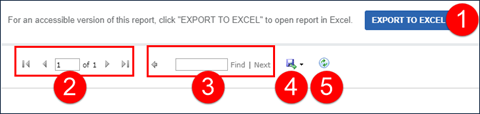
EXPORT TO EXCEL - This button produces an Excel version of the report. It is formatted to look like the online report with each page break appearing on a different page. It can be sorted, filtered and manipulated in Excel. Excel versions sometimes do not look exactly the same as the printed versions. Depending on the report, the Excel output changes to better accommodate the Excel format.
-
Page Navigation - This section displays the current page vs. the total number of pages. Navigate to a specific page by typing a number into the current page field and pressing Enter. The arrows can be used to navigate to the first, next, previous and/or last page.
-
Search Functionality - Allows you to find data on any page in the report. The Next button jumps to the subsequent instance of the search criteria within the document.
-
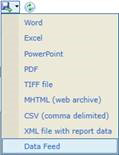
Export - The report can be exported into several formats. Sandata validates exports to CSV, PDF and Excel. The output format can vary slightly from the default report output.
-
Refresh - Updates the displayed data with the current data that exists in the system.
-
Grouping Tab - Displays at the top of most reports and indicates what information is being used to group results. When the group changes, the new group begins on the next page of the report.

-
Column Header - Clicking a column's header,when the arrows are present will sort the results in ascending/descending order based on that column's content.

-
Report Legend page - The last page of reports displays general information pertaining to the report including icons used.
Icon
Text 
Client ID on call 
Secondary Mutual Client 
Cluster 
Multiple clients with the same phone 
Exported 
Unmatched Client/Phone 
Mobile 
The value has been changed 
Incomplete Call 
FVV Call 
FVV Parent 
FVV Attempt 
Manual Call 
Telephony Call 
Employee Voice Recording 
Client Voice Recording 
Employee Speaker Verification - Pass 
Employee Speaker Verification - Fail 
Client Speaker Verification - Pass 
Client Speaker Verification - Fail