Individual Client Activity Report
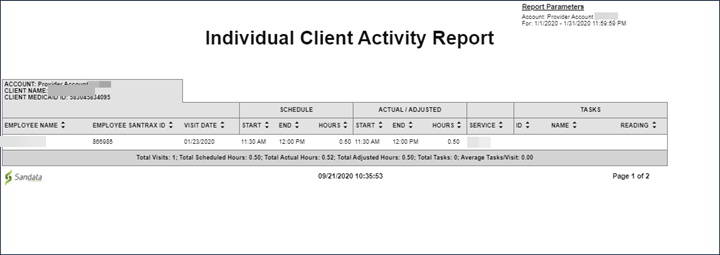
Description: This report shows visit activity for clients for a selected date range, with each client on their own page. The report displays scheduled versus actual hours, tasks, services and information about the employee who performed the visit. The maximum date range for this report is 31 days.
Use: Use this report to review visit activity by client and compare scheduled times to actual times. This report shows the services being provided to specific clients over the course of the month. Tasks performed are displayed to show the specific activities being provided to the client.
Parameters: Use the following fields to limit the report output to:
|
Field |
Description |
|---|---|
|
Payer |
the selected payer(s) |
|
Program |
the selected program(s) |
|
Service |
the selected service(s) |
|
Client |
client by name (last name, first name) or Sandata client ID When a partial name is entered the report displays results that begin with the entered characters. |
|
Client Medicaid ID |
clients with the entered Medicaid ID The entered value must be an exact match to a client’s Medicaid ID. |
Report Grouping Tab: Reports are grouped by the following fields. Each change in these fields results in a page break
|
Field |
Description |
|---|---|
|
Account |
the provider agency’s Sandata EVV account number |
|
Client Name |
the client's name |
|
Client Medicaid ID |
the client's Medicaid ID |
Report Output: Each column of the report displays:
|
Columns |
Description |
|---|---|
|
Employee Name |
the employee's name |
|
Employee Santrax ID |
the employee's Santrax ID |
|
Visit Date |
the date of the visit |
|
Schedule: Start |
the scheduled start time for the visit |
|
Schedule: End |
the scheduled end time for the visit |
|
Schedule: Hours |
the total hours scheduled for the visit |
|
Actual/Adjusted: Start |
the actual/manually entered start time for the visit |
|
Actual/Adjusted: End |
the actual/manually entered end time for the visit |
|
Actual/Adjusted: Hours |
the actual/manually entered hours elapsed for the visit |
|
Service |
the service performed for the visit |
Tasks: Each column of the report displays:
|
Columns |
Description |
|---|---|
|
ID |
the task ID |
|
Name |
the task name |
|
Reading |
any reading entered for the task |
|
Total Visits |
the total number of visits for the client over the selected date range |
|
Total Scheduled Hours |
the total number of scheduled hours for the client over the selected date range |
|
Total Actual Hours |
the total number of actual hours for the client over the selected date range |
|
Total Adjusted Hours |
the total number of manually entered hours for the client over the selected date range |
|
Total Tasks |
the total number of tasks |
|
Average Tasks/Visit |
the average number of tasks performed for the visit |