EVV Compliance Report
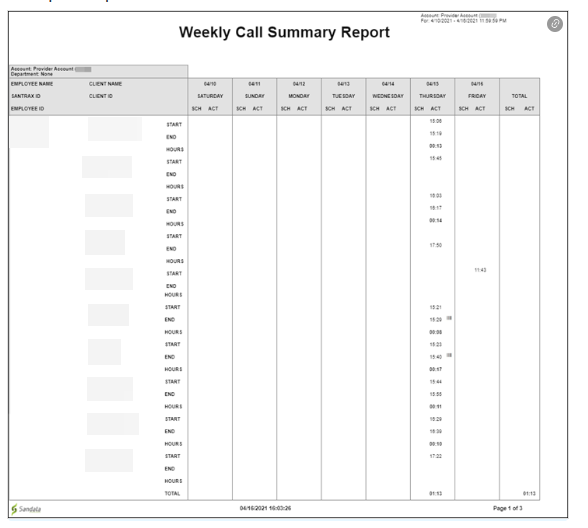
Description: This report displays a summary view of all calls placed for the selected week in a weekly grid format, sorted by employee. The report includes information about each call, the client, the employee, and general information about each call. The report includes scheduled and actual times for each call as well as the call duration. If adjusted call times exist for the visit, they are displayed on this report. If no adjusted times exist, the actual call time is displayed.
Use: Use this report to view worker’s schedules and actual call information for each week. This report can be compared to a worker’s schedule to assist in determining schedule compliance.
Parameters: Use the following fields to limit the report output to:
|
Field |
Description |
|---|---|
| Client |
Client by name (last name, first name) or Sandata client ID When a partial name is entered the report displays results that begin with the entered characters. |
| Employee |
Employee by name (last name, first name) or Santrax ID When a partial name is entered the report displays results that begin with the entered characters. |
Report Grouping Tab: Reports are grouped by the following fields. Each change in these fields results in a page break
| Field | Description |
|---|---|
| Account | the provider agency |
| Department | the department |
Report Output: Each column of the report displays:
| Column | Description |
|---|---|
| Employee Name |
the employee’s name Blank if unknown. |
| Santrax ID | the employees Santrax ID |
| Employee ID | the employee ID |
| Client Name |
the client’s name. Blank if unknown. |
| Client ID | the client’s ID number |
| SCH | the scheduled call time |
| ACT |
the actual call time If an adjusted call time exists, the adjusted value is displayed in this column. |
| Date/Day of Week | the date and day of the week the call occurred |
| Total | the total duration of all calls across the selected date range |