Detail Visit Status Report
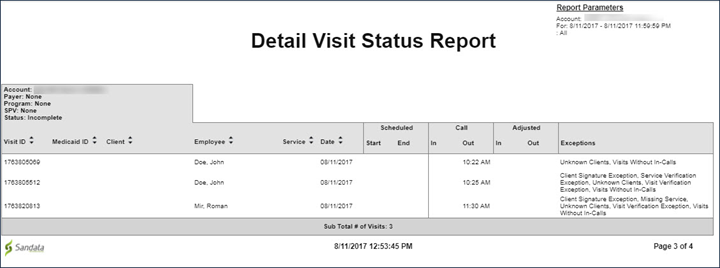
Description: This report is a detailed view of all visits based on the selected date range and parameters. The report groups the client and employee information pertaining to the visit with the visit details such as, exceptions, services, date, time and the actual/adjusted call-in and call-out times.
The vendor is expected to send all data compliant with the specification in a manner to avoid any exceptions from being triggered in Aggregator.
The Detail Visit Status Report is the only place the VisitOtherID value is visible in Aggregator. The value is in the column labeled 'VisitID'.

Use this report to review a detailed overview of all visits within a selected date range.
Parameters: Use the following fields to limit the report output to:
| Field | Description |
|---|---|
|
Payer |
visits for the selected payer |
|
Program |
the selected program(s) |
| Supervisor |
visits for the selected supervisor |
|
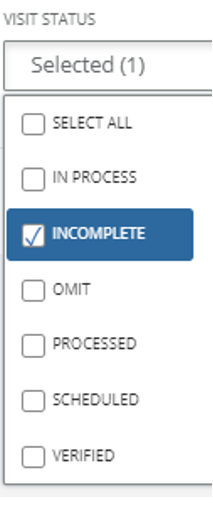
Visit Status |
visits for the selected visit status |
Report Output: Each column of the report displays:
| Field | Description |
|---|---|
|
Visit ID |
the Visit ID related to the visit |
|
Medicaid ID |
the client's Medicaid ID |
| Client |
the client associated with the visit |
|
Employee |
the name of the employee who conducted the visit |
| Service | the service(s) performed during the visit |
| Date | the date of the visit |
| Scheduled, Start, End | the scheduled start time and end time for the visit |
| Call, In, Out | the call-in and call out time of the visit |
| Adjusted, In, Out | the manual call in and call out times for the visit |
| Exceptions | any exceptions that occurred during the visit |
1. Select the Report Type and Report Name.

2. Select the Date Range and other parameters as needed.
a. Select the Visit Status (e.g.,"Incomplete").
Column headings of the report include Visit ID:
