Client Visit Summary Report
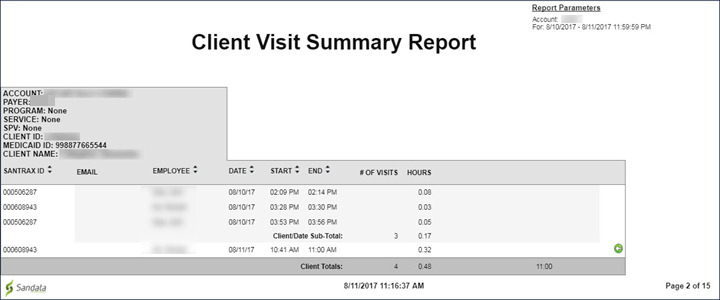
Description: This report shows all visits for the selected date range sorted by client, with one client per page, for the selected date range. The report provides visit hour sub-totals by date and client as well as basic visit information which includes: visit date, employee's Santrax ID, employee's name, number of visits, visit start and end time, and visit hours.
Use: Use this report to review visit hours and information by client.
Parameters: Use the following fields to limit the report output to:
| Field | Description |
|---|---|
|
Payer |
the selected payer(s) |
|
Program |
the selected program(s) |
|
Service |
the selected service(s) |
|
Client |
client by name (last name, first name) or Sandata client ID When a partial name is entered the report displays results that begin with the entered characters. |
|
Client Medicaid ID |
Clients with the entered Medicaid ID The entered value must be an exact match to a client's Medicaid ID. |
|
Supervisor |
the selected supervisor |
|
Department |
the selected department |
|
Task |
the selected task(s) |
|
Employee |
employee by name (last name, first name) or Santrax ID When a partial name is entered the report displays results that begin with the entered characters. |
Report Output: Each column of the report displays:
| Columns | Description |
|---|---|
|
Santrax ID |
the employee’s Santrax ID. |
|
|
the employee’s email address. |
|
Employee |
the employee who conducted the visit. |
|
Date |
the date of the visit. |
|
Start |
the start time of the visit. |
|
End |
the end time of the visit. |
|
# Of Visits |
the number of visits conducted. |
|
Hours |
the length of the visit in hours |