Request a Mobile or Fixed Visit Verification Device
If program rules allow and Sandata is providing mobile and/or fixed visit verification devices, users, typically administrators, can click the REQUEST DEVICE button on the Edit Client screen and request a mobile or fixed visit verification device for the selected client. Follow the instructions below to order a device.
-
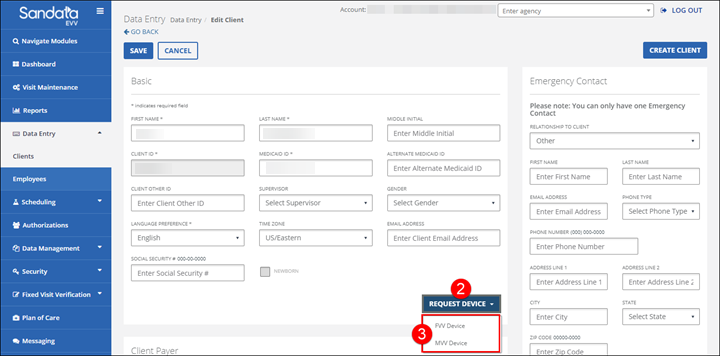
Go to Data Entry > Clients and search for and open a Client Profile.
-
Click the REQUEST MOBILE DEVICE button.
Depending on the privileges assigned to the user, this button is used to request a mobile device or an FVV device. If a user has both privileges assigned, they can select either MVV or FVV device.
-
Select either FVV DEVICE or MVV DEVICE.
-
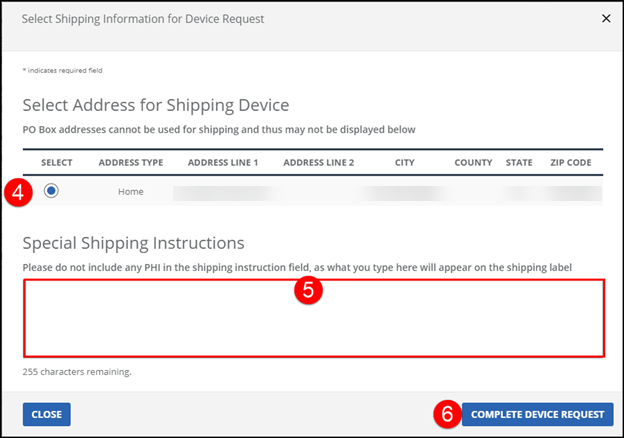
Select an address to the ship the device to.
-
Enter any Special Shipping Instructions, if necessary.
-
Click the COMPLETE DEVICE REQUEST button.
-
Click OK on the Request Mobile Device Confirmation pop-up.
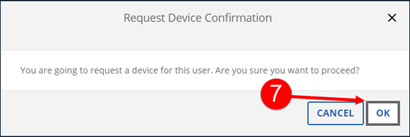
The device request is submitted to the Sandata fulfillment center.