Sandata Date Range Reports

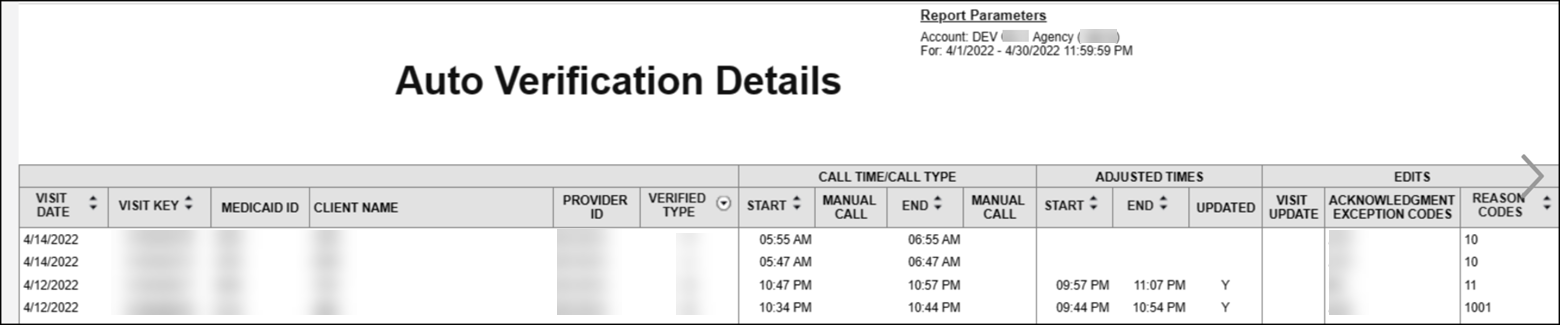
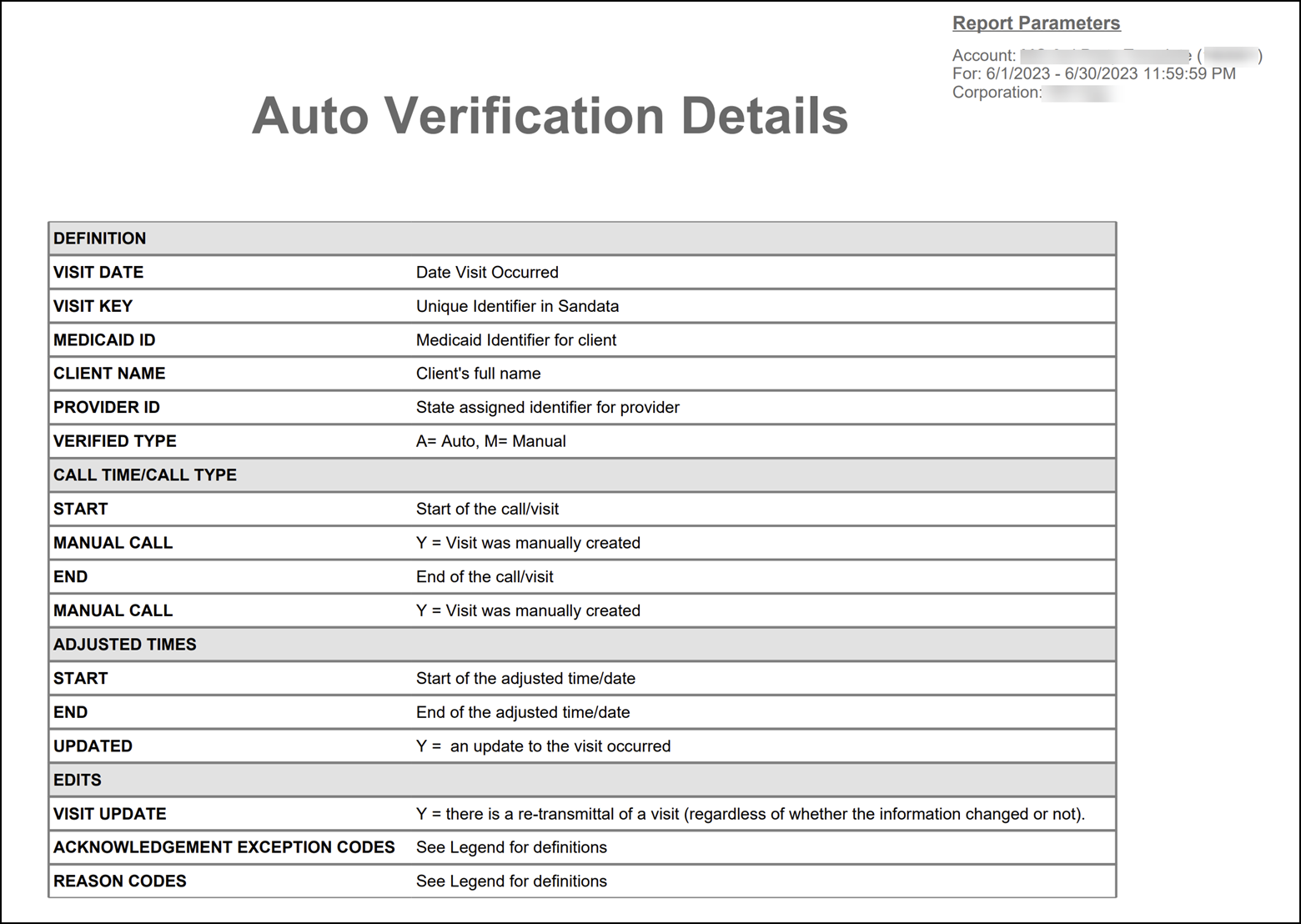
This report displays all visits for the selected date range and shows how they were confirmed (manually or automatically), including details about any manual edits made to the visit. This shows visit verification activity details to enhance program compliance. To minimize manual editing, auto-verified visits are preferred. This improves visit capture and reduces provider agency workload.
Use the following fields to limit the report output:
|
Field |
Description |
|---|---|
|
Payer |
The selected payer(s) |
|
Program |
The selected program(s) |
|
Service |
The selected service(s) |
Each column of the report displays:
|
Columns |
Description |
|---|---|
|
Visit Date |
The date of the visit |
|
Visit Key |
The visit ID related to the visit |
|
Medicaid ID |
The client's Medicaid ID. Blank if non-applicable or unknown. |
|
Client Name |
The client’s name |
|
Provider ID |
The state assigned identifier for the provider (Example: Provider Medicaid ID) |
|
Verified Type |
How the visit was verified (Key: A = Automatic, M = Manual) |
|
Call Time/Call Type |
------------ |
|
Start |
The call in time for the visit |
|
End |
The call out time for the visit |
|
Manual Call |
Shows 'Y' if the call out was manually created |
|
Adjusted Times |
------------ |
|
Start |
The manually entered start time for the visit |
|
End |
The manually entered end time for the visit |
|
Updated |
Shows 'Y' if an adjusted call in or call out was added |
|
Edits |
------------ |
|
Visit Update |
Shows 'Y' if the visit was manually updated |
|
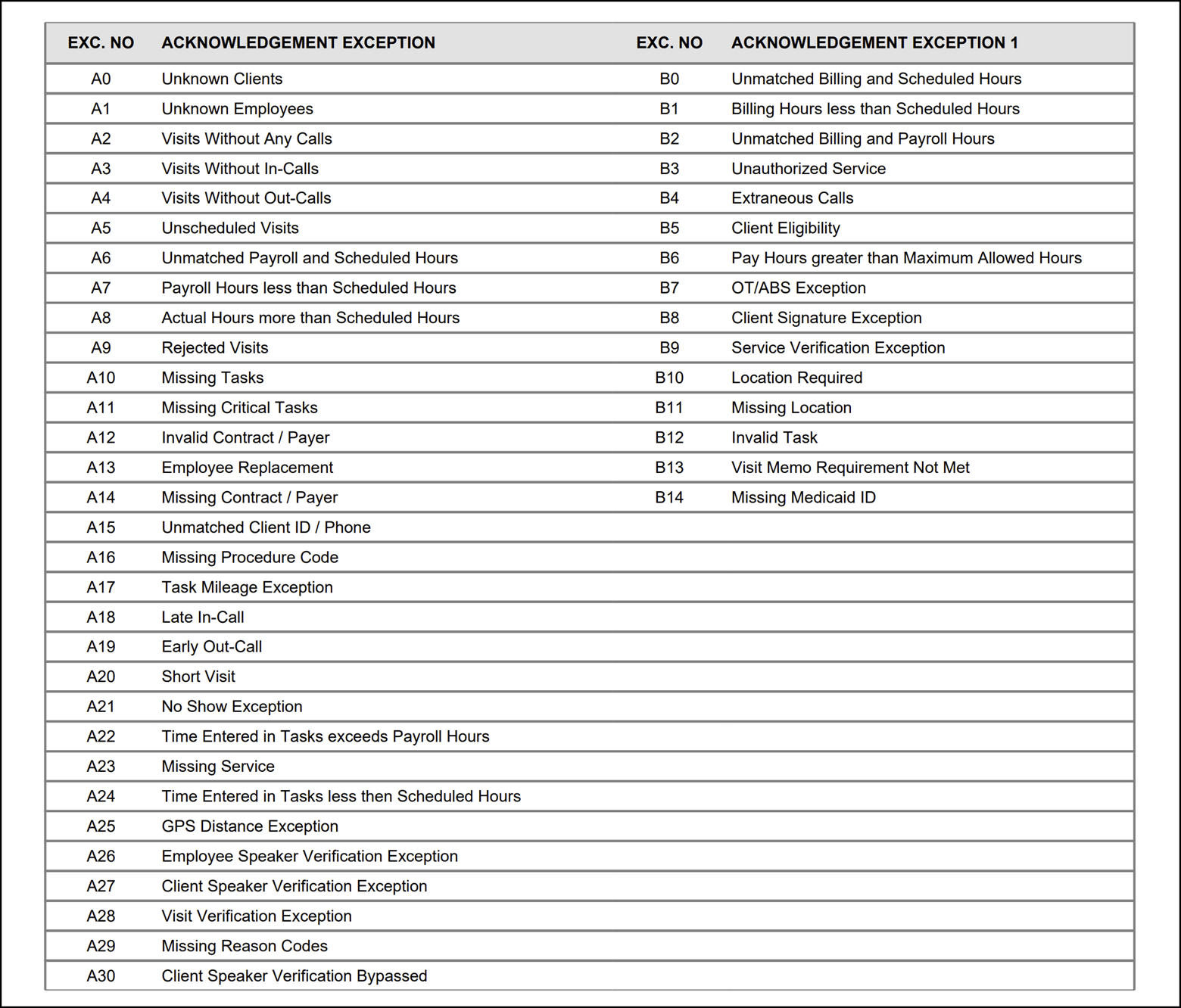
Acknowledgment Exception Codes |
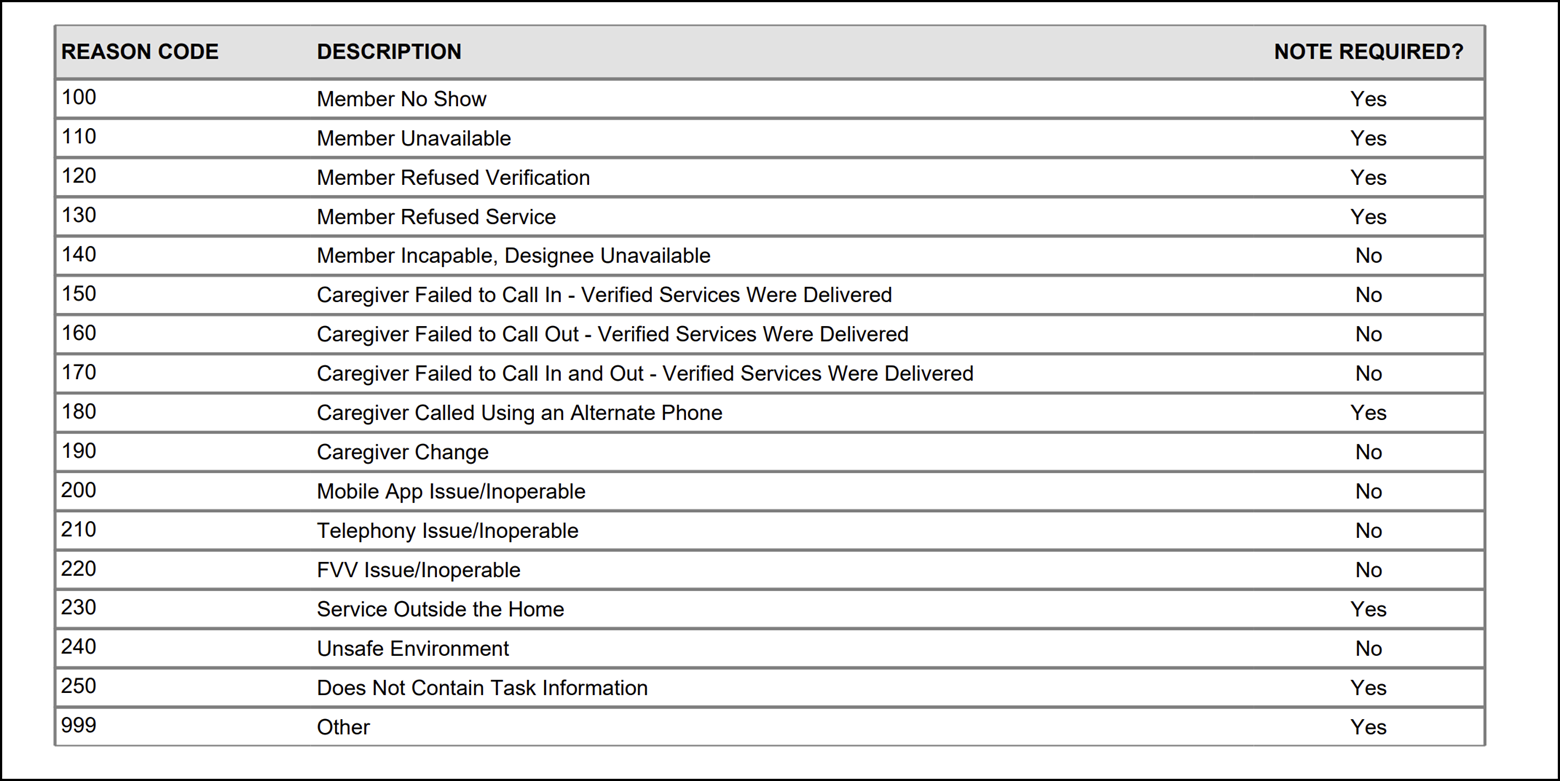
The related codes if an exception was acknowledged. See the legend at the end of the report for a full list of codes |
| Reason Codes |
Any reason codes applied when editing the related visit. See the legend at the end of the report for a full list of codes |
Sample Report
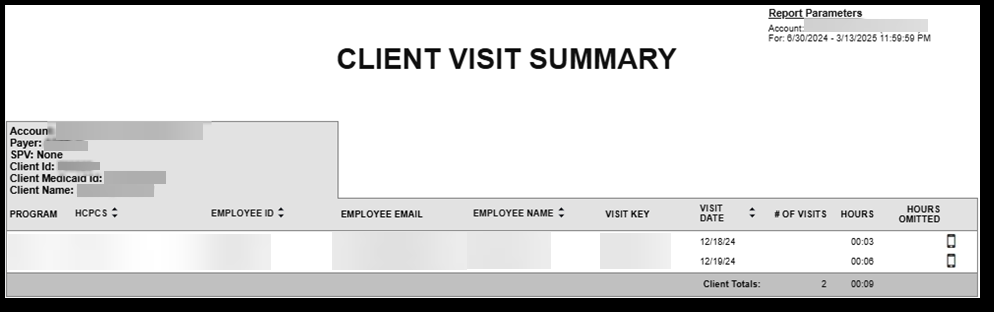
This report shows all verified visits, without exceptions for the selected date range, sorted by client, with one client per page for the selected date range. The report provides visit hour sub-totals by date and client and basic visit information including:
-
Visit date
-
Employee's Santrax ID
-
Employee's name
-
Number of visits
-
Visit start and end time, and visit hours.
Use this report to review visit hours and information by client.
Use the following fields to limit the report output:
| Field | Description |
|---|---|
| Payer | The selected payer(s) |
| Program | The selected program(s) |
| Service | The selected service(s) |
| Client |
Client by name (last name, first name) or Sandata client ID. When a partial name is entered the report displays results that begin with the entered characters. |
| Client Medicaid ID |
Clients with the entered Medicaid ID. The entered value must be an exact match to a client's Medicaid ID. |
| Supervisor | The selected supervisor |
| Department | The selected department |
| Task | The selected task(s) |
| Employee |
Employee by name (last name, first name) or Santrax ID. When a partial name is entered the report displays results that begin with the entered characters. |
Each column of the report displays the following information:
| Columns | Description |
|---|---|
| Program | The name of the program |
| HCPCS | The Healthcare Common Procedure Coding System service code |
| Employee ID | The employee’s Santrax ID |
| Employee Email | The employee’s email address |
| Employee Name | The employee's name |
| Visit Key | The visit id related to the visit |
| Visit Date | The date of the visit |
| # Of Visits | The number of visits conducted |
| Hours | The length of the visit in hours |
| Hours Omitted | The number of hours for visits with a status of OMIT |
Sample Report
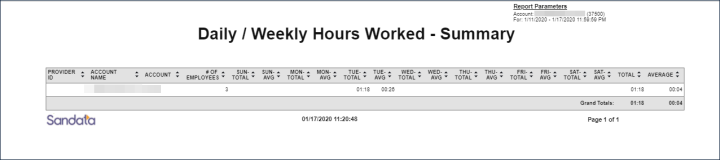
This report displays the number of hours worked per employee, by agency, for the selected week. This report is intended to help users understand the total amount of hours being worked per agency and review the total number of employees and the average hours worked, per employee. The information can be compared across agencies in order to identify discrepancies and trends.
Use the following fields to limit the report output:
|
Field |
Description |
|---|---|
|
Payer |
The selected payer(s) |
|
Program |
The selected program(s) |
|
Service |
The selected service(s) |
|
Employee |
The selected employee |
Each column of the report displays the following information:
|
Columns |
Description |
|---|---|
|
Provider ID |
The state assigned identifier for the provider (e.g Provider Medicaid ID) |
|
Account Name |
The account name |
|
Account |
The provider agency's Sandata EVV account number |
|
# Of Employees |
The number of employees |
|
Sun/Mon/Tue/Wed/Thur/Fri/Sat Total |
The total number of hours worked by all employees for each day of the week. |
|
Sun/Mon/Tus/Wed/Thur/Fri/Sat Average |
The average number of hours worked by all employees for each day of the week. |
|
Total |
The total number of hours worked by all employees for the week |
|
Average |
The average number of daily hours worked by all employees for the week |
|
Grand Totals |
The grand totals for the total and average numbers of hours worked by all employees, across all agencies in the program, for the week |
Sample Report
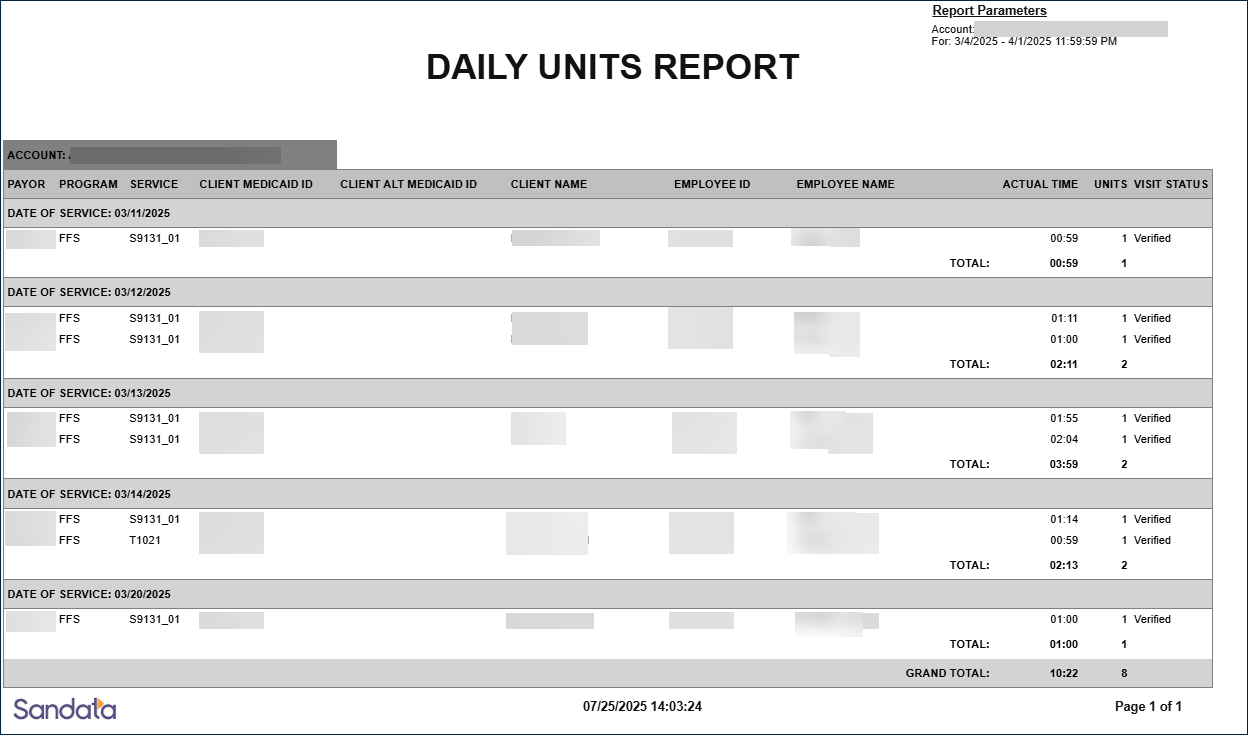
The Daily Units Report displays a summary of units for clients by date of service, within a date range. Use this report to view the total hours and units by client visits over a date range of 1 to 31 days.
Use the following fields to limit the report output:
| Field | Description |
|---|---|
| Account |
Total actual time and total units for the selected account(s) (Aggregator-view only) |
| Provider ID |
Total actual time and total units for the entered Provider ID (Aggregator-view only) |
| Program | Total actual time and total units for the selected program(s) |
| Payer | Total actual time and total units for the selected payer(s) |
| Client | Total actual time and total units for the selected client |
| Service | Total actual time and total units for the selected service |
| Client Medicaid ID | Total actual time and total units for the selected Medicaid ID |
| Employee | Total actual time and total units for the selected employee |
Each column of the report displays the following information:
| Field | Description |
|---|---|
| Payor | The selected payer(s) |
| Program | The program for the visit |
| Service | The service(s) performed during the visit |
| Client Medicaid ID | The client’s Medicaid ID |
| Client Alt Medicaid ID | The client’s alternate Medicaid ID |
| Client Name | The client’s name |
| Employee ID | The employee’s ID |
| Employee Name | The name of the employee who conducted the visit |
| Actual Time | The calculated duration for the visit in hours, which will reflect any adjusted times |
| Units | The total number of units for the visit rounded to a whole number |
| Visit Status | The status of the visit |
| Date of Service | The date of the services performed |
| Total Time (per Visit) | The total time of visits by day |
| Total Units (per Visit) | The total number of units by day |
| Grand Total | The total number of hours and units for the specified date range |
Sample Report
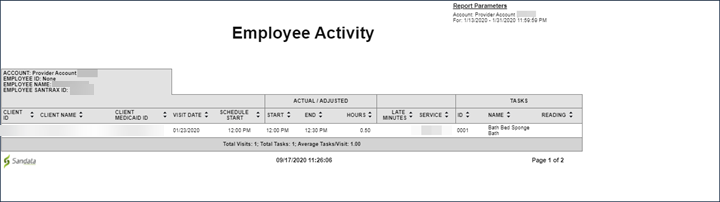
This report shows visit activity for each employee, with each employee’s information displayed on its own page. The Employee Activity Report displays information about visits performed by the employee for the selected date range. The maximum date range of this report is 31 days. Use this report to review visit activity by employee. The report shows the detailed employee visit history. It can be used to monitor employee trends for late visits and tasks being performed. Times shown for the visit are based on the final visit times, using actual times or adjusted times if any adjustments occurred.
Use the following fields to limit the report output:
|
Field |
Description |
|---|---|
|
Payer |
The selected payer(s) |
|
Program |
The selected program(s) |
|
Service |
The selected service(s) |
|
Employee |
Employee by name (last name, first name) or Santrax ID. When a partial name is entered the report displays results that begin with the entered characters. |
Reports are grouped by the following fields. Each change in these fields results in a page break.
|
Field |
Description |
|---|---|
|
Account |
The provider agency |
|
Employee ID |
The employee's ID number |
|
Employee Name |
The employee's name |
|
Employee Santrax ID |
The employee's Santrax ID |
Each column of the report displays the following information:
|
Columns |
Description |
|---|---|
|
Client ID |
The Sandata client ID |
|
Client Name |
The client's name |
|
Client Medicaid ID |
The client’s Medicaid ID and/or Alternate Medicaid ID If not available, Payer ID. If newborn support is enabled and the client is flagged as a newborn, is shown as “N.” |
|
Visit Date |
The date of the visit |
|
Schedule Start |
The scheduled start time for the visit |
|
Start |
The actual or the manually entered start time for the visit If no adjustment was made, the actual start time displays. |
|
End |
The actual or the manually entered end time for the visit If no adjustment was made, the actual start time displays. |
|
Hours |
The duration of the visit in hours based on either the adjusted or actual times |
|
Late Minutes |
The difference between the scheduled and actual/manually entered start time (in minutes). If no adjustment was made, the actual start time displays. |
|
Service |
The service code for the visit |
Tasks repeat as many times as needed to display all tasks entered for the visit. Each column of the report displays the following information:
|
Columns |
Description |
|---|---|
|
ID |
The task ID |
|
Name |
The task name |
|
Reading |
Any reading entered for the task |
|
Total Visits |
The total number of visits performed by the employee |
|
Total Tasks |
The total number of tasks entered by the employee |
|
Average Tasks/Visit |
The average number of tasks performed per visit |
Sample Report
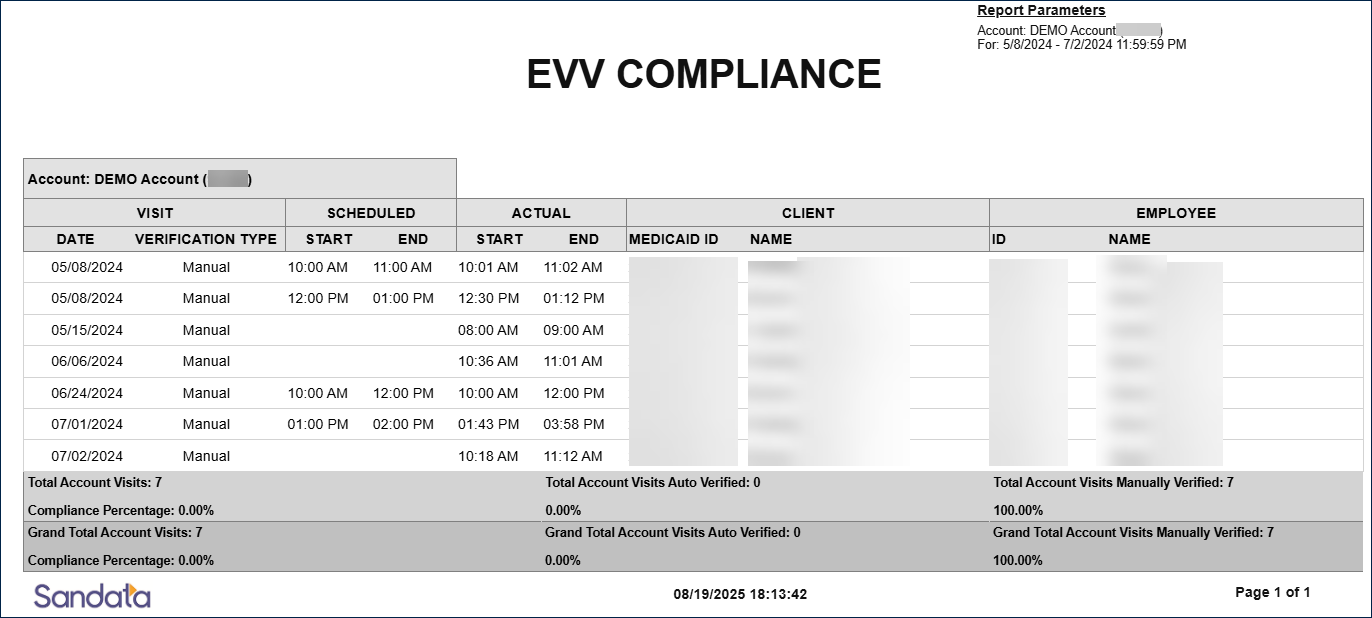
The EVV Compliance Report displays a summary view of visits within a date range, by start and end times, and lists the client and employee for each visit. The type of visit verification, such as manual or auto -verified displays for each visit. Use this report to view EVV Compliance by Visit Verification Type.
Use the following fields to limit the report output:
| Field | Description |
|---|---|
| Client |
Client by name (last name, first name) or Sandata client ID When a partial name is entered the report displays results that begin with the entered characters. |
| Employee |
Employee by name (last name, first name) or Santrax ID When a partial name is entered the report displays results that begin with the entered characters. |
Each column of the report displays the following information:
| Column | Description |
|---|---|
| Visit Date | The date of the visit |
| Visit Verification Type | The type of visit verification (auto, manual) |
| Scheduled Start | The scheduled start time of the visit |
| Schedule End | The scheduled end time of the visit |
| Actual Start |
The actual start time If an adjusted call time exists, the adjusted value is displayed in this column. |
| Actual End |
The actual end time If an adjusted call time exists, the adjusted value is displayed in this column. |
| Client Medicaid ID | The client’s Medicaid ID number |
| Client Name | The client's name (last, first) |
| Employee ID | The employee’s ID number |
| Employee Name | The employees name (last, first) |
| Total Account Visits | The total number of visits for this account by selected date range |
| Total Account Visits Auto Verified | The total number of auto verified visits for this account by selected date range |
| Total Account Visits Manually Verified | The total number of manually verified visits for this account by selected date range |
| Grand Totals | The grand totals of all accounts |
Sample Report
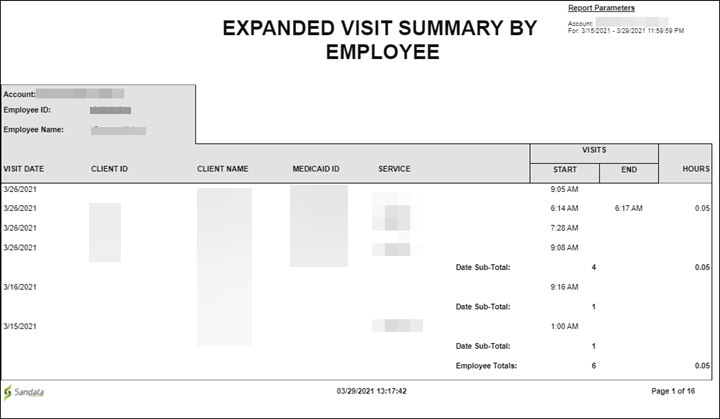
This report shows an expanded view of all visits for the selected date range. The Expanded Visit Summary By Employee Report is broken out by employee, with each change in employee starting a new page. The visit dates, start/end times and other general information about the employee’s visits are included. The maximum date range for this report is 730 days. Use this report to review all employee activity to support payroll and understand how many hours specific employees are working.
Use the following fields to limit the report output:
|
Field |
Description |
|---|---|
|
Payer |
The selected payer(s) |
|
Program |
The selected program(s) |
|
Service |
The selected service(s) |
|
Client |
Client by name (last name, first name) or Sandata client ID. When a partial name is entered the report displays results that begin with the entered characters. |
|
Supervisor |
The supervisor code for the client(s) at the provider agency |
|
Department |
The selected department |
|
Employee |
Employee by name (last name, first name) or Santrax ID. When a partial name is entered the report displays results that begin with the entered characters. |
Reports are grouped by the following fields. Each change in these fields results in a page break.
|
Field |
Description |
|---|---|
|
Account |
The provider agency |
|
Employee ID |
The employee's ID |
|
Employee Name |
The employee's name |
Each column of the report displays the following information:
|
Columns |
Description |
|---|---|
|
Visit Date |
The date of the visit |
|
Client ID |
The Sandata client ID |
|
Client Name |
The client’s name. Blank if unknown. |
|
Medicaid ID |
The client’s Medicaid ID and/or Alternate Medicaid ID If not available, Payer ID. If newborn support is enabled and the client is flagged as a newborn, is shown as "N". |
|
Service |
The service performed for the visit |
|
Visit: Start |
The start time of the visit (if an adjusted value exists, it is displayed here. if no adjusted value exists then the actual start time is displayed) |
|
Visit: End |
The end time of the visit (if an adjusted value exists, it is displayed here. If no adjusted value exists then the actual end time is displayed) |
|
Hours |
The duration of the visit in hours |
Sample Report
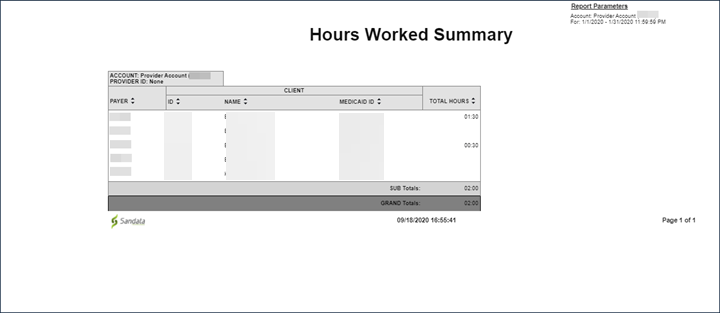
The Hours Worked Summary Report shows a summary view of all hours worked by employees for the selected date range. The maximum date range for this report is 31 days. This report can be used by an agency to review the amount of time being spent by field staff on visits. The report can help payers review how much times agencies are spending on visits on average. This report is limited to verified or processed visits and does not include visits which are still in process or that are flagged with exceptions.
Use the following fields to limit the report output:
|
Field |
Description |
|---|---|
|
Payer |
The selected payer(s) |
|
Program |
The selected program(s) |
|
Service |
The selected service(s) |
|
Client |
Client by name (last name, first name) or Sandata client ID When a partial name is entered the report displays results that begin with the entered characters. |
|
Client Medicaid ID |
Clients with the entered Medicaid ID The entered value must be an exact match to a client’s Medicaid ID. |
Reports are grouped by the following fields. Each change in these fields results in a page break.
|
Field |
Description |
|---|---|
|
Account |
The provider agency Sandata EVV account number |
|
Provider ID |
The state assigned identifier for the provider (e.g. Provider Medicaid ID) |
Each column of the report displays the following information:
|
Columns |
Description |
|---|---|
|
Payer |
The payer for the visit |
|
Client: ID |
The Sandata client ID |
|
Client: Name |
The client's name |
|
Client: Medicaid ID |
The client’s Medicaid ID and/or Alternate Medicaid ID In some programs, this could be a custom Payer ID. If newborn support is enabled and the client is flagged as a newborn, shown as "N.” |
|
Total Hours |
The total number of hours for each client |
|
SUB Totals |
The total number of all hours worked by employees |
|
GRAND Total |
The grand total of hours worked by the employee |
Sample Report
This report details the various informational exceptions found in Visit Maintenance and lists each exception type by page. A reason code legend can be found at the end of the report. Use this report to see visits that have informational exceptions by a specified date range.
Use the following fields to limit the report output:
| Field | Description |
|---|---|
| Account |
Visits associated with the selected account(s) (only available on Aggregator view) |
| Program | Visits for the selected program(s) |
| Contract | Visits for the selected contract(s) |
| Client | The client associated with the visit |
| Service | Visits for the selected service(s) performed during the visit |
| Supervisor | Visits for the selected supervisor(s) |
| Client Medicaid ID | Visits for the entered ID |
| Employee | Visits for the entered employee |
| Department | Visits for the selected department(s) |
| Exception | Visits for the selected exception(s) |
Each column of the report displays the following information:
| Field | Description |
|---|---|
| SPV | The supervisor at the provider agency |
| Client Medicaid ID | The client’s Medicaid ID |
| Client Name | The client’s name |
| Phone # | The client’s primary phone number |
| Employee Name | The name of the employee who carried out the visit |
| Group Visit Code | The code associated with the group visit |
| Visit Date | The date the visit occurred |
| Scheduled Start Time | The scheduled start-time for the related visit |
| Scheduled End Time | The scheduled end-time for the related visit |
| Scheduled Hours | The scheduled time in hours for the related visit |
| Actual Start Time | The start-time for the related visit |
| Actual End Time | The end-time for the related visit |
| Actual Hours | The time elapsed in hours for the related visit |
| Adjusted Start Time | Any manual edits to the start-time for the related visit |
| Adjusted End Time | Any manual edits to the end-time for the related visit |
| Adjusted Hours | Any manual edits to the hours elapsed for the related visit |
| Billed Hours | The billable hours for the related visit |
| Reason Codes | Any reason codes applied to the related visit |
| Tasks | The tasks performed for the visit |
| EX (Exported) |
An indicator of the visit’s exported status X = Exported to the aggregator, but not yet exported for payroll or billing C = A change was made to a previously exported visit (Blank) = Either fully exported (including payroll or billing), or not yet exported at all |
Sample Report
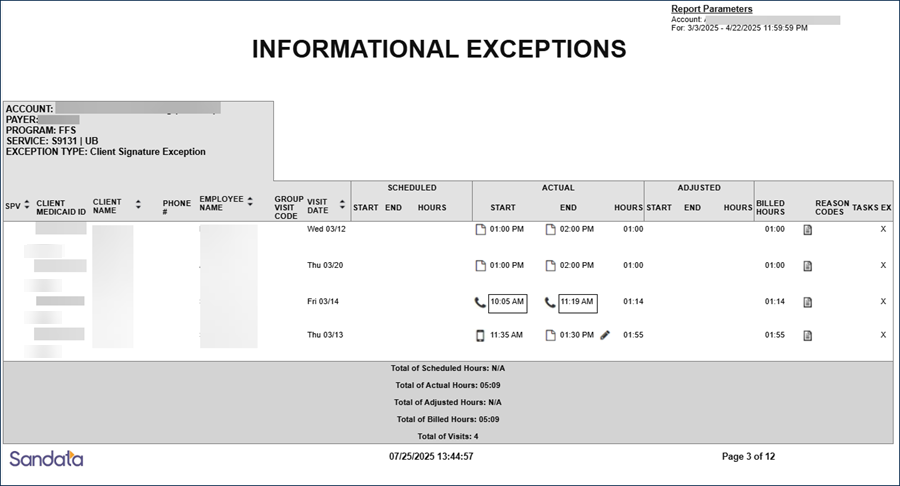
The Observation Question Report displays the details of the responses provided to observation questions entered using Sandata Mobile Connect. The report is separated out with each client receiving their own page. It displays the date of the visit, the employee who performed the visit, and the observation questions and responses recorded during the visit. Each question is displayed in a separate column. Use this report to assist in understanding responses to observation questions over time. This information can assist in monitoring trends and reviewing how different employees answer the same question. This ability to track trends increases the value of the collected observation information.
Use the following fields to limit the report output:
|
Field |
Description |
|---|---|
|
Payer |
The selected payer(s) |
|
Client |
Client by name (last name, first name) or Sandata client ID When a partial name is entered the report displays results that begin with the entered characters. |
|
Client Medicaid ID |
Clients with the entered Medicaid ID The entered value must be an exact match to a client’s Medicaid ID. |
|
Employee |
Employee by name (last name, first name) or Santrax ID When a partial name is entered the report displays results that begin with the entered characters. |
Reports are grouped by the fields below. Each change in these fields results in a page break.
|
Field |
Description |
|---|---|
|
Account |
The provider agency's Sandata EVV account number |
|
Provider ID |
The state assigned identifier for the provider (e.g Provider Medicaid ID) |
|
Client Name |
The client’s name. Blank if unknown. |
|
Client Medicaid ID |
The client’s Medicaid ID and/or Alternate Medicaid ID If not available, Payer ID. If newborn support is enabled and the client is flagged as a newborn, is shown as "N". |
|
Diagnosis Code |
The diagnosis code and brief description, if available |
|
Supervisor |
The supervisor at the provider agency |
Each column of the report displays the following information:
|
Columns |
Description |
|---|---|
|
Visit Date |
The date of the visit |
|
Employee Name |
The employee’s name Blank if unknown. |
|
Santrax ID |
The employee's Santrax ID |
|
Observation Questions |
The observation questions and responses recorded during the visit Each observation question is displayed in it’s own column. |
Sample Report
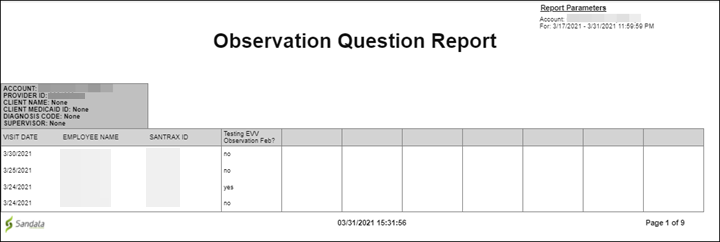
This report shows a summary view of payroll information, sorted by employee. The report is broken out by employee with each change in employee starting a new page. The report includes the number of visits performed by the employee, basic visit information and payable hours in decimal and fractional numbers. Use this report to review payroll information by employee. The Payroll Summary By Employee Report can be compared to actual payroll or exported to support payroll operations as necessary.
Use the following fields to limit the report output to:
|
Field |
Description |
|---|---|
|
Payer |
The selected payer(s) |
|
Program |
The selected program(s) |
|
Service |
The selected service(s) |
|
Client |
Client by name (last name, first name) or Sandata client ID When a partial name is entered the report displays results that begin with the entered characters. |
|
Client Medicaid ID |
The client’s Medicaid ID and/or Alternate Medicaid ID If not available, Payer ID. If newborn support is enabled and the client is flagged as a newborn, is shown as "N". |
|
Supervisor |
The supervisor code from the client(s) at the provider agency |
|
Department |
The selected department |
|
Employee |
Employee by name (last name, first name) or Santrax ID When a partial name is entered the report displays results that begin with the entered characters. |
Reports are grouped by the following fields. Each change in these fields results in a page break.
|
Field |
Description |
|---|---|
|
Employee ID |
The employee ID |
|
Santrax ID |
The employee's Santrax ID |
|
Employee Name |
The employee's name |
Each column of the report displays the following information:
|
Columns |
Description |
|---|---|
|
Client Name |
The client’s name. Blank if unknown. |
|
Client ID |
The Sandata client ID |
|
Visit Date |
The date of the visit |
|
Service |
The service performed for the visit |
|
# of Visits |
The number of visits |
|
Pay Hrs Decimal |
The pay hours in decimal numbers |
|
Pay Hrs Fractional |
The pay hours in fractional numbers |
Sample Report
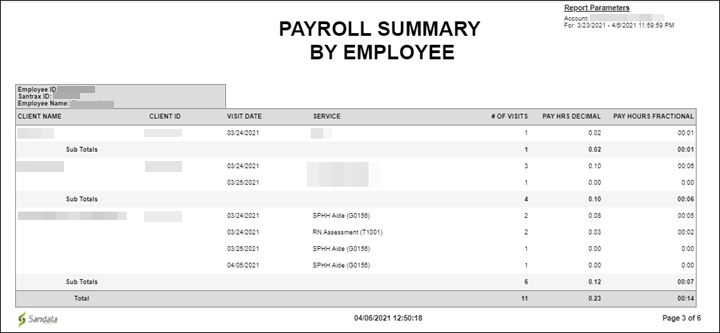
This report shows the plan of care requirements and if they were over or under served during a specific date range, grouped by client. The report displays the client’s identification information, the plan of care details, and if the plan of care conditions were met. The maximum date range for this report is 31 days. This report allows users to compare the planned activities (plan of care) to the actual tasks logged for each visit during selected date range. If more tasks were performed than scheduled, Over displays in the last column. If less tasks were performed than scheduled, Under displays in the last column. This report allows agency and payer users to view overall client care and identify gaps occurring within the visits. Poor plan of care compliance could mean poor outcomes for a client and would need to be investigated to determine if the plan of care needs to be updated, the caregiver needs to understand the activities that need to happen or if other action is needed.
Use the following fields to limit the report output to:
|
Field |
Description |
|---|---|
|
Payer |
The selected payer(s) |
|
Service |
The selected service(s) |
|
Client |
Client by name (last name, first name) or Sandata client ID When a partial name is entered the report displays results that begin with the entered characters. |
|
Client Medicaid ID |
Clients with the entered Medicaid ID The entered value must be an exact match to a client’s Medicaid ID. |
Reports are grouped by the following fields. Each change in these fields results in a page break.
|
Field |
Description |
|---|---|
|
Provider ID |
The state assigned identifier for the provider (e.g. Provider Medicaid ID) |
|
Account |
The provider agency's Sandata EVV account number |
|
Client ID |
The Sandata client ID |
|
Client Name |
The client's name |
|
Client Medicaid ID |
The client’s Medicaid ID and/or Alternate Medicaid ID If not available, Payer ID. If newborn support is enabled and the client is flagged as a newborn, is shown as "N". |
|
Alternate Medicaid ID |
the client’s Alternate Medicaid ID if available |
Each column of the report displays the following information:
|
Columns |
Description |
|---|---|
|
Service |
The service performed for the visit |
|
Start Date |
The start of the week displayed If more than a week is selected or the selected week doesn’t match to the week for the Plan of Care, multiple sections display for a single client for each week. |
|
End Date |
The end of the week displayed |
|
Task ID |
The ID of the task entered during telephony |
|
Task |
The name of the task |
|
Times |
The number of times the task should be performed |
|
Planned Duration |
The number of times the task should be performed |
|
Actual Duration |
The actual amount of time for each task This field only displays for tasks configured to require a reading. |
|
Over / Under |
If the client was over or under served based on the plan of care and the tasks entered for the visit |
Sample Report
This report shows all schedules for a selected date range. The report is grouped by employee with each employee receiving their own page for easy distribution. The report displays the field staff and client’s name and identification information as well as the visit information. The maximum date range for this report is 31 days. Use this report to review and verify employee schedules for a selected date range. This report can be provided in hard copy (or PDF) to the employee so they have information about upcoming schedules. This allows to review upcoming activity and make any changes before the visit.
Use the following fields to limit the report output to:
|
Field |
Description |
|---|---|
|
Employee |
Employee by name (last name, first name) or Santrax ID When a partial name is entered the report displays results that begin with the entered characters. |
Reports are grouped by the following fields. Each change in these fields results in a page break
|
Field |
Description |
|---|---|
|
Account |
The provider agency's Sandata EVV account number |
|
Provider ID |
The state assigned identifier for the provider (e.g Provider Medicaid ID) |
|
Employee Name |
The employee's name |
|
Employee Santrax ID |
The employee's Santrax ID |
|
Employee Email |
The employee's email address |
Each column of the report displays the following information:
|
Columns |
Description |
|---|---|
|
Schedule Date |
The scheduled date of the visit |
|
Time In |
The scheduled start time for the visit |
|
Time Out |
The scheduled end time for the visit |
|
Hours / Min |
The scheduled length of the visit in hours and minutes |
|
Client Name |
The client's name |
|
Client Medicaid ID |
The client’s Medicaid ID and/or Alternate Medicaid ID If not available, Payer ID. If newborn support is enabled and the client is flagged as a newborn, is shown as "N.” |
|
Client Address |
The client's primary address |
|
Payer |
The payer for the visit |
|
Program |
The program for the visit |
|
Service |
The service scheduled to be performed for the visit |
|
Number of Visits |
The number of visits scheduled for the employee |
|
Number of Hours |
The total duration of visits scheduled for the employee |
|
Grand Totals |
The total of all visits for all employees |
Sample Report
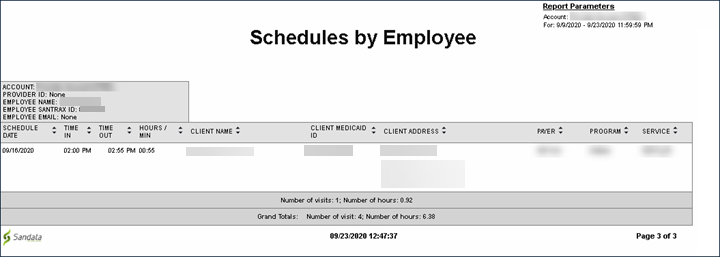
This report is a summary view of the status of all visits, based on the selected date range and parameters. The results are sorted by the amount of time each visit has remained in the same status.
Use the following fields to limit the report output:
|
Field |
Description |
|---|---|
|
Payer |
The selected payer(s) |
|
Program |
The selected program |
|
Supervisor |
The selected supervisor |
Each column of the report displays the following information:
|
Columns |
Description |
|---|---|
|
Status |
The status for the related visit |
|
Age, <1 days, 1-5 days, 11-15 days, 16-31 days |
The amount of days a visit status has remained unchanged |
|
Total # |
The total number visits for the related status |
Sample Report
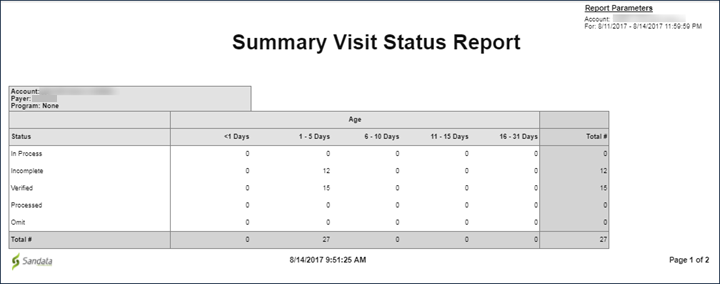
This report shows the verified hours for paying field staff for a selected date range. The report displays a list of all verified visits performed by a field staff including the client names, visit information and billable amounts, sorted by employee name. The maximum date range for this report is 31 days. Use this report to review verified hours when processing payroll for field staff or to compare actual payroll hours shown for a current or upcoming pay period. Only visits with a status of Verified or Processed display on this report. Bill and pay hours may be the same or different, depending on any adjustments made or rounding rules applied.
Use the following fields to limit the report output to:
|
Field |
Description |
|---|---|
|
Client |
Client by name (last name, first name) or Sandata client ID When a partial name is entered the report displays results that begin with the entered characters. |
|
Client Medicaid ID |
Clients with the entered Medicaid ID The entered value must be an exact match to a client’s Medicaid ID. |
|
Employee |
Employee by name (last name, first name) or Santrax ID When a partial name is entered the report displays results that begin with the entered characters. |
Each column of the report displays:
|
Columns |
Description |
|---|---|
|
Employee |
The employee ID |
|
Employee Name |
The employee's name |
|
Santrax ID |
The employee's Santrax ID |
|
Dept |
The employee’s department Depending on the agency’s specific configurations, this field may display a different value.
|
|
Client: ID |
The Sandata client ID |
|
Client: Name |
The client's name |
|
Client: Medicaid ID |
The client’s Medicaid ID and/or Alternate Medicaid ID If not available, Payer ID. If newborn support is enabled and the client is flagged as a newborn, is shown as "N". |
|
Service |
The service performed for the visit |
|
Visit Date |
The date of the visit |
|
Start |
The actual/manually entered start time for the visit |
|
End |
The actual/manually entered end time for the visit |
|
Bill Hours |
The total billable hours for the visit |
|
Pay Hours |
The total payable hours for the visit |
Sample Report
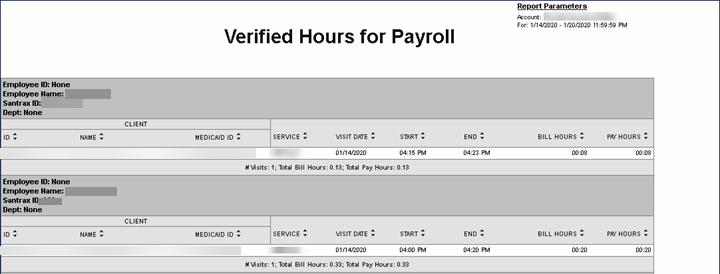
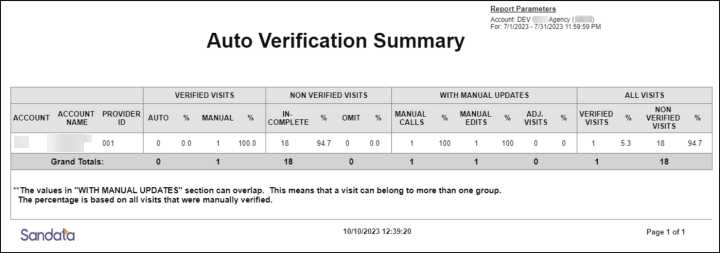
This report displays verification statistics for each provider agency for the selected date range. This report allows users to compare the number of automatically verified visits versus manually confirmed visits across agencies. The results include all visits. This report displays cross agency visit verification trends, which provides an overview of the overall program compliance. To minimize manual editing, auto-verified visits are preferred. This improves visit capture and reduces provider agency workload.
Use the following fields to limit the report output:
|
Field |
Description |
|---|---|
|
Payer |
The selected payer(s) |
|
Program |
The selected program(s) |
|
Service |
The selected service(s) |
Each column of the report displays the following information:
|
Columns |
Description |
|---|---|
|
Account |
the provider’s EVV account number |
|
Account Name |
the account name |
|
Provider ID |
the state assigned identifier for the provider (e.g Provider Medicaid ID) |
| Verified Visits | ------ |
| Auto | the number of visits that did not have any manual updates applied |
| % | the percentage of visits that did not have any manual updates applied |
| Manual | the number of visits that have manual updates applied |
| % | the percentage of visits that have manual updates applied |
| Non Verified Visits | ------ |
| In-Complete | the number of unverified visits missing necessary information |
| % | the percentage of unverified visits missing necessary information |
| Omit | the number of unverified visits flagged for omission |
| % | the percentage of unverified visits flagged for omission |
| With Manual Updates | ------ |
| Manual Calls | the number of manually created calls |
| % | the percentage of manually created calls |
| Manual Edits | the number of visits with manual edits |
| % | the percentage of visits with manual edits |
| Adj, Visits | the number of visits with adjusted times |
| % | the percentage of visits with adjusted times |
| All Visits | ------ |
| Verified Visits | the number of verified visits |
| % | the percentage of verified visits |
| Non Verified Visits | the number of visits that have not been completed and are scheduled or are still pending manual updates |
| % | the percentage of visits that have not been completed and are scheduled or are still pending manual updates |
Sample Report
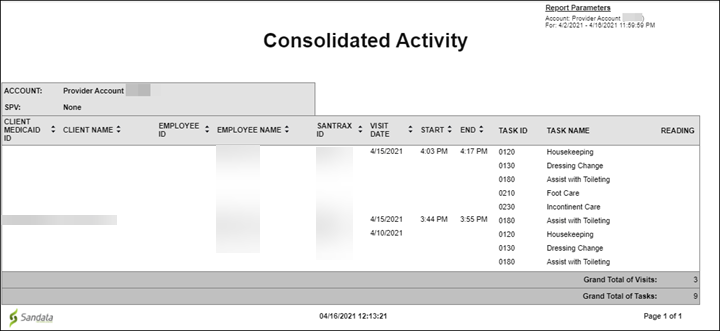
This report displays visit information and detailed task data, including any collected readings for the account, over a selected date range. The report consolidates activity by client showing the employee and tasks for each visit. The maximum date range for this report is 31 days. Use this report to review visit and task activity over a selected date range for a given client. This can assist users in reviewing visit and task history.
Use the following fields to limit the report output:
|
Field |
Description |
|---|---|
|
Payer |
the selected payer(s) |
|
Program |
the selected program(s) |
|
Service |
the selected service(s) |
|
Client |
Client by name (last name, first name) or Sandata client ID When a partial name is entered the report displays results that begin with the entered characters. |
|
Client Medicaid ID |
clients with the entered Medicaid ID The entered value must be an exact match to a client’s Medicaid ID. |
|
Supervisor |
the supervisor code for the client(s) at the provider agency |
|
Employee |
Employee by name (last name, first name) or Santrax ID When a partial name is entered the report displays results that begin with the entered characters. |
Reports are grouped by the following fields. Each change in these fields results in a page break.
|
Field |
Description |
|---|---|
|
Account |
the provider agency |
|
SPV |
the supervisor at the provider agency |
Each column of the report displays:
|
Columns |
Description |
|---|---|
|
Client Medicaid ID |
the client’s Medicaid ID and/or Alternate Medicaid ID If not available, Payer ID. If newborn support is enabled and the client is flagged as a newborn, is shown as "N". |
|
Client Name |
the client’s name. Blank if unknown. |
|
Employee ID |
the employee ID |
|
Employee Name |
the employee’s name Blank if unknown. |
|
Santrax ID |
the employee's Santrax ID |
|
Visit Date |
the date of the visit |
|
Start |
the start time of the visit (actual or adjusted, if an adjustment exists) |
|
End |
the end time of the visit (actual or adjusted, if an adjustment exists) |
|
Task ID |
the task ID |
|
Task Name |
the task(s) performed for the visit |
|
Reading |
the reading associated with the task |
|
Grand Total of Visits |
the grand total of visits for the selected date range |
|
Grand Total of Tasks |
the grand total of tasks performed for the selected date range |
Sample Report
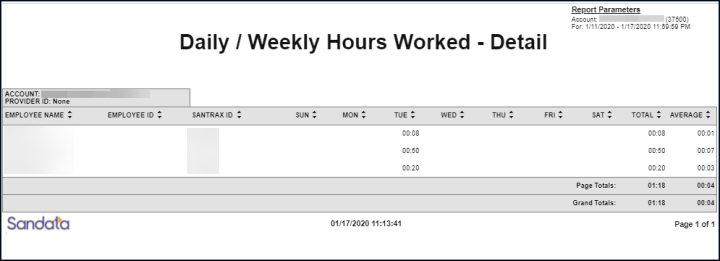
This report displays a detailed view of the hours worked by each employee for each agency, daily and weekly. This report allows users to view the total hours being worked per employee and should be used with the Summary version for analysis. This information can be compared across agencies to locate discrepancies and trends. Users can also review this report to identify workers who may be working more than a given number of hours per day or week.
Use the following fields to limit the report output:
|
Field |
Description |
|---|---|
|
Payer |
The selected payer(s) |
|
Program |
The selected program(s) |
|
Service |
The selected service(s) |
|
Employee |
The selected employee |
Reports are grouped by the following fields. Each change in these fields results in a page break.
|
Field |
Description |
|---|---|
|
Account |
the provider agency |
|
Provider ID |
the state assigned identifier for the provider (e.g Provider Medicaid ID) |
Each column of the report displays:
|
Columns |
Description |
|---|---|
|
Employee Name |
the employee's name |
|
Employee ID |
the assigned employee ID |
|
Santrax ID |
the employee's Santrax ID |
|
Sun/Mon/Tus/Wed/Thus/Fri/Sat |
the total number of hours worked by employees for each day of the week |
|
Total |
the total number of hours worked by the employee (for the week) Individual values are displayed as minutes. |
|
Average |
the average number of daily hours worked by the employee (for the week) |
Sample Report
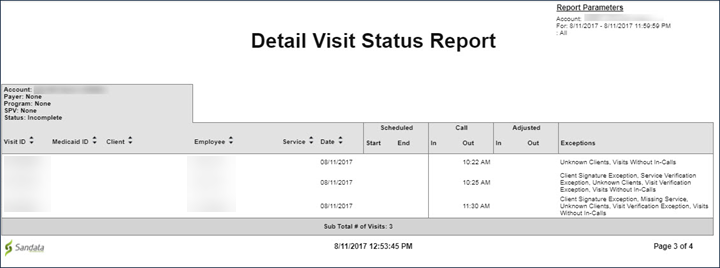
This report is a detailed view of all visits based on the selected date range and parameters. The report groups the client and employee information pertaining to the visit with the visit details such as, exceptions, services, date, time and the actual/adjusted call-in and call-out times. Use this report to review a detailed overview of all visits within a selected date range.
Use the following fields to limit the report output:
| Field | Description |
|---|---|
|
Payer |
visits for the selected payer |
|
Program |
the selected program(s) |
| Supervisor |
visits for the selected supervisor |
|
Visit Status |
visits for the selected visit status |
Each column of the report displays the following information:
| Field | Description |
|---|---|
|
Visit ID |
the Visit ID related to the visit |
|
Medicaid ID |
the client's Medicaid ID |
|
Client |
the client associated with the visit |
| Employee |
the name of the employee who conducted the visit |
|
Service |
the service(s) performed during the visit |
|
Date |
the date of the visit |
|
Scheduled, Start, End |
the scheduled start time and end time for the visit |
|
Call, In, Out |
the call-in and call out time of the visit |
|
Adjusted, In, Out |
the manual call in and call out times for the visit |
|
Exceptions |
any exceptions that occurred during the visit |
Sample Report
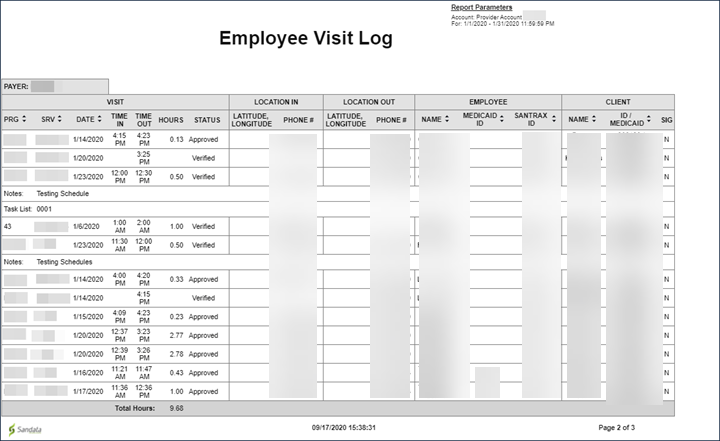
This report shows a log of all visit activity for employees. The report displays information about the visit, employee and client. Each payer receives its own page. The maximum date range for this report is 31 days. Use this report to view detailed information about the visit. This report includes standard visit information, as well as the status of the visit, the location of the visit, any visit notes entered using a mobile device and tasks. This report can be exported to excel to allow for sorting and filtering. Schedules are not shown on this report.
Use the following fields to limit the report output:
|
Field |
Description |
|---|---|
|
Client Medicaid ID |
clients with the entered Medicaid ID The entered value must be an exact match to a client’s Medicaid ID. |
|
Employee |
employee by name (last name, first name) or Santrax ID When a partial name is entered the report displays results that begin with the entered characters. |
Reports are grouped by the following fields. Each change in these fields results in a page break.
|
Field |
Description |
|---|---|
|
Payer |
the payer |
Each column of the report displays the following information:
|
Columns |
Description |
|---|---|
|
Visit: PRG |
the program for the visit |
|
Visit: SRV |
the service for the visit |
|
Visit: Date |
the date of the visit |
|
Visit: Time In |
the actual or the manually entered start time for the visit If no adjustment was made, the actual start time displays. |
|
Visit: Time Out |
the actual or the manually entered end time for the visit. If no adjustment was made, the actual end time displays. |
|
Visit: Hours |
the calculated duration for the visit in hours |
|
Visit: Status |
the status of the visit |
|
Location In: Latitude, Longitude |
the latitude and longitude of the primary address displayed in the report This value only displays for visits captured with a mobile device. |
|
Location In: Phone # |
the EVV phone number from which the call was made |
|
Location Out: Latitude, Longitude |
the latitude and longitude of the primary address displayed in the report This value only displays for visits captured with a mobile device. |
|
Employee: Name |
the employee's name |
|
Employee: Medicaid ID |
the state or payer assigned identifier for the employee |
|
Employee: Santrax ID |
the employee's Santrax ID |
|
Client: Name |
the client's name |
|
Client: ID/Medicaid |
the client’s Medicaid ID and/or Alternate Medicaid ID If not available, Payer ID. If newborn support is enabled and the client is flagged as a newborn, is shown as "N.” |
|
SIG |
indicates if a signature was recorded for this client for the visit |
Sample Report
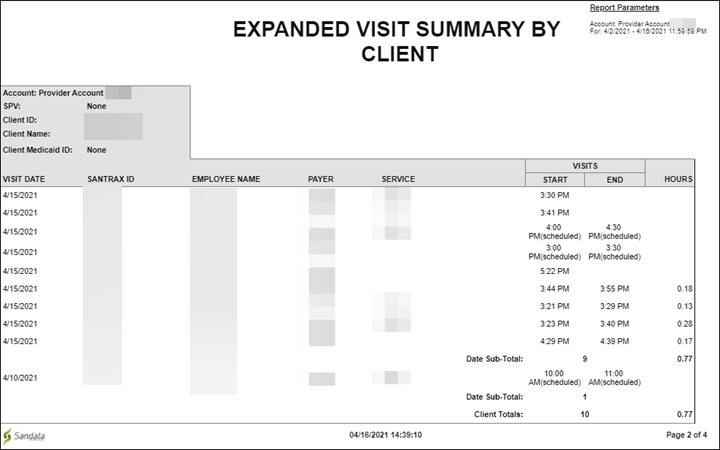
This report shows an expanded summary of all visits for the selected date range. The report is broken out by client, with each change in client starting a new page. The visit dates, start/end times and other general information about the client’s visits are included. The maximum date range of this report is 730 days. Subtotals are listed by date. Use this report to review visit activity for clients over a selected date range. This report allows users to view client activity across all workers. The report can be used to support billing when there are rollups by member and date.
Use the following fields to limit the report output:
|
Field |
Description |
|---|---|
|
Payer |
the selected payer(s) |
|
Program |
the selected program(s) |
|
Service |
the selected service(s) |
|
Client |
Client by name (last name, first name) or Sandata client ID When a partial name is entered the report displays results that begin with the entered characters. |
|
Supervisor |
the supervisor code for the client(s) at the provider agency |
|
Department |
the selected department |
|
Employee |
Employee by name (last name, first name) or Santrax ID When a partial name is entered the report displays results that begin with the entered characters. |
Reports are grouped by the following fields. Each change in these fields results in a page break.
|
Field |
Description |
|---|---|
|
Account |
the provider agency |
|
SPV |
the supervisor at the provider agency |
|
Client ID |
the Sandata client ID |
|
Client Name |
the client's name |
|
Client Medicaid ID |
the client's Medicaid ID |
Each column of the report displays the following information:
|
Columns |
Description |
|---|---|
|
Visit Date |
the visit date |
|
Santrax ID |
the employee's Santrax ID |
|
Employee Name |
the employee's name |
|
Payer |
the payer for the related visit |
|
Service |
the service performed for the visit |
|
Visits: Start |
the start time of the visit |
|
Visits: End |
the end time of the visit |
|
Hours |
the length of the visit in hours |
|
Date Sub-Total |
the sub total of visits that occurred on that day |
|
Client Totals |
the total number of visits performed for the client over the selected date range |
Sample Report
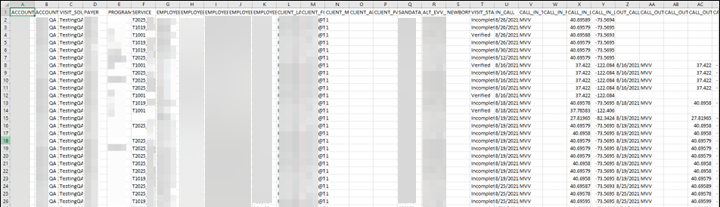
This report produces a comma separated file or an excel spreadsheet that includes details for all visits that occurred within the selected date range. This includes all details about the visit including call in/call out times, exceptions, employee and client information and other data points. If specific data items are not collected by the program, that field will be blank on the report output. This report can be run for a maximum of 31 days. Use this export to create an easily sortable list of all visits that occurred within the selected date range. This information can also be used to populate a third-party data store including agency management systems, payroll systems and/or a data warehouse.
Use the following fields to limit the report output:
|
Field |
Description |
|---|---|
|
Payer |
the selected payer(s) |
|
Program |
the selected program(s) |
|
Service |
the selected service(s) |
|
Client |
Client by name (last name, first name) or Sandata client ID When a partial name is entered the report displays results that begin with the entered characters. |
|
Client Medicaid ID |
clients with the entered Medicaid ID The entered value must be an exact match to a client's Medicaid ID. |
|
Employee |
employee by name (last name, first name) or Santrax ID When a partial name is entered, the report displays results that begin with the entered characters. |
Each column of the report displays the following information:
|
Columns |
Description |
|---|---|
|
Account |
the provider agency's Sandata EVV account number |
|
Account Number |
the account name |
|
Visit Source |
indicates the source of the visit (Sandata or the Alt EVV vendor providing the information) |
|
Payer |
the payer for the visit |
|
Program |
the program for the visit |
|
Service |
the service for the visit |
|
Employee Last Name |
the last name of the employee |
|
Employee First Name |
the first name of the employee |
| Employee SNN | the employee's social security number |
| Employee ID | the employee's ID |
| Employee Santrax ID | the employee's Santrax ID |
| Client Last Name | the client's last name |
| Client First Name | the client's first name |
| Client Medicaid ID | the client's Medicaid ID |
| Client Alternate Medicaid ID |
the client's Medicaid and/or Alternate Medicaid ID If not available, Payer ID. If newborn support is enabled and the client is flagged as a newborn, is shown as "N". |
| Client Payer ID | the client's payer ID |
| Sandata Client ID | the Sandata client ID |
| ALT EVV Client ID | the client's ID from an alternate EVV system |
| Newborn | indicates if the client is a newborn |
| Visit Status | the status of the visit |
| In Call | the date and time the call in was received |
| Call In Type | the call type used to place the call in (TVV/MVV/Manual/Other) |
| Call In Phone | the phone number from which the call in was made, if applicable |
| Call In Latitude | the latitude of the location the call in was made from. This value only displays for visits captured by a mobile device |
| Call in Longitude | the longitude of the location the call in was made from. This value only displays for visits captured by a mobile device |
| Out Call | the date and time the call out was received |
| Call Out Type | the call type used to place the call out (TVV/MVV/Manual/Other) |
| Call Out Phone | the phone number from which the call out was made, if applicable |
| Call Out Latitude | the latitude of the location the call out was made from. This value only displays for visits captured by a mobile device |
| Call Out Longitude | the longitude of the location the call out was made from. This value only displays for visits captured by a mobile device |
| Adjusted In Time | the manually entered start time of the visit |
| Adjusted Out Time | the manually entered end time of the visit |
| Actual Time | the total duration of the visit based on actual call times |
| Adjusted Time | the total duration of the visit based on manually entered call times |
| Bill Time | the total billable time for the visit |
| Units | the total billable units for the related visit, if applicable |
| Group Visit | indicates whether or not the visit was a Group Visit |
| Group Visit Code | the group visit coded associated with the visit, if applicable |
| GPS Exception |
indicates whether or not the visit was flagged with a GPS exception This field is blank if the GPS Exception is not enabled. |
| GPS Call In Distance | the distance in feet from the client's closest address |
| GPS Call Out Distance | the distance in feet from the client's closest address |
| Client Signature | indicates if a signature was recorded for this client for the visit |
| Client Signature Type | indicates the type of signature recorded for the visit (Voice or Written) |
| Client Verified Time | indicates whether the client verified the time of the visit |
| Client Verified Service | indicates whether the client verified the service |
| Unknown Client Exception | indicates whether the visit is flagged with an exception caused by an unknown client |
| Unknown Employee Exception | indicates whether the visit is flagged with an exception caused by an unknown employee |
| Visit WO In Call Exception | indicates whether the visit is flagged with an exception caused by a missing in call |
| Visit WO Out Call Exception | indicates whether the visit is flagged with an exception caused by a missing out call |
| Unmatched ClientID Phone Exception | indicates whether the visit is flagged with an exception caused by a mismatched phone number |
| Missing Service Exception | indicates whether the visit is flagged with an exception caused by a missing service |
| Unauthorized Service Exception | indicates whether the visit is flagged with an exception caused by an unauthorized service |
| Visit Verification Exception | indicates whether the visit is flagged with an exception caused by the client not verifying the start and end times of the visit |
| Total Original Exceptions | the total number of exceptions originally applied to visits |
| Total Current Exceptions | the total number of exceptions currently applied to visits |
| Provider ID | the state assigned identifier for the provider (e.g. Provider Medicaid ID) |
Sample Report
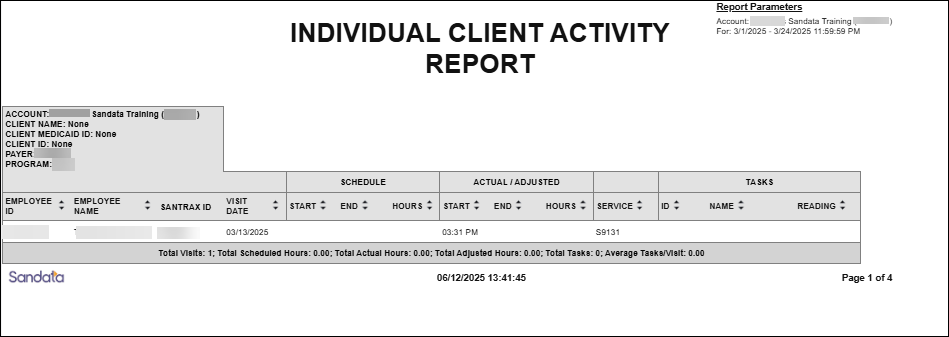
This report shows visit activity for clients for a selected date range, with each client on their own page. The report displays scheduled versus actual hours, tasks, services and information about the employee who performed the visit. The maximum date range for this report is 31 days. Use this report to review visit activity by client and compare scheduled times to actual times. This report shows the services being provided to specific clients over the course of the month. Tasks performed are displayed to show the specific activities being provided to the client.
Use the following fields to limit the report output:
| Field | Description |
|---|---|
| Payer | the selected payer(s) |
| Program | the selected program(s) |
| Service | the selected service(s) |
| Client |
client by name (last name, first name) or Sandata client ID When a partial name is entered the report displays results that begin with the entered characters. |
| Client Medicaid ID |
clients with the entered Medicaid ID The entered value must be an exact match to a client’s Medicaid ID. |
Reports are grouped by the following fields. Each change in these fields results in a page break.
| Field | Description |
|---|---|
| Account | the provider agency’s Sandata EVV account number |
| Client Name | the client's name |
| Client Medicaid ID | the client's Medicaid ID |
Each column of the report displays the following information:
| Columns | Description |
|---|---|
| Employee ID | the employee's agency designated ID - either autogenerated or manually entered (depending on system configuration) |
| Employee Name | the employee's name |
| Santrax ID | the employee ID for telephony |
| Visit Date | the date of the visit |
| Schedule: Start | the scheduled start time for the visit |
| Schedule: End | the scheduled end time for the visit |
| Schedule: Hours | the total hours scheduled for the visit |
| Actual/Adjusted: Start | the actual/manually entered start time for the visit |
| Actual/Adjusted: End | the actual/manually entered end time for the visit |
| Actual/Adjusted: Hours | the actual/manually entered hours elapsed for the visit |
| Service | the service performed for the visit |
| Tasks: ID | the task ID |
| Tasks: Name | the task name |
| Tasks: Reading | the task name |
Totals
| Columns | Description |
|---|---|
| Total Visits | the total number of visits for the client over the selected date range |
| Total Scheduled Hours | the total number of scheduled hours for the client over the selected date range |
| Total Actual Hours | the total number of actual hours for the client over the selected date range |
| Total Adjusted Hours | the total number of manually entered hours for the client over the selected date range |
| Total Tasks | the total number of tasks |
| Average Tasks/Visit | the average number of tasks performed for the visit |
Sample Report
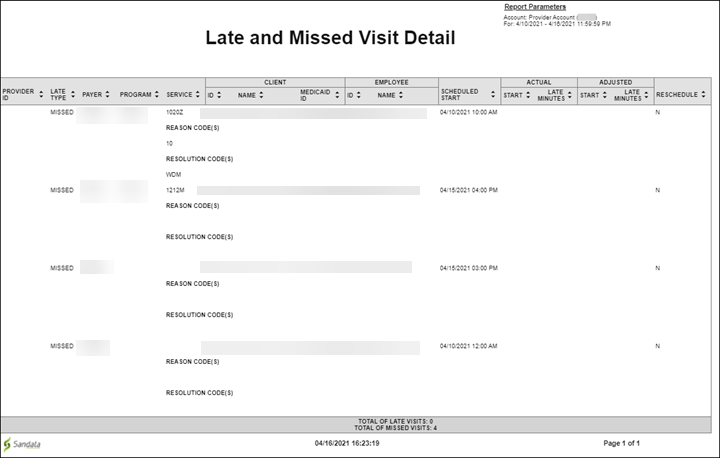
This report displays a listing of all late or missed visits that occurred within the selected date rate. The report shows whether the visit was late (the call in was received after the scheduled start time) or missed (no call in was received for the schedule). The report includes general information about the visit, including client and employee information. The scheduled start, actual and adjusted start times are also shown on this report as well as whether or not the visit was rescheduled.
Use this report to gauge an agencies schedule compliance. This report allows users to track both late and missed visits to ensure clients received care as scheduled. Users can also review actual recorded times versus the adjusted times entered to assist in determining if visits are regularly being adjusted to match the scheduled times.
Use the following fields to limit the report output:
|
Field |
Description |
|---|---|
|
Payer |
the selected payer(s) |
|
Program |
the selected program(s) |
|
Service |
the selected service(s) |
|
Client |
client by name (last name, first name) or Sandata client ID When a partial name is entered the report displays results that begin with the entered characters. |
|
Client Medicaid ID |
clients with the entered Medicaid ID The entered value must be an exact match to a client’s Medicaid ID. |
|
Employee |
employee by name (last name, first name) or Santrax ID When a partial name is entered the report displays results that begin with the entered characters. |
Each column of the report displays the following information:
|
Columns |
Description |
|---|---|
|
Provider ID |
The state assigned identifier for the provider (e.g Provider Medicaid ID) |
|
Late Type |
indicates whether the visit was LATE or MISSED |
|
Payer |
the payer for the related visit |
|
Program |
the program for the visit |
|
Service |
the service performed for the visit |
|
Client: ID |
the client's ID number |
|
Client: Name |
the client's name |
|
Client: Medicaid ID |
the client’s Medicaid ID and/or Alternate Medicaid ID If not available, Payer ID. If newborn support is enabled and the client is flagged as a newborn, is shown as "N". |
|
Employee: ID |
the employee ID |
|
Employee: Name |
the employee's name |
|
Scheduled Start |
the scheduled start time of the visit |
|
Actual: Start |
the actual start time of the visit |
|
Actual: Late Minutes |
the difference between the scheduled and actual start times showing if the employee was late based on the scheduled start |
|
Adjusted: Start |
the adjusted start time of the visit |
|
Adjusted: Late Minutes |
the difference between the scheduled and adjusted start times showing if the employee was late based on the scheduled start |
|
Reschedule |
N=No or Y=Yes, indicating whether there the visit was rescheduled from an earlier visit |
|
Reason Code(s) |
any reason codes applied when editing the related visit |
|
Resolution Code(s) |
any resolution codes applied when editing the related visit |
Sample Report
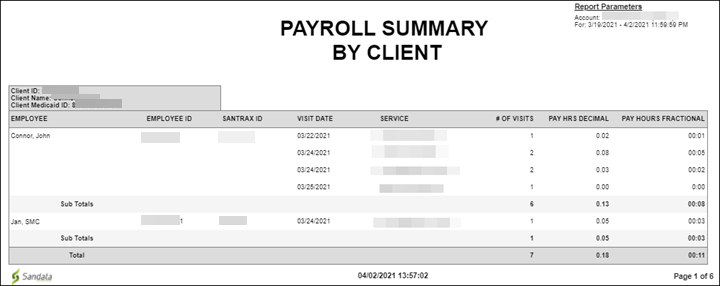
This report shows a summary view of payroll information, sorted by client. The report is broken out by client with each change in client starting a new page. The report includes the number of visits performed for the client, basic visit information and payable hours in decimal and fractional formats. Use this report to review payroll information by client. This report is used to understand the impact of specific clients on overall agency payroll.
Use the following fields to limit the report output:
|
Field |
Description |
|---|---|
|
Payer |
the selected payer(s) |
|
Program |
the selected program(s) |
|
Service |
the selected service(s) |
|
Client |
client by name (last name, first name) or Sandata client ID When a partial name is entered the report displays results that begin with the entered characters. |
|
Client Medicaid ID |
clients with the entered Medicaid ID The entered value must be an exact match to a client’s Medicaid ID. |
|
Supervisor |
the supervisor code for the client(s) at the provider agency |
|
Department |
the selected department |
|
Employee |
employee by name (last name, first name) or Santrax ID When a partial name is entered the report displays results that begin with the entered characters. |
Reports are grouped by the following fields. Each change in these fields results in a page break.
|
Field |
Description |
|---|---|
|
Client ID |
Sandata Client ID |
|
Client Name |
the client's name |
|
Client Medicaid ID |
the client's Medicaid ID |
Each column of the report displays the following information:
|
Columns |
Description |
|---|---|
|
Employee |
the employee's name |
|
Employee ID |
the employee's ID number |
|
Santrax ID |
the employee's Santrax ID |
|
Visit Date |
the date of the visit |
|
Service |
the service performed for the visit |
|
# of Visits |
the number of visits |
|
Pay Hrs Decimal |
the pay hours in decimal numbers |
|
Pay Hrs Fractional |
the pay hours in fractional numbers |
Sample Report
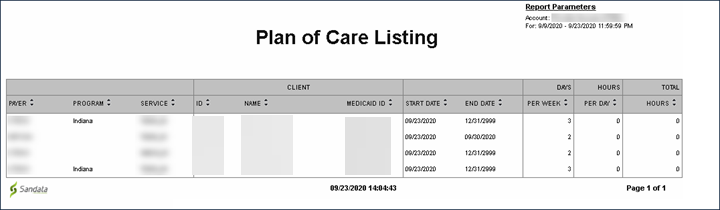
This report shows the summarized plan of care for visits scheduled during a selected date range. The maximum date range for this report is 730 days. Use this report to review the plan of care for visits scheduled during the selected date range. This report allows users to see when each Plan of Care expires (the end date) for each client and service. The report also shows the days per week and hours per day to help agency staff ensure visits are scheduled appropriately.
Use the following fields to limit the report output:
|
Field |
Description |
|---|---|
|
Payer |
the selected payer(s) |
|
Program |
the selected program(s) |
|
Service |
the selected service(s) |
|
Client |
plans of care with client by name (last name, first name) or Sandata Client ID. When a partial name is entered the report displays results that begin with the entered characters. |
|
Client Medicaid ID |
the client Medicaid ID |
Each column of the report displays the following information:
|
Columns |
Description |
|---|---|
|
Payer |
the payer for the plan of care |
|
Program |
the program for the plan of care |
|
Service |
the service for the plan of care |
|
Client: ID |
the Sandata client ID |
|
Client: Name |
the client's name |
|
Client: Medicaid ID |
the client’s Medicaid ID and/or Alternate Medicaid ID If not available, Payer ID. If newborn support is enabled and the client is flagged as a newborn, is shown as "N.” |
|
Start Date |
the start date of the client's plan of care |
|
End Date |
the end date of the client’s plan of care When no end date is selected, the end date displays as 2099 or 2999. |
|
Days Per Week |
the number of days a week where visits are expected based on the plan of care |
|
Hours Per Day |
the number of hours per day where visits are expected based on the plan of care |
|
Total Hours |
the total number of hours per week where visits are expected based on the plan of care |
Sample Report
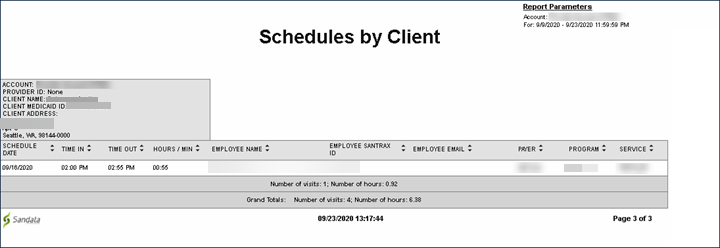
This report shows all schedules for a selected date range. The report is grouped by client with each client receiving their own page. The report displays the employee and client’s name and identification information as well as the visit information. The maximum date range on this report is 31 days.
Use this report to review and verify client schedules for a selected date range. Users can print this report for a client or client designee review all upcoming schedules.
Use the following fields to limit the report output:
|
Field |
Description |
|---|---|
|
Client |
only those visits with the entered client by name (format: last name, first name). When a partial value is entered the report will display results that begin with the entered value. |
|
Client Medicaid ID |
the client's Medicaid ID |
Reports are grouped by the following fields. Each change in these fields results in a page break.
|
Field |
Description |
|---|---|
|
Account |
the provider agency's Sandata EVV account number |
|
Provider |
the state assigned identifier for the provider (e.g Provider Medicaid ID) |
|
Client Name |
the client's name |
|
Client Medicaid ID |
the client’s Medicaid ID and/or Alternate Medicaid ID If not available, Payer ID. If newborn support is enabled and the client is flagged as a newborn, is shown as "N.” |
|
Client Address |
the client's primary address |
Each column of the report displays the following information:
|
Columns |
Description |
|---|---|
|
Schedule Date |
the scheduled date of the visit |
|
Time In |
the scheduled start time for the visit |
|
Time Out |
the scheduled end time for the visit |
|
Hours / Min |
the scheduled length of the visit in hours and minutes |
|
Employee Name |
the employee's name |
|
Employee Santrax ID |
the employee's Santrax ID |
|
Employee Email |
the employee's email address |
|
Payer |
the payer for the visit |
|
Program |
the program for the visit |
|
Service |
the service scheduled for the visit |
|
Number of visits |
the number of visits scheduled for the client |
|
Number of hours |
the total duration of visits scheduled for the client |
|
Grand Totals |
the total of all visits for all clients |
Sample Report
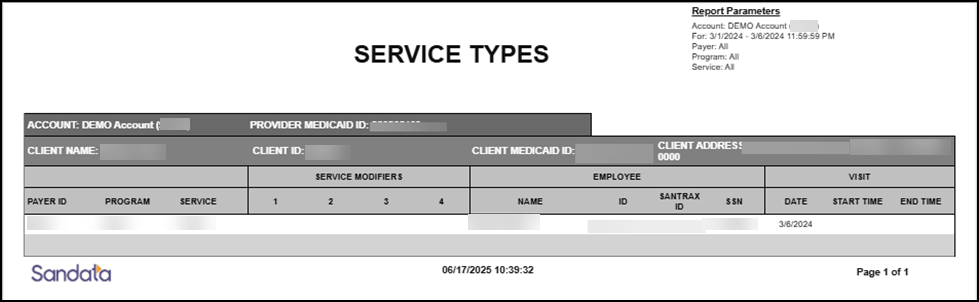
The Service Types Report is a view of the services provided to a client over a selected date range. It includes the employee who provided the service and the visit dates and times. Use this report to review the services provided to a particular client over a date range of 1 to 7 days.
Use the following fields to limit the report output:
| Field | Description |
| Account |
visits associated with the selected account(s) (only available on Aggregator view) |
| Program | visits for the selected program(s) |
| Payer | visits for the selected payer(s) |
| Client | the client associated with the visit |
| Service | visits for the selected service(s) performed during the visit |
Each column of the report displays the following information:
| Field | Description |
|---|---|
| Account | The organization’s name |
| Provider Medicaid ID | The organization’s primary Medicaid ID |
| Client Name | the client associated with the visit |
| Client ID | the Sandata client ID |
| Client Medicaid ID | the client's Medicaid ID |
| Client Address | the client’s primary address |
| Payer ID | the payer ID |
| Program | the program |
| Service | the service performed during the visit |
| Service Modifiers 1,2,3,4 | any modifiers applied to the service for the visit |
| Employee Name | the name of the employee who conducted the visit |
| Employee ID | the Employee ID |
| Santrax ID | the employee's Santrax ID |
| Employee SSN |
the employee’s social security number (masked according to account’s configuration settings) |
| Visit Date | the date of the visit |
| Visit Start Time | the start time for the visit |
| Visit End Time | the end time for the visit |
Sample Report
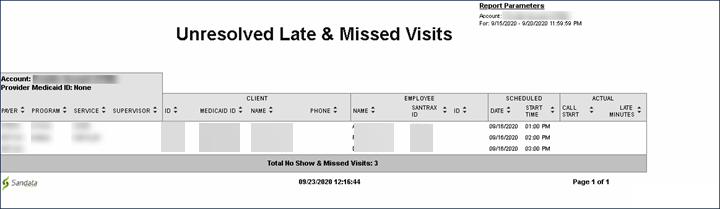
This report shows all unresolved late and missed visits taking place for a selected date range. The report displays the client and field staff’s name and identification information. The report also displays the scheduled start time of the visit and if the call in was received after the scheduled start time. This report uses data from the schedule. For values to display in the late minutes column, the account must be configured to use the Late In Call exception and the threshold for a late call in must be defined as a parameter in the system. The maximum date range for this report is 7 days.
Use this report to review any visits marked as late or missed. The report can be used with the Contingency Plan feature to review which visits require attention. It can also be used to view visits that are either late or missed, over a selected date range. This information allows users to identify trends for specific clients or employees.
Use the following fields to limit the report output:
|
Field |
Description |
|---|---|
|
Payer |
the selected payer(s) |
|
Program |
the selected program(s) |
|
Service |
the selected service(s) |
|
Client |
client by name (last name, first name) or Sandata client ID When a partial name is entered the report displays results that begin with the entered characters. |
|
Client Medicaid ID |
clients with the entered Medicaid ID The entered value must be an exact match to a client’s Medicaid ID. |
|
Employee |
employee by name (last name, first name) or Santrax ID When a partial name is entered the report displays results that begin with the entered characters. |
Each column of the report displays the following information:
|
Columns |
Description |
|---|---|
|
Payer |
the client's payer from the schedule |
|
Program |
the program(s) for the visit from the schedule |
|
Service |
the service scheduled to be performed for the visit |
|
Supervisor |
the client’s supervisor at the provider agency |
|
Client: ID |
the Sandata client ID |
|
Client: Medicaid ID |
the client’s Medicaid ID and/or Alternate Medicaid ID If not available, Payer ID. If newborn support is enabled and the client is flagged as a newborn, is shown as "N.” |
|
Client: Name |
the client's name |
|
Client: Phone |
the client's primary phone number |
|
Employee: Name |
the employee's name from the schedule |
|
Employee: Santrax ID |
the employee's Santrax ID |
|
Employee: ID |
the employee ID |
|
Scheduled: Date |
the scheduled start date for the visit |
|
Scheduled: Start Time |
the scheduled start time for the visit |
|
Actual: Call Start |
the call in time for the visit. This value only displays for a late visit. |
|
Actual: Late Minutes |
the difference between the scheduled and actual start times (in minutes) This value only displays for a late visit. |
|
Total No Show & Missed Visits |
the total number of no show and missed visits |
Sample Report
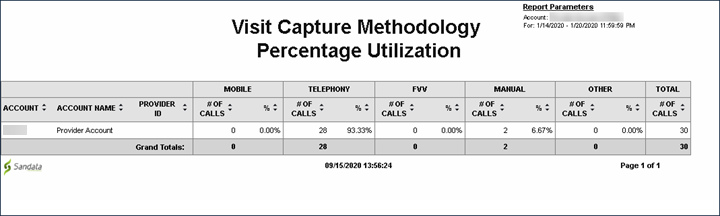
This report shows the percentage of calls captured by a method of visit verification used by an agency for a date range. The report displays the number of calls and what percentage of an agency’s calls were captured using each method. The maximum date range for this report is 31 days. This audit report can be used by individual providers to review the visit capture methodology used for each call placed across all employees. Payers can use this report to compare visit capture methodology use across a group of provider agencies.
Use the following fields to limit the report output:
|
Field |
Description |
|---|---|
|
Payer |
the selected payer(s) |
|
Program |
the selected program(s) |
|
Service |
the selected service(s) |
Each column of the report displays:
|
Columns |
Description |
|---|---|
|
Account |
the provider agency’s Sandata EVV account number |
|
Account Name |
the account name |
|
Provider ID |
the state assigned identifier for the provider (e.g Provider Medicaid ID) |
|
Mobile # of Calls |
the number of mobile calls captured using either SMC or a third-party system |
|
Mobile % |
the total percentage of calls captured using a mobile device |
|
Telephony # of Calls |
the number of telephony calls captured using either TVV or a third-party system |
|
Telephony # |
the total percentage of calls captured using telephony |
|
FVV # of Calls |
the number of fixed visit verification calls captured using a FVV device |
|
FVV % |
the total percentage of calls captured using a FVV device |
|
Manual # of Calls |
the number of calls manually entered in Sandata EVV or a third-party system |
|
Manual % |
the total percentage of calls manually entered in Sandata EVV or a third-party system |
|
Other # of Calls |
the number of calls captured using a third-party system |
|
Other % |
the total percentage of calls captured using a third-party system |
|
Total # of Calls |
the total number of all calls captured |
|
Grand Totals |
the grand total of calls captured in each column |