Sandata Daily Reports

This report displays all contacts and designees associated with a client.
This report is used to review the current state of a client’s contacts and designees. Contacts are for reference only, but designees may have privileges to use the system on behalf of the client. This report helps the responsible entity manage client designees to ensure that access is not permitted if it is not appropriate. If the current system configuration does not support designees, only contacts are displayed on this report.
Parameters
Use the following fields to limit the report output to:
|
Field |
Description |
|---|---|
|
Payer |
The selected payer(s) |
|
Program |
The selected program(s) |
|
Service |
The selected service(s) |
|
Client |
Client by name (last name, first name) or Sandata client ID When a partial name is entered the report will display results that begin with the entered characters. |
|
Client Medicaid ID |
Clients with the entered Medicaid ID The entered value must be an exact match to a client’s Medicaid ID. |
Each column of the report displays:
|
Columns |
Description |
|---|---|
|
Account |
The provider agency's Sandata EVV account number |
|
Account Name |
The account name |
|
Medicaid ID |
The client’s Medicaid ID and/or Alternate Medicaid ID If not available, Payer ID. If newborn support is enabled and the client is flagged as a newborn, is shown as “N.” |
|
Contact: Type |
The type of contact (e.g. Contact or Designee) |
|
Contact: Relationship |
The relationship of the emergency contact to the client |
|
Contact: Name |
The name of the client’s emergency contact |
|
Contact: Email |
The email address of the client’s emergency contact |
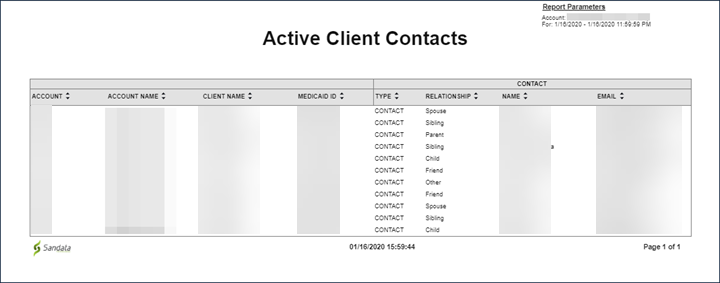
This report lists all active clients and information from the client’s profile including: Santrax ID, name, phone number, city and zip. This report provides an overview of all active clients.
Use the following fields to limit the report output to:
|
Field |
Description |
|---|---|
|
Payer |
the selected payer(s) |
|
Program |
the selected program(s) |
|
Client |
client by name (last name, first name) When a partial name is entered the report will display results that begin with the entered characters. |
|
Client Medicaid ID |
clients with the entered Medicaid ID The entered value must be an exact match to a client’s Medicaid ID. |
|
Supervisor |
the supervisor code for the client(s) at the provider agency |
Report Grouping
Reports are grouped by the following fields. Each change in these fields results in a page break.
|
Field |
Description |
|---|---|
|
Field |
Description |
|
Account |
the provider agency’s Sandata EVV account number |
Each column of the report displays:
| Columns | Description |
|---|---|
|
Client ID |
The Sandata client ID |
|
Client Medicaid ID |
The client’s Medicaid ID and/or Alternate Medicaid ID If not available, Payer ID. If newborn support is enabled and the client is flagged as a newborn, is shown as “N.” |
|
Client Name |
The client's name |
|
Client SSN |
The client's social security number |
|
Phone # |
The client’s primary phone number |
|
Address |
The client’s primary street address (line 1) |
|
City |
The city from the client’s primary address |
|
St |
The state from the client’s primary address |
|
Zip |
The zip code from the client’s primary address |
|
Latitude |
The latitude of the client’s primary address |
|
Longitude |
The longitude of the client’s primary address |
|
Client Alternate ID |
The value entered in the client’s Other ID field |
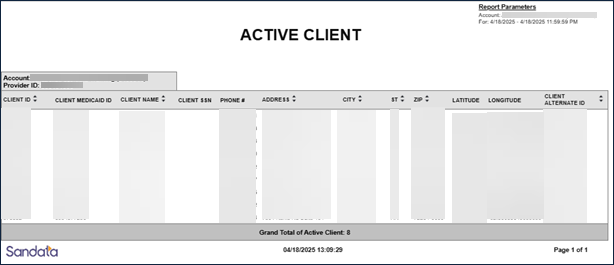
This report displays all the employees for the selected date. The report displays the employee ID, employee name, employee email address, phone number and Santrax ID. Use this report to review current employee information.
Use the following fields to limit the report output to:
| Field | Description |
|---|---|
| Department | The selected department |
| Employee |
The employee by name (last name, first name) or Santrax ID When a partial name is entered the report displays results that begin with the entered characters. |
Report Grouping
Reports are grouped by the following fields. Each change in these fields results in a page break.
| Field | Description |
|---|---|
| Account | The provider agency’s Sandata EVV account number |
Each column of the report displays:
| Columns | Description |
|---|---|
| Employee ID | The employee ID |
| Employee Name | The employee's name |
| Employee Email | The employee’s email address |
| Employee Santrax ID | The employee’s Santrax ID |
| Employee SSN | The employee’s social security number |
| Employee NPI | The employee's National Provider Identifier |
| Phone # | The employee’s phone number |
| Dep |
The employee's department Depending on the agency's specific configurations, this field may display a different value. |
Sample Report
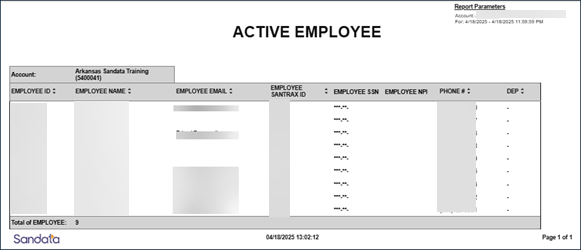
This report provides a comprehensive list of all scheduled visits for the selected date-range. This report lists all scheduled visits with a start date that falls within the selected date-range.
Use the following fields to limit the report output to:
|
Field |
Description |
|---|---|
|
Payer |
The selected payer(s) |
|
Program |
The selected program(s) |
|
Service |
The selected service(s) |
|
Client |
Client by name (last name, first name) or Sandata Client ID When a partial name is entered the report displays results that begin with the entered characters. |
|
Client AR# |
The client’s Account Receivable (AR) number |
|
Supervisor |
The supervisor code for the client(s) at the provider agency |
|
Department |
The selected department |
|
Employee |
Employee by name (last name, first name) or Santrax ID When a partial name is entered the report displays results that begin with the entered characters. |
Each column of the report displays:
|
Columns |
Description |
|---|---|
|
Client Name |
The client's name |
|
Client Phone |
The client’s primary phone number |
|
Employee Santrax ID |
The employee’s Santrax ID |
|
Start |
The scheduled start time for the visit |
|
End |
The scheduled end time for the visit |
|
Hours |
The total hours scheduled for the visit |
|
Client ID |
The Sandata client ID |
|
Employee |
The employee ID |
Sample Report
This report produces an excel spreadsheet that includes details for all clients, regardless of status, for that specific date. This includes all details about the client including demographics, addresses, contacts, and other data points. If specific client data items are not collected by the program, that field will be blank on the report output.
Use this export to create an easily sortable list of all clients that are in the account for that specific date. This information can also be used to populate a third-party data store including agency management systems, payroll systems and/or a data warehouse.
Use the following fields to limit the report output to:
| Field | Description |
|---|---|
| Account | the selected account(s) |
| Agency Grouping | the selected agency grouping |
| Client |
Client by name (last name, first name) or Sandata client ID When a partial name is entered the report displays results that begin with the entered characters. |
| Client Medicaid ID |
clients with the entered Medicaid ID The entered value must be an exact match to a client's Medicaid ID. |
| Provider ID | the state assigned identifier for the provider (e.g., the Provider Medicaid ID) |
Report Output:
|
Columns |
Description |
|---|---|
|
Account |
the provider agency's Sandata EVV account number |
|
Client ID |
the client’s ID |
|
First Name |
the first name of the client |
|
Middle Initial |
the middle initial of the client |
|
Last Name |
the last name of the client |
|
Proper Name |
the proper name of the client |
|
Full Name |
the full name of the client |
|
Suffix |
client’s suffix, if any |
|
Medicaid ID |
the client's Medicaid ID |
|
Alternate Medicaid ID |
the client's Medicaid and/or Alternate Medicaid ID If not available, Payer ID. If newborn support is enabled and the client is flagged as a newborn, this ID shows as "N." |
|
Missing Medicaid ID |
an indicator in the database that designates if the client is missing their Medicaid ID (1), or not (0) |
|
Newborn |
an indicator in the database that designates if the client is a newborn (1), or not (0) |
|
Email Address |
the email address of the client |
|
Custom ID |
the client’s custom id |
|
Other ID |
the client’s other id |
|
AR Number |
the client’s Authorization Number |
|
MRN |
the client’s Medical Record Number |
|
SSN |
the client’s Social Security Number |
|
Timezone |
the time zone for the client |
|
Supervisor |
the supervisor of the client |
|
Supervisor Email |
the email address of the client’s supervisor |
|
Prov Assent Contingency Plan |
indicates if there is a provider’s assent contingency plan |
|
Gender |
the client’s gender |
|
Birth Date |
the birth date of the client |
|
Marital Status |
the martial status of the client |
|
Language |
the primary language of the client |
|
Priority |
the priority for the client |
|
Team |
the team for the client |
|
Branch |
the branch for the client |
|
Borough |
the borough of the client |
|
Primary Diagnosis Code |
the primary diagnosis code of the client |
|
Address Type |
the address type of the client |
|
Address Primary |
indicates the primary address of the client |
|
Address Line 1 |
address line 1 for the client |
|
Address Line 2 |
address line 2 for the client |
|
County |
the county of the client |
|
City |
the city of the client |
|
State |
the state of the client |
|
Zip Code |
the zip code of the client |
|
Latitude |
the latitude location of the client |
|
Longitude |
the longitude location of the client |
|
Address Type Alt 1 |
the alt 1 address type of the client |
|
Address Primary Alt 1 |
indicates if alt 1 is primary address of the client |
|
Address Line 1 Alt 1 |
alt 1 address line 1 for the client |
|
Address Line 2 Alt 1 |
alt 1 address line 2 for the client |
|
County Alt 1 |
alt 1 county of the client |
|
City Alt 1 |
alt 1 city of the client |
|
State Alt 1 |
alt 1 state of the client |
|
Zip Code Alt 1 |
alt 1 zip code of the client |
|
Latitude Alt 1 |
alt 1 latitude location of the client |
|
Longitude Alt 1 |
alt 1 longitude location of the client |
|
Address Type Alt 2 |
the alt 2 address type of the client |
|
Address Primary Alt 2 |
indicates if alt2 is primary address of the client |
|
Address Line 1 Alt 2 |
alt 2 address line 1 for the client |
|
Address Line 2 Alt 2 |
alt 2 address line 2 for the client |
|
County Alt 2 |
alt 2 county of the client |
|
City Alt 2 |
alt 2 city of the client |
|
State Alt 2 |
alt 2 state of the client |
|
Zip Code Alt 2 |
alt 2 zip code of the client |
|
Latitude Alt 2 |
alt 2 latitude location of the client |
|
Longitude Alt 2 |
alt 2 longitude location of the client |
|
Address Type Alt 3 |
the alt 3 address type of the client |
|
Address Primary Alt 3 |
indicates if alt 3 is primary address of the client |
|
Address Line 1 Alt 3 |
alt 3 address line 1 for the client |
|
Address Line 2 Alt 3 |
alt 3 address line 2 for the client |
|
County Alt 3 |
alt 3 county of the client |
|
City Alt 3 |
alt 3 city of the client |
|
State Alt 3 |
alt 3 state of the client |
|
Zip Code Alt 3 |
alt 3 zip code of the client |
|
Latitude Alt 3 |
alt 3 latitude location of the client |
|
Longitude Alt 3 |
alt 3 longitude location of the client |
|
Phone Number 1 |
phone number 1 for the client |
|
Phone Number 2 |
phone number 2 for the client |
|
Phone Number 3 |
phone number 3 for the client |
|
Phone Number 4 |
phone number 4 for the client |
|
Phone Number 5 |
phone number 5 for the client |
|
Designee First Name 1 |
the first name of designee 1 |
|
Designee Last Name 1 |
the last name of designee 1 |
|
Designee Email 1 |
the email address for designee 1 |
|
Designee Phone Type 1 |
the phone type for designee 1 |
|
Designee Contact Phone 1 |
the method of phone contact for designee 1 |
|
Designee Start Date 1 |
start date of designee 1 |
|
Designee End Date 1 |
end date of designee 1 |
|
Designee Relationship 1 |
the relationship of designee 1 to the client |
|
Designee First Name 2 |
the first name of designee 2 |
|
Designee Last Name 2 |
the last name of designee 2 |
|
Designee Email 2 |
the email address for designee 2 |
|
Designee Phone Type 2 |
the phone type for designee 2 |
|
Designee Contact Phone 2 |
the method of phone contact for designee 2 |
|
Designee Start Date 2 |
the start date of designee 2 |
|
Designee End Date 2 |
the end date of designee 2 |
|
Designee Relationship 2 |
the relationship of designee 2 to the client |
|
Designee First Name 3 |
the first name of designee 3 |
|
Designee Last Name 3 |
the last name of designee 3 |
|
Designee Email 3 |
email address for designee 3 |
|
Designee Phone Type 3 |
the phone number category for designee 3 |
|
Designee Contact Phone 3 |
the method of phone contact for designee 3 |
|
Designee Start Date 3 |
the start date of designee 3 |
|
Designee End Date 3 |
the end date of designee 3 |
|
Designee Relationship 3 |
the relationship of the designee 3 to the client |
|
Emergency Contact 1 First Name |
the first name of emergency contact 1 |
|
Emergency Contact 1 Last Name |
the last name of emergency contact 1 |
|
Emergency Contact 1 Phone Type |
the phone type of emergency contact 1 |
|
Emergency Contact 1 Phone |
the phone number for emergency contact 1 |
|
Emergency Contact 1 Email |
email address for emergency contact 1 |
|
Emergency Contact 1 Addr Line1 |
address line 1 for emergency contact 1 |
|
Emergency Contact 1 Addr Line2 |
address line 2 for emergency contact 1 |
|
Emergency Contact 1 City |
city of emergency contact 1 |
|
Emergency Contact 1 State |
state of emergency contact 1 |
|
Emergency Contact 1 Zip |
zip code of emergency contact 1 |
|
Emerg Contact 1 Relationship |
the relationship of the emergency contact 1 to the client |
|
Emergency Contact 2 First Name |
the first name of emergency contact 2 |
|
Emergency Contact 2 Last Name |
the last name of emergency contact 2 |
|
Emergency Contact 2 Phone Type |
the phone type of emergency contact 2 |
|
Emergency Contact 2 Phone |
the phone number for emergency contact 2 |
|
Emergency Contact 2 Email |
the email address for emergency contact 2 |
|
Emergency Contact 2 Addr Line1 |
address line 1 for emergency contact 2 |
|
Emergency Contact 2 Addr Line2 |
address line 2 for emergency contact 2 |
|
Emergency Contact 2 City |
the city of emergency contact 2 |
|
Emergency Contact 2 State |
the state of emergency contact 2 |
|
Emergency Contact 2 Zip |
the zip code of emergency contact 2 |
|
Emerg Contact 2 Relationship |
relationship to client for emergency contact 2 |
|
Emergency Contact 3 First Name |
the first name of emergency contact 3 |
|
Emergency Contact 3 Last Name |
the last name of emergency contact 3 |
|
Emergency Contact 3 Phone Type |
the phone type of emergency contact 3 |
|
Emergency Contact 3 Phone |
the phone number for emergency contact 3 |
|
Emergency Contact 3 Email |
the email address for emergency contact 3 |
|
Emergency Contact 3 Addr Line1 |
address line 1 for emergency contact 3 |
|
Emergency Contact 3 Addr Line2 |
address line 2 for emergency contact 3 |
|
Emergency Contact 3 City |
the city of emergency contact 3 |
|
Emergency Contact 3 State |
the state of emergency contact 3 |
|
Emergency Contact 3 Zip |
the zip code of emergency contact 3 |
|
Emerg Contact 3 Relationship |
relationship to client of emergency contact 3 |
|
Medicaid Enrollment Date |
client’s Medicaid enrollment date |
|
Discharge Date |
client’s discharge date |
|
Last Record Change Date |
last record change date for client |
Sample Report:

This report produces an excel spreadsheet that includes details for all employees, regardless of status, for that specific date. This includes all details about the employee including demographics, address, hire date, termination date, and other data points. If specific client data items are not collected by the program, that field will be blank on the report output.
Use this export to create an easily sortable list of all employees that are in the account for that specific date. This information can also be used to populate a third-party data store including agency management systems, payroll systems and/or a data warehouse.
Use the following fields to limit the report output to:
| Field | Description |
|---|---|
| Department | the employee's department |
| Employee | the name of the employeeWhen a partial name is entered, the report will display results that begin with the entered characters. |
Report Output:
| Columns | Description |
|---|---|
| Account | the provider agency's Sandata EVV account number |
| PIN | the employee’s identification/pin number |
| Employee ID | the employee’s ID |
| SSN | the employee’s social security number |
| Last Name | the last name of the employee |
| First Name | the first name of the client |
| Middle Initial | the middle initial of the employee |
| Proper Name | the proper name of the employee |
| Full Name | the full name of the employee |
| the email address of the employee | |
| Department | the employee’s department |
| Type | the type of employee |
| Discipline | the discipline of the employee |
| Manager Email | the manager’s email address |
| API | the employee’s API (Additional Provider Identifier) number |
| NPI | the employee’s NPI (National Provider Identifier) number |
| Address Line 1 | address line 1 for the employee |
| Address Line 2 | address line 2 for the employee |
| County | the county of the employee |
| City | the city of the employee |
| State | the state of the client |
| Zip Code | the zip code of the client |
| Phone | the phone number for the employee |
| Employee Other ID | the employee’s other id |
| Employee Custom ID | the employee’s custom id |
| Hire Date | the employee’s hire date |
| Term Date | the employee’s termination date |
| DOB | the employee’s date of birth |
| Gender | the employee’s gender |
| Primary Location | the employee’s primary location |
| Record Last Updated | the last record update date for employee |
Sample Report:

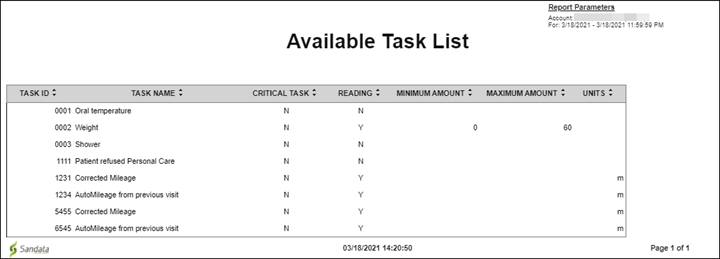
This report shows the list of tasks available for the account as well as general information about each available task as of the day the report was run. Use this review information about the tasks available for the account, including which tasks are designated as critical and which tasks allow for a reading to be entered (e.g. weight). Users can validate the task configuration of the account with this report and it may also be used t o update field staff in the event that tasks or added or removed over time.
This report has no parameters.
Each column of the report displays:
|
Columns |
Description |
|---|---|
|
Task ID |
The identifier for the task |
|
Task Name |
The name of the task |
|
Critical Task |
N=No or Y=Yes, indicating whether or not the task is critical |
|
Reading |
N=No or Y=Yes, indicating whether a reading is required for the task |
|
Minimum Amount |
The minimum value that must be entered for this task’s reading, if configured |
|
Maximum Amount |
The maximum value that may be entered for this task’s reading, if configured |
|
Units |
The units for the task if applicable based on the task configuration |
Sample Report
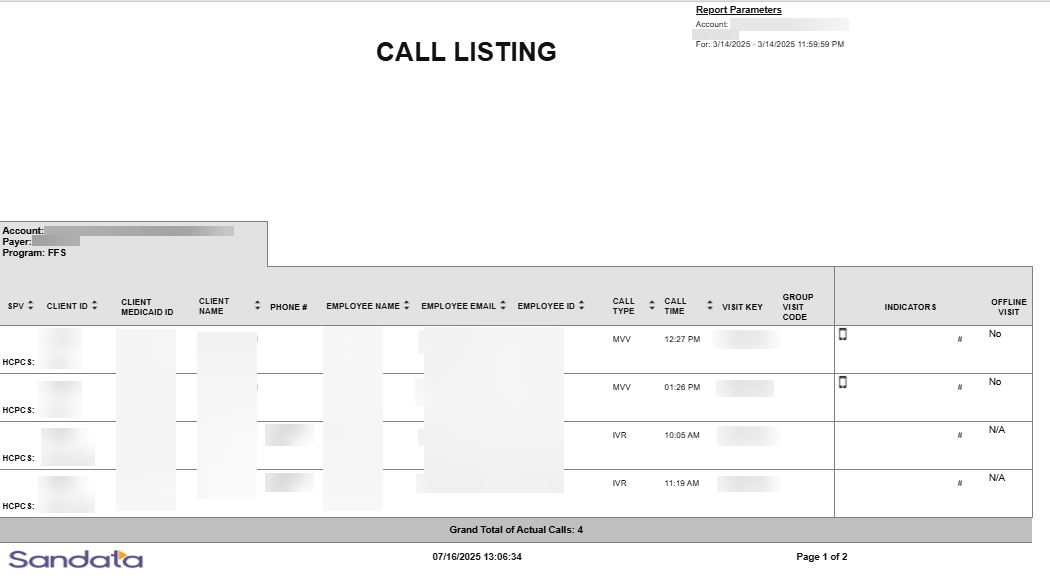
This report displays all calls that were made to Santrax EVV phone numbers for the date and time range that was specified when selecting the report. The calls are listed one after another individually with the beginning pages listing the unknown callsThis report is used to review calls.
Use the following fields to limit the report output to:
| Field | Description |
|---|---|
| Payer | The selected payer(s) |
| Program | The selected program(s) |
| Service | The selected service(s) |
| Client |
Client by name (last name, first name) or Sandata Client ID When a partial name is entered the report displays results that begin with the entered characters. |
| Client Medicaid ID |
Clients with the entered Medicaid ID The entered value must be an exact match to a client’s Medicaid ID. |
| Supervisor | The supervisor code for the client(s) at the provider agency |
| Department | The selected department |
| Employee |
Employee by name (last name, first name) or Santrax ID When a partial name is entered the report displays results that begin with the entered characters. |
Report Grouping
Reports are grouped by the following fields. Each change in these fields results in a page break.
| Field | Description |
|---|---|
| Account | The provider agency’s Sandata EVV account number |
| Payer | The payer |
| Program | The program |
Report Output
Each column of the report displays:
| Columns | Description |
|---|---|
| SPV | The supervisor assigned to the employee |
| Client ID | The Sandata client ID |
| Service HCPS | The service code performed for the call (this appears under the Client ID) |
| Client Medicaid ID |
The client’s Medicaid ID and/or Alternate Medicaid ID If not available, Payer ID. If newborn support is enabled and the client is flagged as a newborn, is shown as “N.” |
| Client Name | The client's name |
| Phone # | The client’s primary phone number |
| Employee Name | The employee's name |
| Employee Email | The employee's email address |
| Employee ID | The employee’s Santrax ID |
| Call Type | The call type for the visit |
| Call Time | The time of the visit |
| Visit Key | The visit key of the visit |
| Group Visit Code | The group visit code associated with the visit |
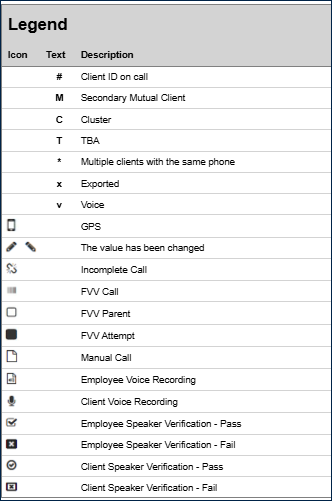
| Indicators | An icon representing call functionality used for the call (see Legend) |
| Offline Visit | Indicates if an offline visit (Yes or No) |
| Grand Total of Actual Calls | The grand total of calls |
Sample Report
Legend
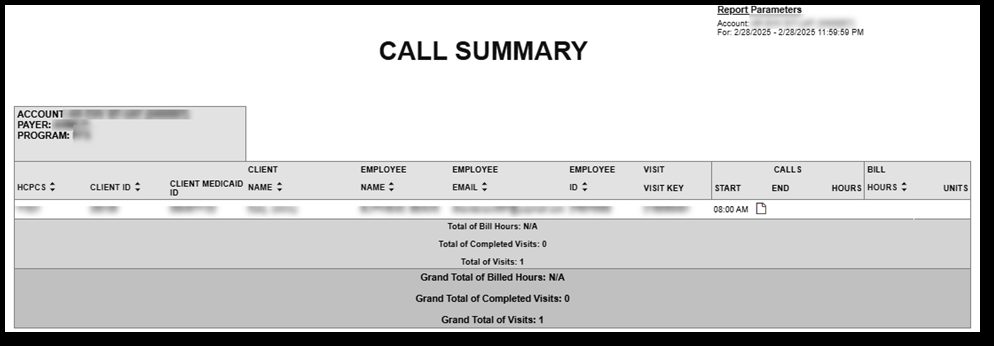
This report focuses on the Start and End calls and calculates the hours worked and number of completed visits on that specific day. Use this report to review current visit information on a daily basis and identify the incomplete visits from the previous day that need follow up. The report also calculates the number of completed visits and billable hours per page as well as a total for the entire report.
Use the following fields to limit the report output to:
| Field | Description |
|---|---|
| Payer | The selected payer(s) |
| Program | The selected program(s) |
| Service | The selected service(s) |
| Client |
Client by name (last name, first name) When a partial name is entered the report will display results that begin with the entered characters. |
| Client Medicaid ID |
Clients with the entered Medicaid ID The entered value must be an exact match to a client’s Medicaid ID. |
| Supervisor | The supervisor code for the client(s) at the provider agency |
| Department | The selected department |
| Employee |
Employee by name (last name, first name) or Santrax ID When a partial name is entered the report displays results that begin with the entered characters. |
Report Grouping
Reports are grouped by the following fields. Each change in these fields results in a page break.
| Field | Description |
|---|---|
| Account | The provider agency’s Sandata EVV account number |
| Payer | The payer |
| Program | The program |
Report Output
Each column of the report displays:
| Columns | Description |
|---|---|
| HCPCS | The Healthcare Common Procedure Coding System service code |
| Client ID | The Sandata client ID |
| Client Medicaid ID |
The client’s Medicaid ID and/or Alternate Medicaid ID If not available, Payer ID. If newborn support is enabled and the client is flagged as a newborn, is shown as “N.” |
| Client Name | The client's name |
| Employee Name | The employee's name |
| Employee Email | The employee’s email address |
| Employee ID | The employee’s ID |
| Visit Key | The visit id related to the visit |
| Calls: Start |
The actual or manually entered start time for the visit If no adjustment was made, the actual start time displays. |
| Calls: End |
The actual or manually entered end time for the visit If no adjustment was made, the actual end time displays. |
| Calls: Hours | The calculated duration for the visit in hours |
| Bill: Hours | The billable hours for the call |
| Bill: Units | The billable units for the call |
| Total of Bill Hours | The total billable hours |
| Total of Completed Visits | The total number of completed visits |
| Total of Visits | The total number of visits |
| Grand Total of Billed Hours | The grand total of billable hours |
| Grand Total of Completed Visits | The grand total of completed visits |
| Grand Total of Visits | The grand total of visits |
Sample Report
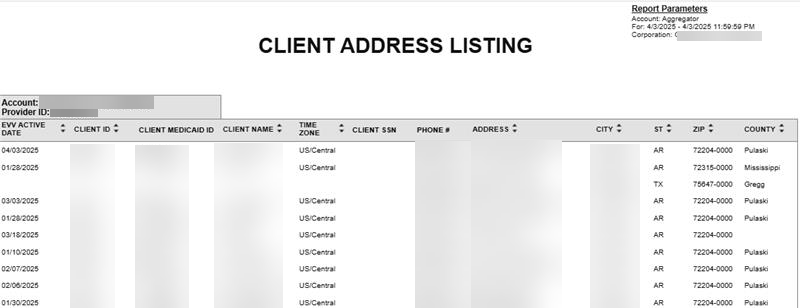
This report shows all clients and the address, phone number and other information for each client for the selected date. Use this report to review a list of all clients and contact information.
Use the following fields to limit the report output to:
| Field | Description |
|---|---|
| Payer | The selected payer(s) |
| Program | The selected program(s) |
| Client |
Client by name (last name, first name) When a partial name is entered the report will display results that begin with the entered characters. |
| Client Medicaid ID |
Clients with the entered Medicaid ID The entered value must be an exact match to a client’s Medicaid ID. |
| Supervisor | The supervisor code for the client(s) at the provider agency |
Report Grouping Tab
Reports are grouped by the following fields. Each change in these fields results in a page break.
| Field | Description |
|---|---|
| Account | The provider agency’s Sandata EVV account number |
Report Output
Each column of the report displays:
| Columns | Description |
|---|---|
| EVV Active Date | The date the client became active in the system |
| Client ID | The Sandata client ID |
| Client Medicaid ID |
The client’s Medicaid ID and/or Alternate Medicaid ID If not available, Payer ID. If newborn support is enabled and the client is flagged as a newborn, is shown as "N.” |
| Client Name | The client's name |
| Time Zone | The client’s time zone |
| Client SSN | The client’s social security number |
| Phone # | The client’s primary phone number |
| Address | The client’s primary street address (line 1) |
| City | The city from the client’s primary address |
| St | The state from the client’s primary address |
| Zip | The zip code from the client’s primary address |
| County |
The county from the client’s primary address This value is manually entered or received via an interface and is not validated against the client’s address. |
Sample Report
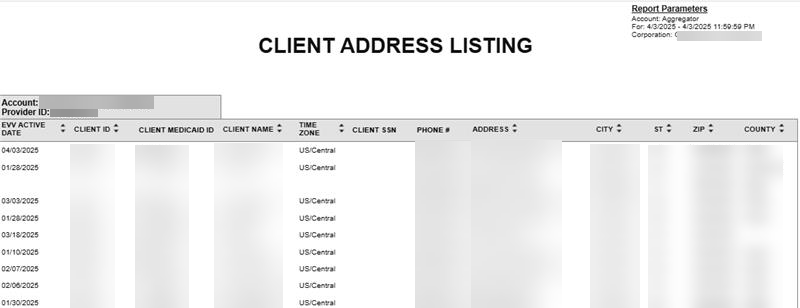
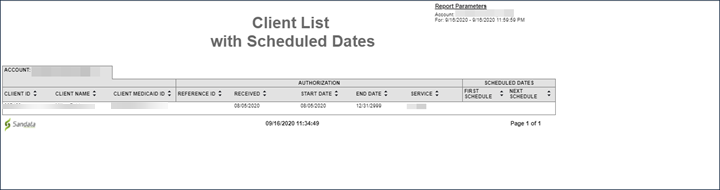
This report shows a list of all clients with schedules. The report displays authorization information and the dates for the client’s first and next schedule.
Use this report to review the responsiveness to client needs. Authorization information is displayed, including the date the authorization was received and the authorization’s start date. This information can identify patterns in how authorizations are issued, for example, extended periods of time from date the authorization was received and the first date of service. The date service was first provided as well as the next scheduled date are displayed to ensure services for active authorizations are ongoing.
Use the following fields to limit the report output to:
|
Field |
Description |
|---|---|
|
Payer |
The selected payer(s) |
|
Program |
The selected program(s) |
|
Service |
The selected service(s) |
|
Client |
Client by name (last name, first name) When a partial name is entered the report will display results that begin with the entered characters. |
|
Client Medicaid ID |
Clients with the entered Medicaid ID The entered value must be an exact match to a client’s Medicaid ID. |
Report Grouping Tab
Reports are grouped by the following fields. Each change in these fields results in a page break
|
Field |
Description |
|---|---|
|
Account |
the provider agency’s Sandata EVV account number |
Report Output
Each column of the report displays:
|
Columns |
Description |
|---|---|
|
Client ID |
The Sandata client ID |
|
Client Name |
The client's name |
|
Client Medicaid ID |
The client’s Medicaid ID and/or Alternate Medicaid ID If not available, Payer ID. If newborn support is enabled and the client is flagged as a newborn, is shown as "N.” |
|
Reference ID |
The authorization’s reference number |
|
Received |
The date the authorization was received by the agency provider |
|
Start Date |
The start date for the authorization |
|
End Date |
The end date for the authorization |
|
Service |
The authorization’s service |
|
First Schedule |
The date of the first scheduled visit after the authorization’s start date |
|
Next Schedule |
The date of the next scheduled visit for that service |
Sample Report
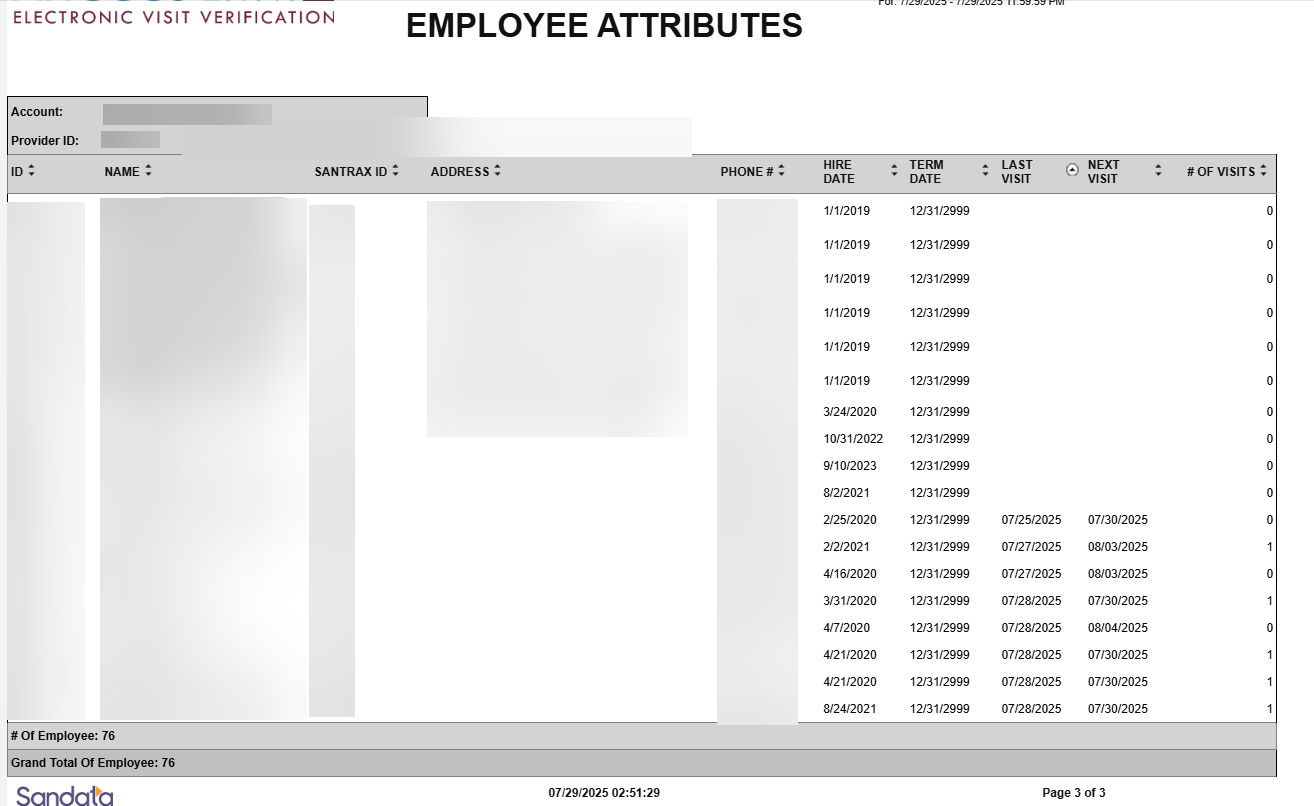
This report shows information about employees as of a selected single date. The report displays basic demographic information as well as important dates (last visit, next visit and number of visits).
This report can be used by provider agencies to better understand their employee roster. Address and phone information are included to make contacting the employee easier. The employee’s last and next visit are displayed to show recent and upcoming activity. The number of upcoming visits for each employee is also included. Typically, the system includes up to 2 weeks of schedules.
Use the following fields to limit the report output to:
| Field | Description |
|---|---|
| Employee | Employee by name (last name, first name) or Santrax ID |
Report Grouping Tab
Reports are grouped by the following fields. Each change in these fields results in a page break
| Field | Description |
|---|---|
| Account | The provider agency’s Sandata EVV account number |
| Provider ID | The state assigned identifier for the provider (e.g. Provider Medicaid ID) |
Report Output
Each column of the report displays:
| Columns | Description |
|---|---|
| ID | The employee's ID number |
| Name | The employee's name |
| Santrax ID | The employee's Santrax ID |
| Address | The employee’s primary address |
| Phone | The employee’s primary phone number |
| Hire Date | The employee’s hire date or the first date the employee was added to Sandata EVV |
| Term Date | The employee’s termination date or the date the employee was marked as inactive (deleted) in Sandata EVV |
| Last Visit | The date and time of the last visit started by the employee |
| Next Visit | The date and time of the employee’s next scheduled visit |
| # of Visits | The number of visits for the employee in Sandata EVV for that day |
| # of Employees | The number of employees for the account |
| Grand Total of Employees | The grand total of employees for the account |
Sample Report
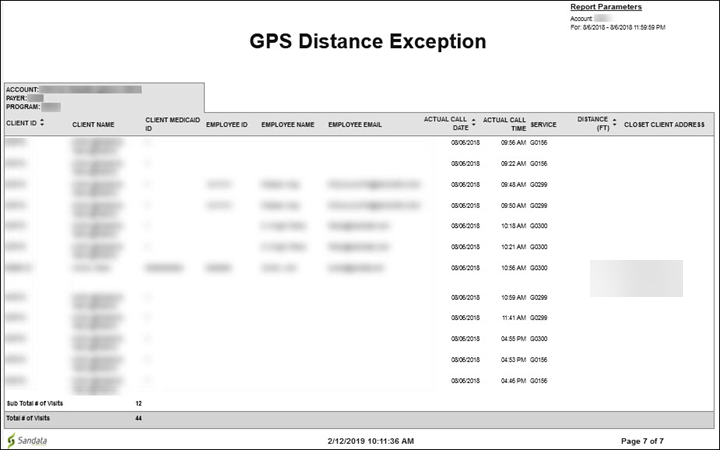
This report displays calls entered by a mobile user from a GPS location that is further from any of the client’s GPS validated addresses than the configured distance threshold. Use this report to identify calls that were not made from an expected location. The report also indicates the distance the call was made from the client’s closest address.
Use the following fields to limit the report output to:
|
Field |
Description |
|---|---|
|
Payer |
The selected payer(s) |
|
Program |
The selected program(s) |
|
Service |
The selected service(s) |
|
Client |
Client by name (last name, first name) When a partial name is entered the report will display results that begin with the entered characters. |
|
Client Medicaid ID |
Clients with the entered Medicaid ID The entered value must be an exact match to a client’s Medicaid ID. |
|
Supervisor |
The supervisor code for the client(s) at the provider agency |
|
Department |
The selected department |
|
Employee |
Employee by name (last name, first name) or Santrax ID When a partial name is entered the report displays results that begin with the entered characters. |
Report Grouping Tab
Reports are grouped by the following fields. Each change in these fields results in a page break.
|
Field |
Description |
|---|---|
|
Account |
The provider agency’s Sandata EVV account number |
|
Payer |
The payer |
|
Program |
The program |
Report Output
Each column of the report displays:
|
Columns |
Description |
|---|---|
|
Client ID |
The Sandata client ID |
|
Client Name |
The client's name |
|
Client Medicaid ID |
The client’s Medicaid ID and/or Alternate Medicaid ID If not available, Payer ID. If newborn support is enabled and the client is flagged as a newborn, is shown as “N”. |
|
Employee ID |
The employee's ID |
|
Employee Email |
The employee's email address |
|
Actual Call Date |
The date the call was received |
|
Actual Call Time |
The time the call was received |
|
Service |
The service performed for the visit |
|
Distance (Ft) |
The distance in feet from the client’s closest address |
|
Closest Client Address |
The client’s address closest to the call’s GPS coordinates |
Report Sample
This report shows plans of care set up for individual clients, which each client receiving a page. The report shows plan of care information including start/end dates, tasks and frequency. Use this report to review individual plans of care for clients. This report can be used to easily review planned activities for a client based on the plan of care entered into or received by the system. Agency personal, including clinicians, can use this report to validate that the plan of care is appropriate for the client and is used by Sandata’s mobile application, SMC when presenting the task list to the employee during the visit.
Use the following fields to limit the report output to:
|
Field |
Description |
|---|---|
|
Payer |
The selected payer(s) |
|
Program |
The selected program(s) |
|
Service |
The selected service(s) |
|
Client |
Client by name (last name, first name) When a partial name is entered the report will display results that begin with the entered characters. |
|
Client Medicaid ID |
Clients with the entered Medicaid ID The entered value must be an exact match to a client’s Medicaid ID. |
Report Grouping Tab
Reports are grouped by the following fields. Each change in these fields results in a page break
|
Field |
Description |
|---|---|
|
Client Name |
The client's name |
|
Client Medicaid ID |
The client’s Medicaid ID and/or Alternate Medicaid ID If not available, Payer ID. If newborn support is enabled and the client is flagged as a newborn, is shown as "N". |
|
Client ID |
The Sandata client ID |
Report Output
Each column of the report displays:
|
Columns |
Definition |
|---|---|
|
Payer |
The payer for the plan of care |
|
Program |
The program(s) for the plan of care |
|
Service |
The service(s) for the plan of care |
|
Provider ID |
The state assigned identifier for the provider (e.g. Provider Medicaid ID) |
|
Account Name |
The account name |
|
Account |
The provider agency’s Sandata EVV account number |
|
Start Date |
The start date of the client’s plan of care |
|
End Date |
The end date of the client’s plan of care When no end date is selected, the end date displays as 2099 or 2999. |
Tasks and Frequency
Each column of the report displays:
|
Columns |
Definition |
|---|---|
|
Task |
The tasks assigned to the plan of care |
|
Times/Wk |
The number of times per week each task is performed |
|
Sun/Mon/Tues/Wed etc |
The days of the week when the task is to be performed Days that are a part of the plan of care are indicated with an “X.” |
Sample Report
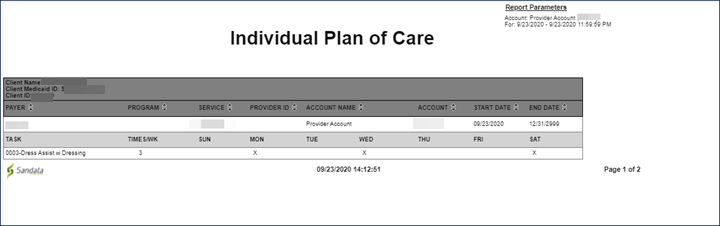
This report displays a list of all provider accounts assigned to the selected access group. It includes general information about each account. Use this report to review a list of all provider accounts.
Report Output
Each column of the report displays:
|
Columns |
Description |
|---|---|
|
Provider Medicaid ID |
The state assigned identifier for the provider |
|
Account Number |
The provider's Sandata EVV account number |
|
Account Name |
The account name |
|
Account Address |
The account's address |
|
Date Created |
The date the provider account was created by Sandata |
Sample Report

This report displays a list of employees and the date they enrolled in speaker verification. Use this report to review employees and identify which employees have been enrolled in speaker verification and which employees still need to be enrolled. This can be used as an operational report for provider agencies actively enrolling users in the speaker verification platform.
This report has no parameters.
Report Grouping Tab
Reports are grouped by the following fields. Each change in these fields results in a page break
|
Field |
Description |
|---|---|
|
Account |
The provider agency |
|
Provider ID |
The state assigned identifier for the provider (e.g Provider Medicaid ID) |
|
Enrolled: |
N/A |
Each column of the report displays:
|
Columns |
Description |
|---|---|
|
Employee ID |
The employee ID |
|
Employee Name |
The employee's name |
|
Santrax ID |
The employee’s Santrax ID |
|
Phone Number |
The employee’s phone number |
|
EVV Active Date |
The date the employee first made known to the EVV system (e.g first entry, first receipt, etc) |
|
Enrollment Date |
The date the employee enrolled in speaker verification |
Sample Report
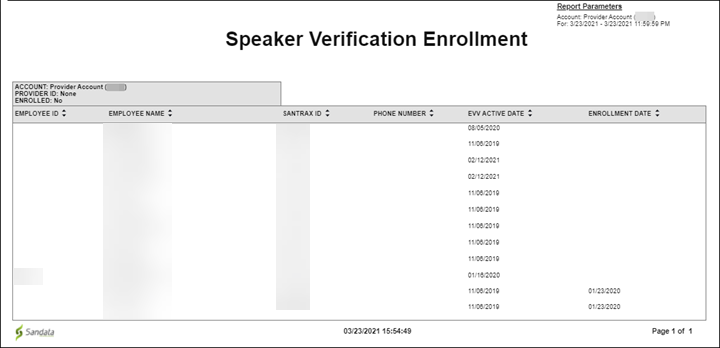
This report provides information for visits on a given date. Reported information for each visit includes all call information. Use this report to see all information about a visit including additional information that is not visible directly on the visit line in Visit Maintenance, such as extraneous calls. This report can be used as a convenient way to report and/or verify visit maintenance information.
Use the following fields to limit the report output to:
| Field | Description |
|---|---|
| Payer | The selected payer(s) |
| Program | The selected program(s) |
| Service | The selected service(s) |
| Client |
Client by name (last name, first name) or Sandata Client ID When a partial name is entered the report displays results that begin with the entered characters. |
| Client Medicaid ID |
Clients with the entered Medicaid ID The entered value must be an exact match to a client’s Medicaid ID. |
| Supervisor | The supervisor code for the client(s) at the provider agency |
| Department | The selected department |
| Employee |
Employee by name (last name, first name) or Santrax ID When a partial name is entered the report displays results that begin with the entered characters. |
Report Grouping
Reports are grouped by the following fields. Each change in these fields results in a page break.
| Field | Description |
|---|---|
| Account | The provider agency’s Sandata EVV account number |
| Payer | The payer |
| Program | The program |
| Service | The service performed for the visit |
Each column of the report lists:
| Columns | Description |
|---|---|
| Client Medicaid ID |
The client’s Medicaid ID and/or Alternate Medicaid ID If not available, Payer ID. If newborn support is enabled and the client is flagged as a newborn, is shown as “N.” |
| Client Name | The client's name |
| Phone # | The client’s primary phone number |
| Employee Name | The employee's name |
| Employee Santrax ID | The employee's Santrax ID |
| Visit Key | The visit id related to the visit |
| Visit Date | The date of the visit |
| Scheduled: Start | The scheduled start time for the visit |
| Scheduled: End | The scheduled end time for the visit |
| Scheduled: Hours | The total hours scheduled for the visit |
| Actual: Start | The actual start time for the visit |
| Actual: End | The actual end time for the visit |
| Actual: Hours | The actual hours elapsed for the visit |
| Adjusted: Start | The manually entered start time for the visit |
| Adjusted: End | The manually entered end time for the visit |
| Adjusted: Hours | The manually entered hours elapsed for the visit |
| Bill Hours | The total billable hours for the related visit |
| Client Verified Service | Indicates if the client verified the service |
| Client Verified Time | Indicates if the client verified the time |
| Client Verified Signature | Indicates if the client verified the signature |
Sample Report
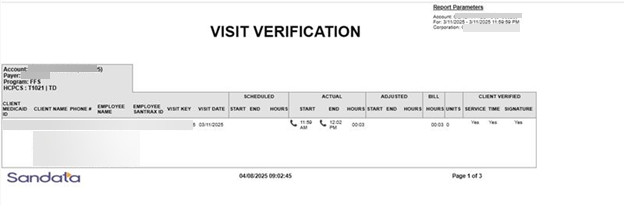
This report shows the Payer, program, and service hierarchy for the account. Use this report to review the Payer, program and service hierarchy as well as the start and end dates for services. The report also displays any modifiers applied to services and whether or not the service is required by the Cures Act.
The report can assist Providers in reviewing the Payer configuration for the program. It can also help payers review the current communication before communicating with providers.
Use the following report fields to limit the report output:
| Field | Description |
|---|---|
| Payer | The selected payer(s) |
Each report column displays:
| Columns | Description |
|---|---|
| Payer | The payer |
| Program | The program |
| Service | The service |
| Provider ID | The state assigned identifier for the provider (e.g. Provider Medicaid ID) |
| Account Name | The account name |
| Account | The provider agency's Sandata EVV account number |
| HCPCS | The HCPCS code used for billing |
| Modifier 1 | The first modifier applied to the service |
| Modifier 2 | The second modifier applied to the service |
| Modifier 3 | The third modifier applied to the service |
| Modifier 4 | The fourth modifier applied to the service |
| Cures Required |
An indicator that displays whether or not the service is required by the Cures Act This indicator only displays if the service has been configured for it. All services for a payer program should be assumed to be Cures Act required unless otherwise indicated. |
| Start Date | The start date for the service |
| End Date | The end date for the serviceAn end date of 12/31/2999 is used to indicate an ongoing service. |
Sample Report
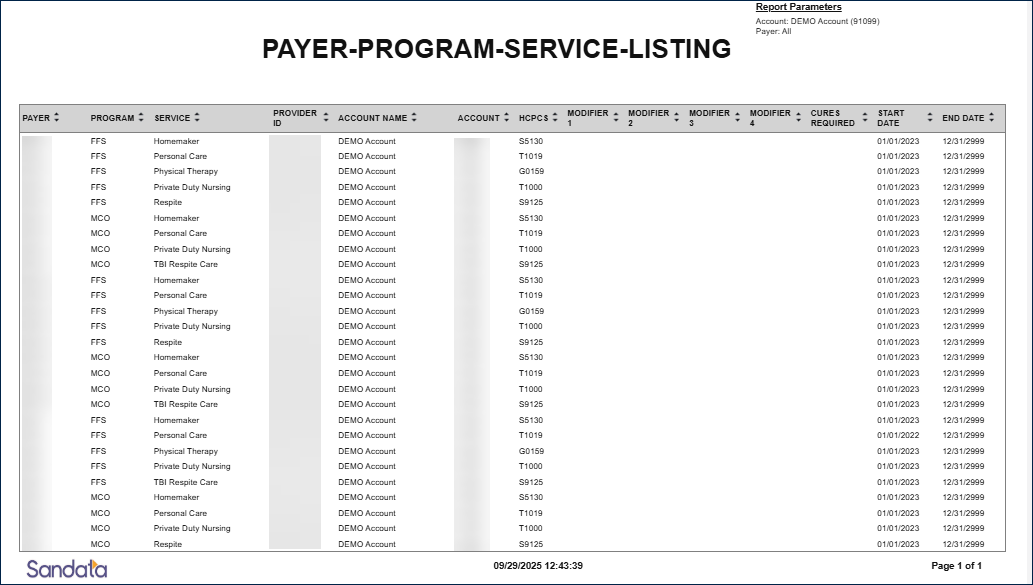
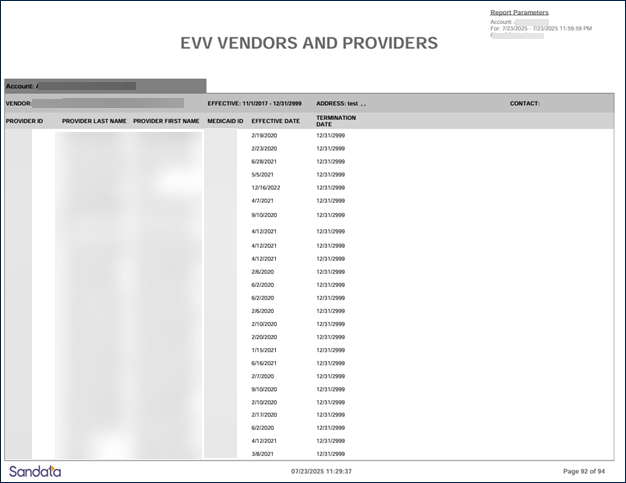
The EVV Vendors and Providers Report provides a list of program EVV Vendors and Providers for a state program based on an entered date range. State users are able to view a list of their providers and their vendors, along with their effective and termination dates. Use the following fields to limit the report output by:
| Field | Description |
|---|---|
| Account | EVV Vendors and Providers associated with the selected account(s) |
| Provider ID | EVV Vendors and Providers associated with the entered Provider ID |
Each column of the report displays:
| Field | Description |
|---|---|
| Account | The account name |
| Vendor | The name of the organization responsible for rendering EVV services |
| Effective | The date range for which the Vendor is considered effective for rendering EVV services |
| Address | The EVV Vendor’s address |
| Contact | The EVV Vendor’s defined contact person |
| Provider ID | The individual provider’s system generated ID number |
| Provider Last Name | The individual provider’s last name |
| Provider First Name | The individual provider’s first name |
| Medicaid ID | The state assigned identifier for the provider |
| Effective Date | The first date which the individual provider is considered effective for rendering EVV services |
| Termination Date | The last date which the individual provider is considered effective for rendering EVV services |
Sample Report
This report produces an excel spreadsheet that includes details for all active and pending clients for that specific date. This includes all details about the client including demographics, addresses, contacts, and other data points. If specific client data items are not collected by the program, that field will be blank on the report output. This report does not show details for inactive clients.
Use this export to create an easily sortable list of all clients that are in the account for that specific date. This information can also be used to populate a third-party data store including agency management systems, payroll systems and/or a data warehouse.
Use the following fields to limit the report output to:
| Field | Description |
|---|---|
| Account | The selected account(s) |
| Agency Grouping | The selected agency grouping |
| Client |
Client by name (last name, first name) or Sandata client ID When a partial name is entered the report displays results that begin with the entered characters. |
| Client Medicaid ID |
Clients with the entered Medicaid ID The entered value must be an exact match to a client's Medicaid ID. |
| Provider ID | The state assigned identifier for the provider (e.g., the Provider Medicaid ID) |
Report Output
See attached Full Client Export Columns pdf here.
Sample

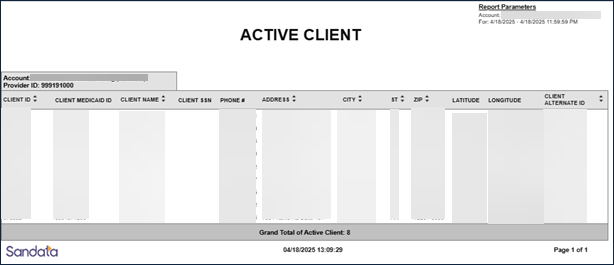
This report lists all active clients and information from the client’s profile including: Santrax ID, name, phone number, city and zip. The Active Clients report provides an overview of all active clients.
Use the following fields to limit the report output to:
|
Field |
Description |
|---|---|
|
Payer |
The selected payer(s) |
|
Program |
The selected program(s) |
|
Client |
Client by name (last name, first name) When a partial name is entered the report will display results that begin with the entered characters. |
|
Client Medicaid ID |
Clients with the entered Medicaid ID The entered value must be an exact match to a client’s Medicaid ID. |
|
Supervisor |
The supervisor code for the client(s) at the provider agency |
Report Grouping
Reports are grouped by the following fields. Each change in these fields results in a page break.
|
Field |
Description |
|---|---|
|
Field |
Description |
|
Account |
The provider agency’s Sandata EVV account number |
Each column of the report displays:
| Columns | Description |
|---|---|
|
Client ID |
The Sandata client ID |
|
Client Medicaid ID |
The client’s Medicaid ID and/or Alternate Medicaid ID If not available, Payer ID. If newborn support is enabled and the client is flagged as a newborn, is shown as “N.” |
|
Client Name |
The client's name |
|
Client SSN |
The client's social security number |
|
Phone # |
The client’s primary phone number |
|
Address |
The client’s primary street address (line 1) |
|
City |
The city from the client’s primary address |
|
St |
The state from the client’s primary address |
|
Zip |
The zip code from the client’s primary address |
|
Latitude |
The latitude of the client’s primary address |
|
Longitude |
The longitude of the client’s primary address |
|
Client Alternate ID |
The value entered in the client’s Other ID field |
Sample Report
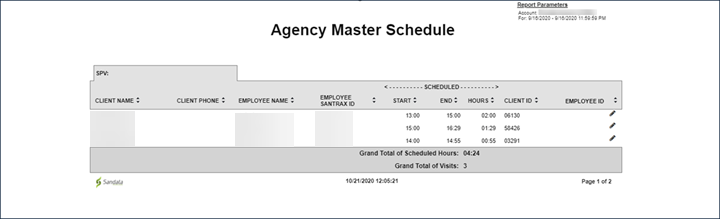
This report provides a comprehensive list of all scheduled visits for the selected date-range. This report lists all scheduled visits with a start date that falls within the selected date-range.
Use the following fields to limit the report output to:
|
Field |
Description |
|---|---|
|
Payer |
The selected payer(s) |
|
Program |
The selected program(s) |
|
Service |
The selected service(s) |
|
Client |
Client by name (last name, first name) or Sandata Client ID When a partial name is entered the report displays results that begin with the entered characters. |
|
Client AR# |
The client’s Account Receivable (AR) number |
|
Supervisor |
The supervisor code for the client(s) at the provider agency |
|
Department |
the selected department |
|
Employee |
employee by name (last name, first name) or Santrax ID When a partial name is entered the report displays results that begin with the entered characters. |
Each column of the report displays:
|
Columns |
Description |
|---|---|
|
Client Name |
The client's name |
|
Client Phone |
The client’s primary phone number |
|
Employee Santrax ID |
The employee’s Santrax ID |
|
Start |
The scheduled start time for the visit |
|
End |
The scheduled end time for the visit |
|
Hours |
The total hours scheduled for the visit |
|
Client ID |
The Sandata client ID |
|
Employee |
The employee ID |
Report Sample
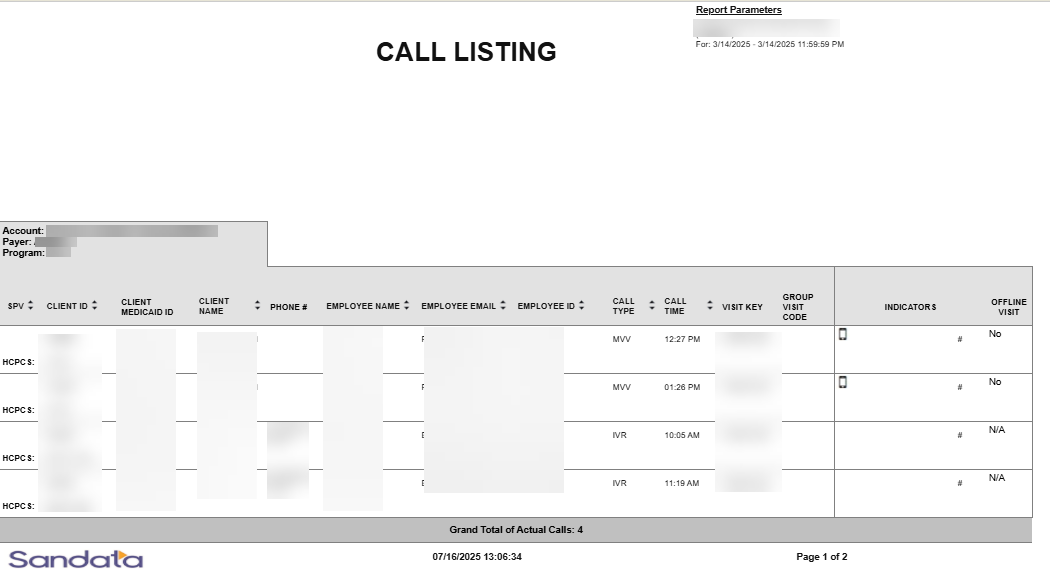
This report displays all calls that were made to Santrax EVV phone numbers for the date and time range that was specified when selecting the report. The calls are listed one after another individually with the beginning pages listing the unknown calls. This report is used to review calls.
Use the following fields to limit the report output to:
| Field | Description |
|---|---|
| Payer | the selected payer(s) |
| Program | the selected program(s) |
| Service | the selected service(s) |
| Client |
client by name (last name, first name) or Sandata Client ID When a partial name is entered the report displays results that begin with the entered characters. |
| Client Medicaid ID |
clients with the entered Medicaid ID The entered value must be an exact match to a client’s Medicaid ID. |
| Supervisor | the supervisor code for the client(s) at the provider agency |
| Department | the selected department |
| Employee |
employee by name (last name, first name) or Santrax ID When a partial name is entered the report displays results that begin with the entered characters. |
Report Grouping
Reports are grouped by the following fields. Each change in these fields results in a page break.
| Field | Description |
| Account | The provider agency’s Sandata EVV account number |
| Payer | The payer |
| Program | The program |
Report Output
Each column of the report displays:
| Columns | Description |
|---|---|
| SPV | The supervisor assigned to the employee |
| Client ID | The Sandata client ID |
| Service HCPS | The service code performed for the call (this appears under the Client ID) |
| Client Medicaid ID |
The client’s Medicaid ID and/or Alternate Medicaid ID If not available, Payer ID. If newborn support is enabled and the client is flagged as a newborn, is shown as “N.” |
| Client Name | The client's name |
| Phone # | The client’s primary phone number |
| Employee Name | The employee's name |
| Employee Email | The employee's email address |
| Employee ID | The employee’s Santrax ID |
| Call Type | The call type for the visit |
| Call Time | The time of the visit |
| Visit Key | The visit key of the visit |
| Group Visit Code | The group visit code associated with the visit |
| Indicators | An icon representing call functionality used for the call (see Legend) |
| Offline Visit | Indicates if an offline visit (Yes or No) |
| Grand Total of Actual Calls | The grand total of calls |
Sample Report
Legend
This report shows all clients and the address, phone number and other information for each client for the selected date. Use this report to review a list of all clients and contact information.
Use the following fields to limit the report output to:
| Field | Description |
|---|---|
| Payer | the selected payer(s) |
| Program | the selected program(s) |
| Client |
client by name (last name, first name) When a partial name is entered the report will display results that begin with the entered characters. |
| Client Medicaid ID |
clients with the entered Medicaid ID The entered value must be an exact match to a client’s Medicaid ID. |
| Supervisor | the supervisor code for the client(s) at the provider agency |
Report Grouping Tab
Reports are grouped by the following fields. Each change in these fields results in a page break.
| Field | Description |
|---|---|
| Account | the provider agency’s Sandata EVV account number |
Report Output
Each column of the report displays:
| Columns | Description |
|---|---|
| EVV Active Date | the date the client became active in the system |
| Client ID | the Sandata client ID |
| Client Medicaid ID |
the client’s Medicaid ID and/or Alternate Medicaid ID If not available, Payer ID. If newborn support is enabled and the client is flagged as a newborn, is shown as "N.” |
| Client Name | the client's name |
| Time Zone | the client’s time zone |
| Client SSN | the client’s social security number |
| Phone # | the client’s primary phone number |
| Address | the client’s primary street address (line 1) |
| City | the city from the client’s primary address |
| St | the state from the client’s primary address |
| Zip | the zip code from the client’s primary address |
| County |
the county from the client’s primary address This value is manually entered or received via an interface and is not validated against the client’s address. |
Sample Report
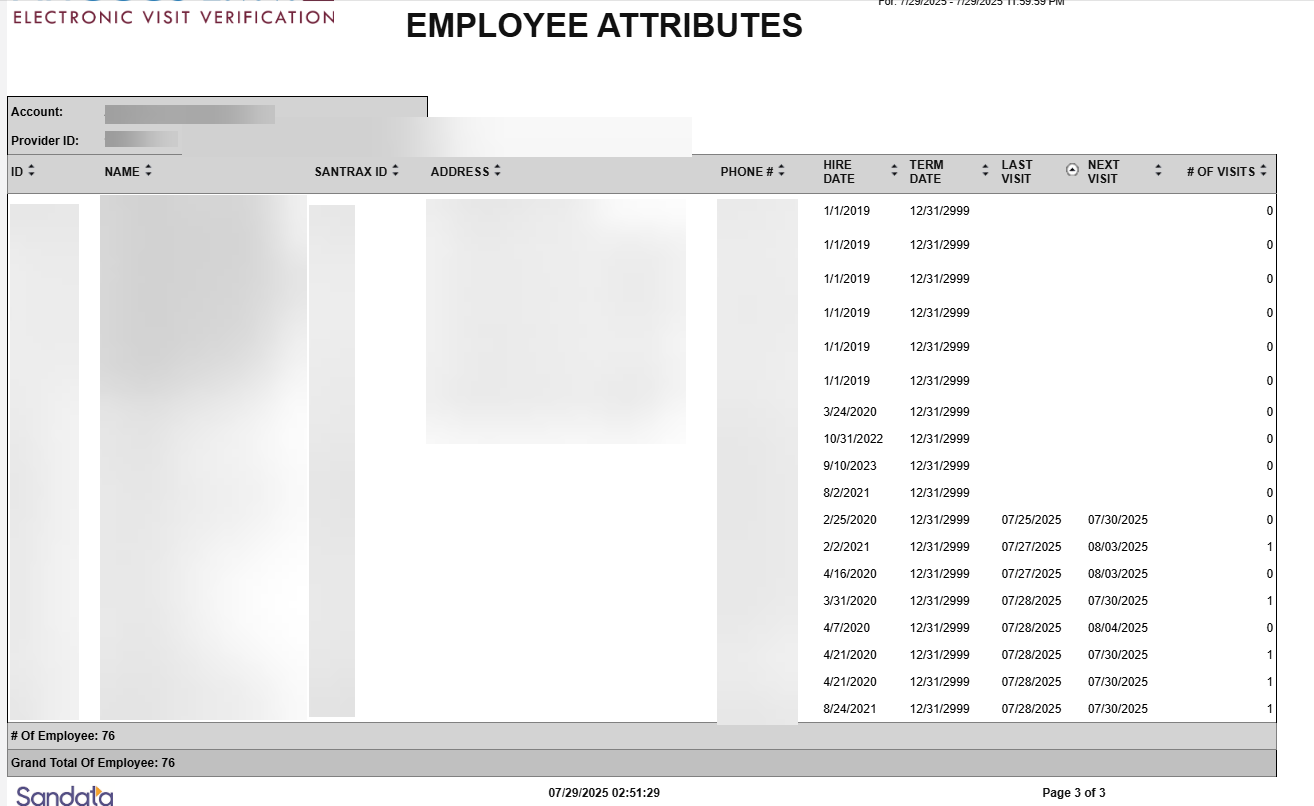
This report shows information about employees as of a selected single date. The report displays basic demographic information as well as important dates (last visit, next visit and number of visits). This report can be used by provider agencies to better understand their employee roster. Address and phone information are included to make contacting the employee easier. The employee’s last and next visit are displayed to show recent and upcoming activity. The number of upcoming visits for each employee is also included. Typically, the system includes up to 2 weeks of schedules.
Use the following fields to limit the report output to:
| Field | Description |
|---|---|
| Employee | Employee by name (last name, first name) or Santrax ID |
Report Grouping Tab
Reports are grouped by the following fields. Each change in these fields results in a page break
| Field | Description |
|---|---|
| Account | the provider agency’s Sandata EVV account number |
| Provider ID | the state assigned identifier for the provider (e.g. Provider Medicaid ID) |
Each column of the report displays:
| Columns | Description |
|---|---|
| ID | The employee's ID number |
| Name | The employee's name |
| Santrax ID | The employee's Santrax ID |
| Address | The employee’s primary address |
| Phone | The employee’s primary phone number |
| Hire Date | The employee’s hire date or the first date the employee was added to Sandata EVV |
| Term Date | The employee’s termination date or the date the employee was marked as inactive (deleted) in Sandata EVV |
| Last Visit | The date and time of the last visit started by the employee |
| Next Visit | The date and time of the employee’s next scheduled visit |
| # of Visits | The number of visits for the employee in Sandata EVV for that day |
| # of Employees | The number of employees for the account |
| Grand Total of Employees | The grand total of employees for the account |
Sample Report
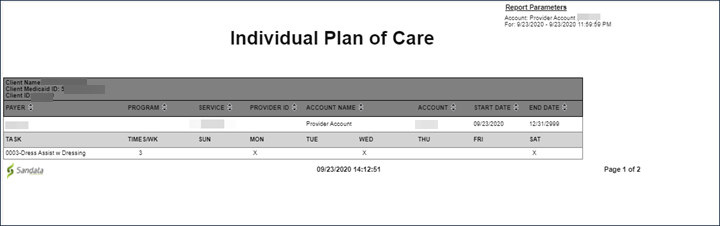
This report shows plans of care set up for individual clients, which each client receiving a page. The report shows plan of care information including start/end dates, tasks and frequency. Use this report to review individual plans of care for clients. This report can be used to easily review planned activities for a client based on the plan of care entered into or received by the system. Agency personal, including clinicians, can use this report to validate that the plan of care is appropriate for the client and is used by Sandata’s mobile application, SMC when presenting the task list to the employee during the visit.
Use the following fields to limit the report output to:
|
Field |
Description |
|---|---|
|
Payer |
The selected payer(s) |
|
Program |
The selected program(s) |
|
Service |
The selected service(s) |
|
Client |
Client by name (last name, first name) When a partial name is entered the report will display results that begin with the entered characters. |
|
Client Medicaid ID |
Clients with the entered Medicaid ID The entered value must be an exact match to a client’s Medicaid ID. |
Report Grouping Tab
Reports are grouped by the following fields. Each change in these fields results in a page break
|
Field |
Description |
|---|---|
|
Client Name |
The client's name |
|
Client Medicaid ID |
The client’s Medicaid ID and/or Alternate Medicaid ID If not available, Payer ID. If newborn support is enabled and the client is flagged as a newborn, is shown as "N". |
|
Client ID |
The Sandata client ID |
Report Output
Each column of the report displays:
|
Columns |
Definition |
|---|---|
|
Payer |
The payer for the plan of care |
|
Program |
The program(s) for the plan of care |
|
Service |
The service(s) for the plan of care |
|
Provider ID |
The state assigned identifier for the provider (e.g. Provider Medicaid ID) |
|
Account Name |
The account name |
|
Account |
The provider agency’s Sandata EVV account number |
|
Start Date |
The start date of the client’s plan of care |
|
End Date |
The end date of the client’s plan of care When no end date is selected, the end date displays as 2099 or 2999. |
Each column of the report displays:
|
Columns |
Definition |
|---|---|
|
Task |
The tasks assigned to the plan of care |
|
Times/Wk |
The number of times per week each task is performed |
|
Sun/Mon/Tues/Wed etc |
The days of the week when the task is to be performed Days that are a part of the plan of care are indicated with an “X.” |
Sample Report
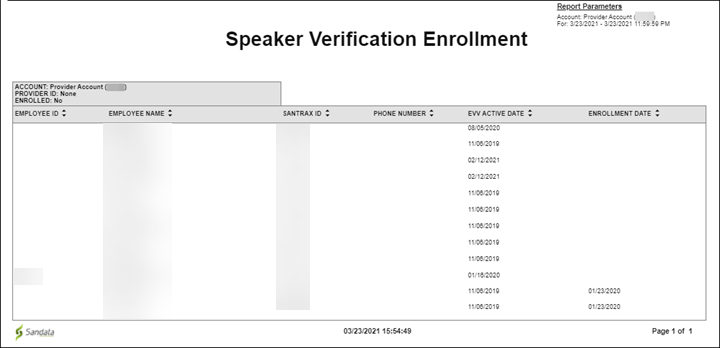
This report displays a list of employees and the date they enrolled in speaker verification. Use this report to review employees and identify which employees have been enrolled in speaker verification and which employees still need to be enrolled. This can be used as an operational report for provider agencies actively enrolling users in the speaker verification platform.
This report has no parameters.
Reports are grouped by the following fields. Each change in these fields results in a page break
|
Field |
Description |
|---|---|
|
Account |
the provider agency |
|
Provider ID |
The state assigned identifier for the provider (e.g Provider Medicaid ID) |
|
Enrolled: |
N/A |
Each column of the report displays:
|
Columns |
Description |
|---|---|
|
Employee ID |
the employee ID |
|
Employee Name |
the employee's name |
|
Santrax ID |
the employee’s Santrax ID |
|
Phone Number |
the employee’s phone number |
|
EVV Active Date |
the date the employee first made known to the EVV system (e.g first entry, first receipt, etc) |
|
Enrollment Date |
the date the employee enrolled in speaker verification |
Sample Report
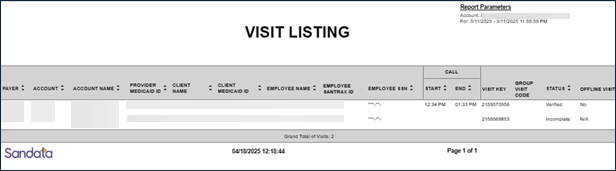
This report displays all actual calls for all visits across all agencies for the selected day. It allows the user to see all activity for a specific day across agencies, allowing users to perform further analytics on activity. Use this report to view all visits for the selected day and review the visit status and call in/out times in one report.
This report does not offer any parameters. All visits are included.
Each column of the report displays:
| Columns | Description |
|---|---|
| Payer | the payer |
| Account | the provider’s Sandata EVV account number |
| Account Name | the account name |
| Provider Medicaid ID | the state assigned identifier for the provider (e.g. Provider Medicaid ID) |
| Client Name | the client's name |
| Client Medicaid ID |
the client’s Medicaid ID and/or Alternate Medicaid ID If not available, Payer ID. If newborn support is enabled and the client is flagged as a newborn, is shown as “N.” |
| Employee Name | the employee's name |
| Employee Santrax ID | the employee’s Santrax ID |
| Employee SSN | the employee’s social security number |
| Call: Start | the call in time for the visit |
| Call: End | the call out time for the visit |
| Visit Key | the visit id related to the visit |
| Group Visit Code | the group visit code associated with the visit |
| Status | the status of the visit |
| Offline Visit | indicates if this was an offline mobile visit (Yes, No, N/A) |
Sample Report
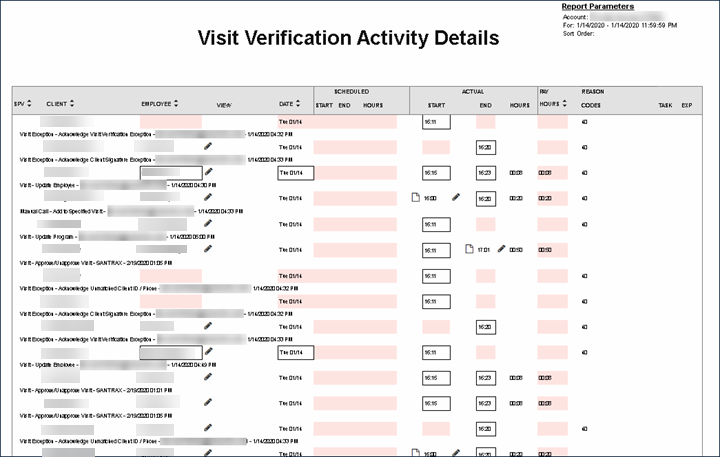
This report shows all visits taking place for a specific day. The report displays visit information including client name, employee name, call in and call out time as well as additional visit information including scheduled visit times, and billing information.
This report is from a previous version of the application and does not include all information for a payer program.
Use this report to review activity performed for visits that occurred for a selected. This shows all of the changes that were made for the visit along with the reason codes applied. The second line of the visit shows what the change was, who made the change and when. This report can be used to understand visits are being modified and which user is making those modifications.
Use the following fields to limit the report output to:
|
Field |
Description |
|---|---|
|
Payer |
the selected payer(s) |
|
Program |
the selected program(s) |
|
Service |
the selected service(s) |
|
Client |
client by name (last name, first name) or Sandata Client ID When a partial name is entered the report displays results that begin with the entered characters. |
|
Client Medicaid ID |
clients with the entered Medicaid ID The entered value must be an exact match to a client’s Medicaid ID. |
Each column of the report lists:
|
Columns |
Description |
|---|---|
|
SPV |
the supervisor at the provider agency |
|
Client |
the client's ID and name (last, first) |
|
Employee |
the employee's username |
|
View |
N/A |
|
Date |
the date of the visit |
|
Scheduled Start |
the scheduled start time for the visit |
|
Scheduled End |
the scheduled end time for the visit |
|
Scheduled Hours |
the total hours scheduled for the visit |
|
Actual Start |
the actual start time for the visit |
|
Actual End |
the actual end time for the visit |
|
Actual Hours |
the total hours based on actual calls |
|
Pay Hours |
the total payable hours |
|
Reason Codes |
any reason codes applied when editing the visit |
|
Task |
the tasks performed for the visit |
|
EXP |
indicates whether or not the visit has been exported |
Sample Report
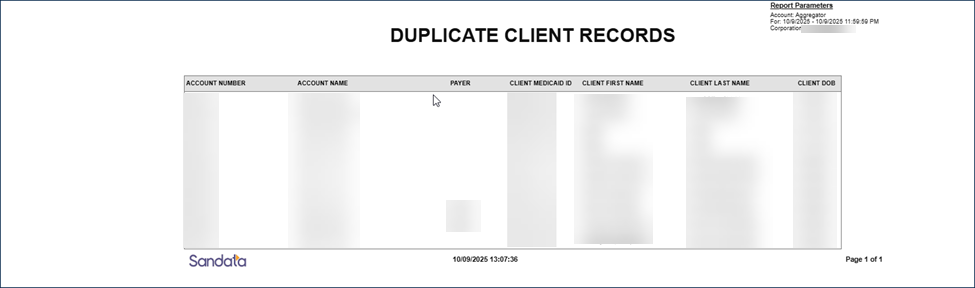
This report helps to identify duplicate client records, identified by matching client last name and date of birth. This daily report can be exported as both a CSV and an Excel file.
Use this report to identify potential duplicate Client records. You can limit the report output by date.
Each column of the EVV report displays the following information:
| Columns | Description |
|---|---|
| Account Number | the provider agency’s account number |
| Account Name | the provider agency account name |
| Payer | the payer ID |
| Client Medicaid ID | the state assigned ID or EOEA assigned ID |
| Client First Name | the client’s first name |
| Client Last Name | the client’s last name |
| Client DOB | the client's date of birth |
Sample Report
This report produces an excel spreadsheet that includes details for all employees for that specific date. This includes all details about the employee including demographics, address, hire date, termination date, and other data points. If specific client data items are not collected by the program, that field will be blank on the report output.
Use the following fields to limit the report output to:
| Field | Description |
|---|---|
| Account | the selected account(s) |
| Agency Grouping | the selected agency grouping |
| Department | the employee's department |
| Provider ID | the state assigned identifier for the provider (e.g., the Provider Medicaid ID) |
| Employee | the name of the employee. When a partial name is entered, the report will display results that begin with the entered characters. |
See the Full Employee Export Columns file here for column header names and descriptions.
Sample Report
