Sandata Billing Reports

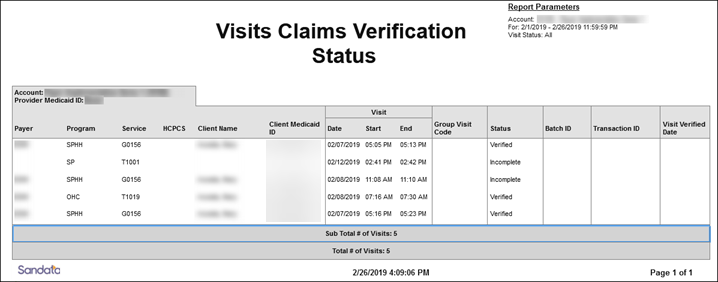
This report displays all visits within the selected date range and shows the last time each visit was returned to the payer for validation. Use this report to track the status of visits relative to claims validation. It can be used to review when a particular visit was returned to the adjudicating system.
Use the following fields to limit the report output:
|
Field |
Description |
|---|---|
|
Payer |
Visits for the selected payer(s) |
|
Program |
Visits for the selected program(s) |
|
Service |
Visits for the selected service(s) |
|
Client Medicaid ID |
Visits for the client's Medicaid ID |
|
Supervisor |
Visits for the selected supervisor at the provider agency |
|
Visit Status |
Visits for the selected visit status |
Reports are grouped by the following fields. Each change in these fields results in a page break.
|
Field |
Description |
|---|---|
|
Account: |
The selected provider |
|
Provider Medicaid ID: |
The provider's Medicaid ID and/or Alternate Medicaid ID |
Each column of the report displays:
|
Columns |
Description |
|---|---|
|
PayerT |
The payer for the related visit |
|
Program |
The program(s) fir the visit |
|
Service |
The service performed for the visit |
|
HCPCS |
The HCPCS code used for billing |
|
Client Name |
The client name Blank if unknown |
|
Medicaid ID |
The client’s Medicaid ID and/or Alternate Medicaid ID If not available, Payer ID. If newborn support is enabled and the client is flagged as a newborn, is shown as “N”. |
|
Visit Date/Start/End |
The date, start time and end time of the visit |
|
Group Visit Code |
The group visit code associated with the visit, if applicable |
|
Status |
The status of the visit |
|
Batch ID |
Currently Unavailable |
|
Transaction ID |
Currently Unavailable |
|
Visit Verified Date |
Currently Unavailable |
Sample Report
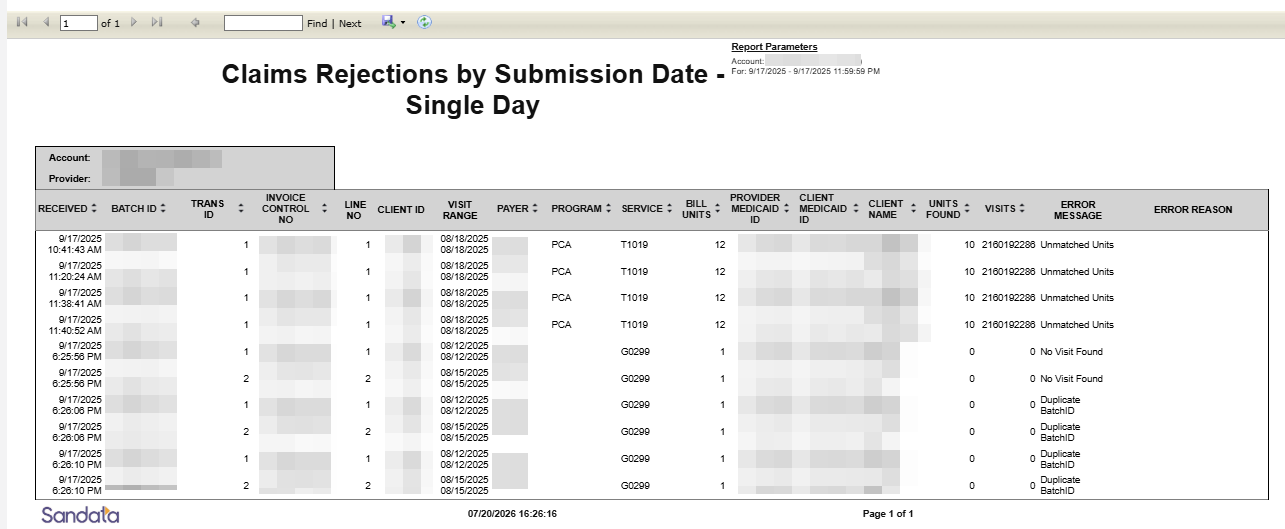
This report shows all claims validation requests that were returned unsuccessfully by the Sandata’s Claims Validation system. The report shows the request including the error message returned. Use this report to quickly identify claims where matching EVV information was not found. This can assist in identifying visits that require action so they can be resubmitted to the claims validation system.
Use the following fields to limit the report output:
| Field | Description |
|---|---|
| Payer | Visits for the selected payer(s) |
| Program | Visits for the selected program(s) |
| Service | Visits for the selected service(s) |
Reports are grouped by the following fields. Each change in these fields results in a page break.
| Field | Description |
|---|---|
| Account | The provider agency’s Sandata EVV account number |
| Provider | The state assigned identifier for the prover (e.g Provider Medicaid ID) |
Each column of the report lists the following information:
| Columns | Description |
|---|---|
| Received | The date the claim was received by Sandata Claims Validation |
| Batch ID | The batch ID number for the claims validation request |
| Trans ID | The transaction ID number for the claims validation request |
| Invoice Control NO | The invoice control number for the claims validation request |
| Line NO | The line number within the invoice |
| Client ID | The Sandata client ID |
| Visit Range | The date range for the claim where the visits were reviewed |
| Payer | The payer for the claim line |
| Program | The program for the claim line |
| Service | The service for the claim line |
| Bill Unit | The billable units for the claim line. This reflects the total billing requested for the date range |
| Exception | The information returned for the failed claims request |
| Provider Medicaid ID |
The client's Medicaid ID and/or Alternate Medicaid ID If not available, Payer ID. If newborn support is enabled and the client is flagged as a newborn, is shown as "N". |
| Client Name |
The client's name. Blank if unknown. |
| Units Found | The total billable units for all visits found matching the request criteria |
| Visits | The number of visits found which were reviewed for the claims request |
Sample Report
What does this report show?
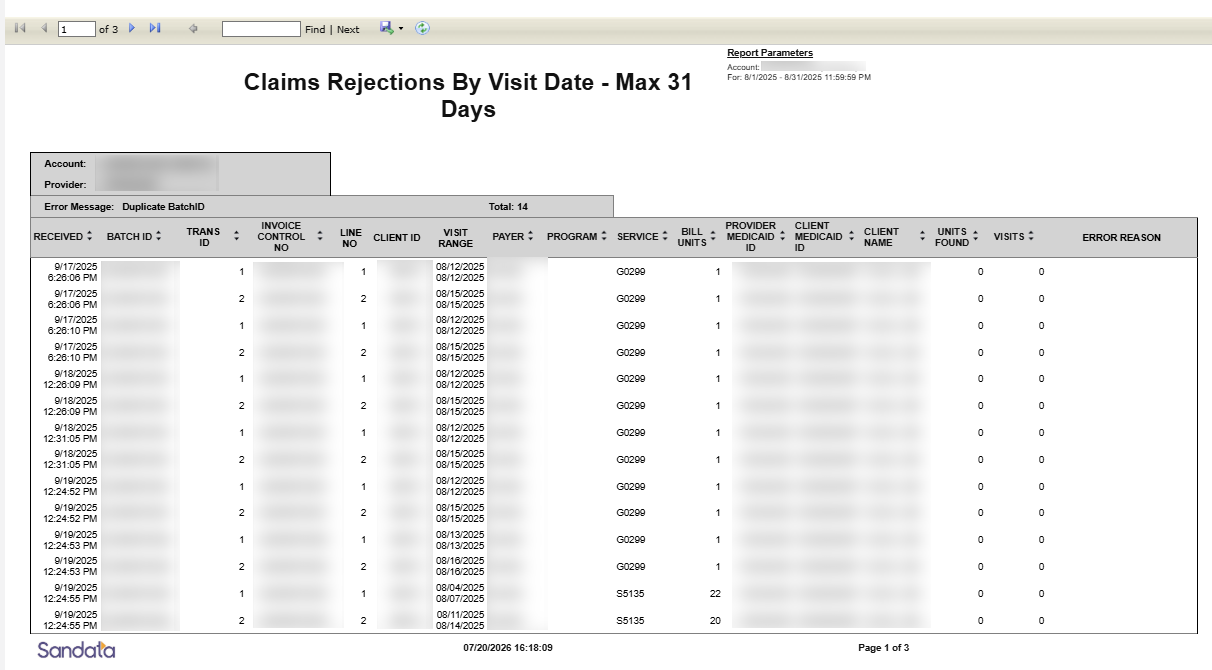
The Claims Rejections by Visit Date - Max 31 Days Report helps you identify claims that were rejected because they could not be matched to an Electronic Visit Verification (EVV) visit. This report displays claims based on the visit date of service, allowing you to review rejected claims for visits that occurred during a selected date range of up to 31 days. Use this report to investigate claim rejections, identify mismatched information between claims and visits, and determine what needs to be corrected before resubmitting a claim.
Before You Begin
Keep these points in mind before running the report.
For the best results:
-
Run the report for a maximum of 31 days at a time.
-
Run the report separately for each Sandata account.
-
Use this report with your other Sandata reports to gain a complete picture of your claims and visits.
When reviewing your results, remember:
-
Claims that cannot be matched to a visit are not associated with a specific Sandata account because Sandata cannot determine which account the missing visit belongs to.
-
Because this report is based on visit dates, claims without a matching visit date are not included in the report results.
When should I use this report?
Use this report when you need to:
-
Review rejected claims for services provided during a specific date range.
-
Investigate why a claim did not match an EVV visit.
-
Identify claim or visit information that needs to be corrected.
-
Verify that visits were recorded and verified before claims were submitted.
Which Claims Rejections report should I use?
There are two Claims Rejections reports. Both identify claims that failed to match an EVV visit, but each uses a different date to retrieve results.
| If you want to... | Use this report |
|---|---|
| Review claims based on the date services were provided | Claims Rejections by Visit Date - Max 31 Days |
| Review claims based on the date claims were submitted | Claims Rejections by Submission Date - Max 31 Days |
How do I use this report?
After running the report, work through each rejected claim using the following process.
-
Review the rejected claim and note the reported error.
-
Compare the information on the claim with the associated EVV visit.
Check these items first:
-
Provider ID - Does the Provider ID on the claim match the Provider ID in Sandata?
-
Client ID - Does the claim match the correct client?
-
Visit Date - Does the service date on the claim match the visit date?
-
Payer ID - Does the payer match on both the claim and the visit?
-
Procedure Code - Does the procedure code match? Some states require modifiers to match exactly. Follow your state's requirements.
-
Units - Are the billed units equal to or less than the verified visit units? Follow your state's unit rounding requirements.
-
Submission Timing - Was the visit entered and verified in Sandata before the claim was submitted?
-
-
Determine whether the problem exists on the claim or the visit and correct the issue.
Why didn't my claim match a visit?
Several issues can prevent a claim from matching an EVV visit. Review the common issues below to identify what needs to be corrected.
The visit wasn't verifiedOnly visits in Verified status (Auto Verified or Manual Verified) are eligible for claims matching. Visits in Incomplete or Omit status cannot be matched.
Check that:
-
The visit is in Verified status.
-
All required visit information has been entered.
-
Any exceptions have been resolved.
A claim can only be matched to an EVV visit that has already been received and verified by the Sandata EVV Aggregator.
Check that:
-
The visit was received by Sandata before the payer processed the claim.
-
The visit was already in Verified status when the claim was submitted.
The procedure code on the claim must match the procedure code on the verified EVV visit.
Check that:
-
The procedure code on the claim matches the procedure code on the verified EVV visit.
-
Any required procedure code modifiers also match, if applicable.
The billed units don't match
The units billed on the claim must be less than or equal to the verified visit units.
Check that:
-
The number of units billed on the claim does not exceed the verified visit units.
-
The units on the claim and the verified visit were calculated using your payer's or state's unit rounding requirements.
What should I do if a claim doesn't match a visit?
After identifying the issue, either:
-
Correct the claim and resubmit it.
-
Correct the visit, verify it if necessary, and then resubmit the claim.
Before resubmitting, confirm that all claim and visit information matches.
Available Filters
Use filters to narrow your report results.
| Filter | Description |
|---|---|
| Date Range | Limits results to the selected visit date range (up to 31 days). |
| Payer | Displays claims for a specific payer. |
| Program | Displays claims for a specific program. |
Field Definitions
| Field | Definition |
|---|---|
| Account | Provider name and Sandata account number. |
| Provider | Provider Identifier on the claim. |
| Error | The reason the claim did not match a visit. |
| Total | Total number of claims for the error shown. |
| Received | Date the claim was received by the Sandata system. |
| Batch ID | Batch ID assigned to the claim. |
| Transaction ID | Transaction ID associated with the claim. This field is not used in all states. |
| Invoice Control Number (ICN) | Unique identifier assigned by the payer to track the claim. |
| Line No. | Service line number on the claim. |
| Client ID | Client identifier on the claim. |
| Visit Range | Start and end dates of the visit on the claim. |
| Payer | Payer identifier on the claim. |
| Program | Program associated with a potential matching visit. This field populates only for Unmatched Units errors. |
| Service | Procedure code on the claim. |
| Bill Units | Units billed on the claim. |
| Provider Medicaid ID | Provider Medicaid ID on the claim. |
| Client Medicaid ID | Client Medicaid ID on the claim. |
| Client Name | Client name from the potential matching visit. This field populates only for Unmatched Units errors. |
| Units Found | Number of units found on the potential matching visit. This field populates only for Unmatched Units errors. |
| Visits | Number of visits that matched the claim. |
| Error Reason | Additional information about the matching error. This may include information from the claim response file's Note Detail field. |
Sample Report
What does this report show?
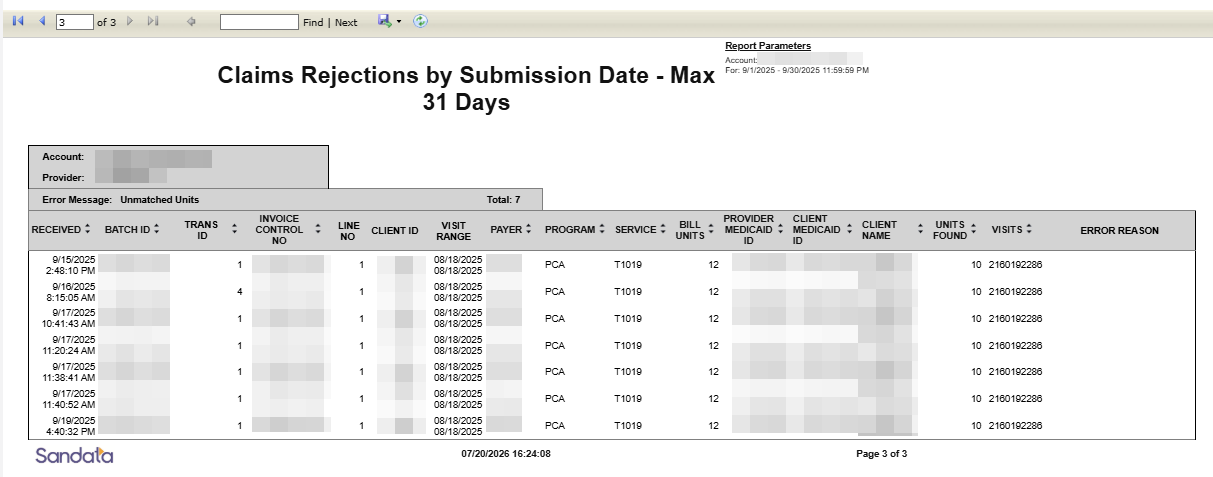
The Claims Rejections by Submission Date - Max 31 Days Report helps you identify claims that were rejected because they could not be matched to an Electronic Visit Verification (EVV) visit. This report displays claims based on the claim submission date, allowing you to review rejected claims submitted during a selected date range of up to 31 days. Use this report to investigate claim rejections, identify mismatched information between claims and visits, and determine what needs to be corrected before resubmitting a claim.
Before You Begin
Keep these points in mind before running the report.
For the best results:
-
Run the report for a maximum of 31 days at a time.
-
Run the report separately for each Sandata account.
-
Use this report with your other Sandata reports to gain a complete picture of your claims and visits.
When reviewing your results, remember claims that cannot be matched to a visit are not associated with a specific Sandata account because Sandata cannot determine which account the missing visit belongs to.
When should I use this report?
Use this report when you need to:
-
Review claims submitted during a specific date range.
-
Investigate recently rejected claims.
-
Identify claim or visit information that needs to be corrected.
-
Monitor claim submission activity and identify claims that need to be resubmitted.
Which Claims Rejections report should I use?
There are two Claims Rejections reports. Both identify claims that failed to match an EVV visit, but each uses a different date to retrieve results.
| If you want to... | Use this report |
|---|---|
| Review claims based on the date services were provided | Claims Rejections by Visit Date - Max 31 Days |
| Review claims based on the date claims were submitted | Claims Rejections by Submission Date - Max 31 Days |
How do I use this report?
After running the report, work through each rejected claim using the following process.
-
Review the rejected claim and note the reported error.
-
Compare the information on the claim with the associated EVV visit.
Check these items first:
-
Provider ID - Does the Provider ID on the claim match the Provider ID in Sandata?
-
Client ID - Does the claim match the correct client?
-
Visit Date - Does the service date on the claim match the visit date?
-
Payer ID - Does the payer match on both the claim and the visit?
-
Procedure Code - Does the procedure code match? Some states require modifiers to match exactly. Follow your state's requirements.
-
Units - Are the billed units equal to or less than the verified visit units? Follow your state's unit rounding requirements.
-
Submission Timing - Was the visit entered and verified in Sandata before the claim was submitted?
-
-
Determine whether the problem exists on the claim or the visit and correct the issue.
Why didn't my claim match a visit?
Several issues can prevent a claim from matching an EVV visit. Review the common issues below to identify what needs to be corrected.
The visit wasn't verifiedOnly visits in Verified status (Auto Verified or Manual Verified) are eligible for claims matching. Visits in Incomplete or Omit status cannot be matched.
Check that:
-
The visit is in Verified status.
-
All required visit information has been entered.
-
Any exceptions have been resolved.
A claim can only be matched to an EVV visit that has already been received and verified by the Sandata EVV Aggregator.
Check that:
-
The visit was received by Sandata before the payer processed the claim.
-
The visit was already in Verified status when the claim was submitted.
The procedure code on the claim must match the procedure code on the verified EVV visit.
Check that:
-
The procedure code on the claim matches the procedure code on the verified EVV visit.
-
Any required procedure code modifiers also match, if applicable.
The billed units don't match
The units billed on the claim must be less than or equal to the verified visit units.
Check that:
-
The number of units billed on the claim does not exceed the verified visit units.
-
The units on the claim and the verified visit were calculated using your payer's or state's unit rounding requirements.
What should I do if a claim doesn't match a visit?
After identifying the issue, either:
-
Correct the claim and resubmit it.
-
Correct the visit, verify it if necessary, and then resubmit the claim.
Before resubmitting, confirm that all claim and visit information matches.
Available Filters
Use filters to narrow your report results.
| Filter | Description |
|---|---|
| Date Range | Limits results to the selected submission date range (up to 31 days). |
| Payer | Displays claims for a specific payer. |
| Program | Displays claims for a specific program. |
Field Definitions
| Field | Definition |
|---|---|
| Account | Provider name and Sandata account number. |
| Provider | Provider Identifier on the claim. |
| Error | The reason the claim did not match a visit. |
| Total | Total number of claims for the error shown. |
| Received | Date the claim was received by the Sandata system. |
| Batch ID | Batch ID assigned to the claim. |
| Transaction ID | Transaction ID associated with the claim. This field is not used in all states. |
| Invoice Control Number (ICN) | Unique identifier assigned by the payer to track the claim. |
| Line No. | Service line number on the claim. |
| Client ID | Client identifier on the claim. |
| Visit Range | Start and end dates of the visit on the claim. |
| Payer | Payer identifier on the claim. |
| Program | Program associated with a potential matching visit. This field populates only for Unmatched Units errors. |
| Service | Procedure code on the claim. |
| Bill Units | Units billed on the claim. |
| Provider Medicaid ID | Provider Medicaid ID on the claim. |
| Client Medicaid ID | Client Medicaid ID on the claim. |
| Client Name | Client name from the potential matching visit. This field populates only for Unmatched Units errors. |
| Units Found | Number of units found on the potential matching visit. This field populates only for Unmatched Units errors. |
| Visits | Number of visits that matched the claim. |
| Error Reason | Additional information about the matching error. This may include information from the claim response file's Note Detail field. |