Sandata Aggregator Authorization Reports

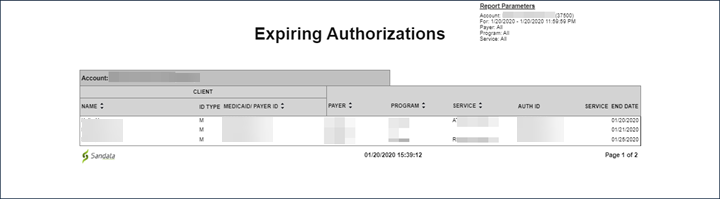
This report displays a listing of authorizations that will expire within 31 days of the selected date. This report allows users to review all expiring authorizations and quickly determine which authorizations require action to either end services or obtain an updated or new authorization for the client. It is best practice to run this report for the current date to identify authorizations that will be expiring.
Use the following fields to limit the report output:
|
Field |
Description |
|---|---|
|
Payer |
the selected payer(s) |
|
Program |
the selected program(s) |
|
Service |
the selected service(s) |
|
Client |
client by name (last name, first name) or Sandata Client ID When a partial name is entered the report displays results that begin with the entered characters. |
|
Client AR# |
the client’s Account Receivable (AR) number |
Report Grouping Tab
|
Field |
Description |
|---|---|
|
Account |
the provider agency’s Sandata EVV account number |
Each column of the report displays the following information:
|
Columns |
Description |
|---|---|
|
Client: Name |
the client's name |
|
Client: ID Type |
the type of identifier displayed on the report for the client (M = Medicaid ID, P = Payer ID, C=Client ID, N=Newborn) |
|
Client: Medicaid/Payer ID |
the client’s identifier based on the ID Type specified |
|
Payer |
the authorization's payer |
|
Program |
the authorization's program |
|
Service |
the authorization's service |
|
Auth ID |
the authorization’s reference ID number provided by the payer |
|
Service End Date |
the end date for the authorization's service |
Sample Report
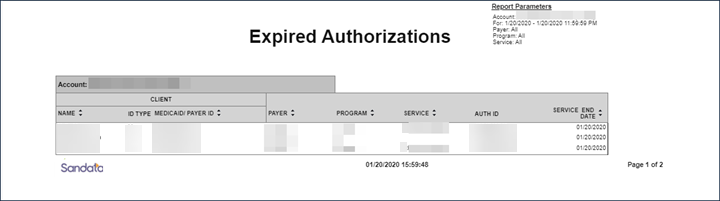
This report displays a listing of authorizations that have expired as of the selected date. This report allows users to review all expired authorizations and using that data, determine whether or not replacement authorizations need to be obtained. Only authorizations that have not been replaced by a subsequent authorization for the save service are displayed on this report.
Use the following fields to limit the report output:
|
Field |
Description |
|---|---|
|
Payer |
the selected payer(s) |
|
Program |
the selected program(s) |
|
Service |
the selected service(s) |
|
Client |
client by name (last name, first name) or Sandata Client ID When a partial name is entered the report displays results that begin with the entered characters. |
|
Client AR# |
the client’s Account Receivable (AR) number |
Reports are grouped by the following fields. Each change in these fields results in a page break.
|
Field |
Description |
|---|---|
|
Account |
the provider agency’s Sandata EVV account number |
Each column of the report displays the following information:
|
Columns |
Description |
|---|---|
|
Client: Name |
the client's name |
|
Client: ID Type |
the type of identifier displayed on the report for the client (M = Medicaid ID, P = Payer ID, C=Client ID, N=Newborn) |
|
Client: Medicaid/Payer ID |
the client’s identifier based on the ID Type specified |
|
Payer |
the authorization's payer |
|
Program |
the authorization's program |
|
Service |
the authorization's service |
|
Auth ID |
the authorization’s reference ID number. provided by the payer |
|
Service End Date |
the end date for the authorization's service |
Sample Report
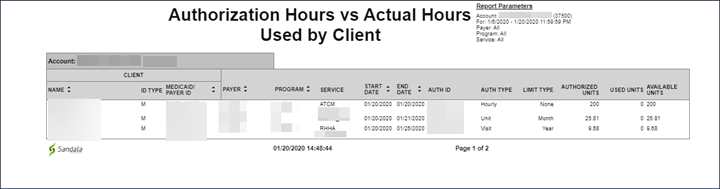
This report displays the number of authorized hours compared to the total number of verified hours recorded by the system. The report is grouped by client. This report allows identify to compare the number of hours being utilized for each client versus the number of hours that client has authorizations for.
Use the following fields to limit the report output:
|
Field |
Description |
|---|---|
|
Payer |
the selected payer(s) |
|
Program |
the selected program(s) |
|
Service |
the selected service(s) |
|
Client |
the entered client |
|
Client AR# |
the entered client account receivables number |
Reports are grouped by the following fields. Each change in these fields results in a page break.
| Field |
Description |
|---|---|
|
Account |
the provider agency |
Each column of the report displays the following information:
| Columns |
Description |
|---|---|
|
Name |
the client's name |
|
ID Type |
the type of identifier displayed on the report for the client (M = Medicaid ID, P = Payer ID, C=Client ID, N=Newborn) |
|
Medicaid/Payer ID |
the client’s identifier based on the type specified |
|
Payer |
the authorization's payer |
|
Program |
the authorization's program |
|
Service |
the authorization's service |
|
Start/End Date |
the start and end dates of the authorization |
|
Auth ID |
the authorization’s reference ID number provided by the payer |
|
Auth Type |
the type of authorization (hourly, units, visit) |
|
Limit Type |
the type of limitation set for the authorization |
|
Authorized Units |
the number of authorized units |
| Used Units |
the number of units that have been associated with verified units The number of units displayed is based on EVV data only and does not represent adjustments or actual billing information. |
|
Available Units |
the number of units remaining for the authorization (based on verified EVV visits) |
Sample Report
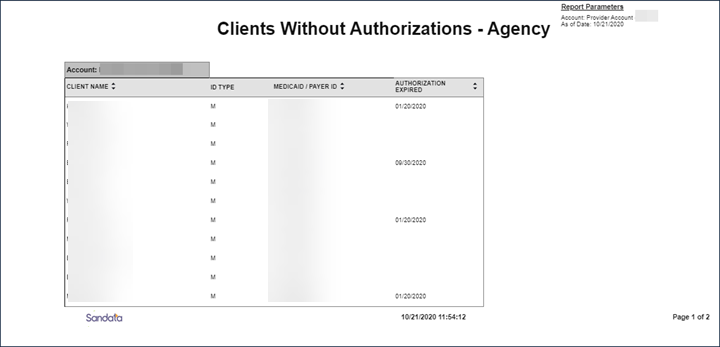
This report displays a listing of all clients that do not have an authorization as of the selected date. Clients with one or more authorizations active as of the selected date do not appear on this report. This report is only available when Authorization functionality is enabled. Authorizations are generally received from a payer using an interface. This report allows users to review all clients that do not have a current authorization to identify where the appropriate actions to end services or obtain an authorization from the payer are required. While a client can have multiple authorizations, based on service, this report only displays clients without any authorizations as of the selected date.
This report has no parameters.
Reports are grouped by the following fields. Each change in these fields results in a page break.
|
Field |
Description |
|---|---|
|
Account |
the provider agency’s Sandata EVV account number |
Each column of the report displays the following information:
|
Columns |
Description |
|---|---|
|
Client Name |
the client's name |
|
ID Type |
the type of identifier displayed on the report for the client (M = Medicaid ID, P = Payer ID, C=Client ID, N=Newborn) |
|
Medicaid/Payer ID |
the client’s identifier based on the ID Type specified |
|
Authorization Expired |
the date the client’s authorization expired This field is blank if the client has not had an authorization. |
Sample Report
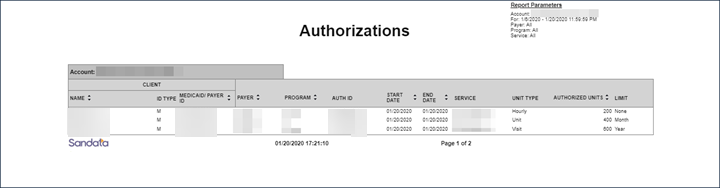
This report displays a list of all authorizations in the system as of the selected day. This report allows users to view all authorizations over the selected date range. This report displays any authorizations in effect on any day that falls within the selected date range. The report helps monitor overall authorization information.
Use the following fields to limit the report output:
| Field |
Description |
|---|---|
|
Payer |
the selected payer(s) |
|
Program |
the selected program(s) |
|
Service |
the selected service(s) |
|
Client |
the entered client |
|
Client AR# |
the entered client AR number |
Reports are grouped by the following fields. Each change in these fields results in a page break.
| Field |
Description |
|---|---|
|
Account |
the provider agency |
Each column of the report displays the following information:
| Columns |
Description |
|---|---|
|
Name |
the client's name |
|
ID Type |
the type of identifier displayed on the report for the client (M = Medicaid ID, P = Payer ID, C=Client ID, N=Newborn) |
|
Medicaid/Payer ID |
the client’s identifier based on the type specified |
|
Payer |
the client's payer |
|
Program |
the program(s) for the visit |
|
Auth ID |
the authorization’s reference ID number provided by the payer |
|
Start/End Date |
the start and end date for the authorizations Authorizations that are considered ‘open ended’ may display with an end date that is blank. |
|
Service |
the authorization's service |
|
Unit Type |
the type of unit (hourly, unit, visit) |
|
Authorized Units |
the number of authorized units |
|
Limit |
the type of limitation set for the authorization |
Sample Report