Manage Contacts in Staff Members' Profiles

The Contacts section contains all of the information for contacts associated with a staff member. These can range from Emergency Contact, to spouse or family member, to other.

| Field | Description |
|---|---|
|
|
Displays the type of contact associated with the staff member. |
|
Name |
Displays the name of the contact associated with the staff member. |
|
Home Phone |
Displays the home phone number of the contact associated with the staff member. |
|
Mobile Phone |
Displays the cell phone number of the contact associated with the staff member. |
|
Work Phone |
Displays the work phone number of the contact associated with the staff member. |
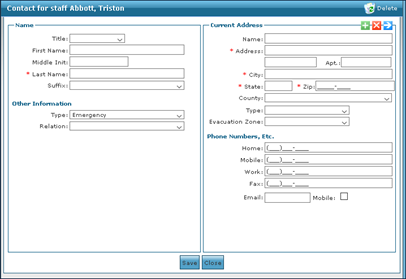
The Contacts Window is used to add a contact to an associated staff member.
|
Field |
Description |
|---|---|
|
Title |
Use this drop down to select the contact’s title. |
|
First Name |
Use this field to enter the contact’s first name. |
|
Middle Initial |
Use this field to enter the contact’s middle initial. |
|
Last Name |
Use this field to enter the contact’s last name. |
|
Suffix |
Use this drop down to select the contact’s suffix. |
|
Type |
Use this drop down to select the contact’s category. |
|
Relation |
Use this drop down to select the contact’s relation to the staff member. |
|
Name |
Use this field to enter the contact’s name. |
|
Address |
Use this field to enter the contact’s street name and number. |
|
Apt |
Use this field to enter the contact’s apartment number. |
|
City |
Use this field to enter the contact’s city. |
|
State |
Use this field to enter the contact’s state. |
|
Zip |
Use this field to enter the contact’s zip. |
|
County |
Use this field to enter the contact’s county. |
|
Type |
Use this drop down to select the category of residence. |
|
Evacuation Zone |
Use this drop down to select the contact’s designated evacuation zone. |
|
Home |
Use this field to enter the contact’s home phone number. |
|
Mobile |
Use this field to enter the contact’s cell phone number. |
|
Work |
Use this field to enter the contact’s work phone number. |
|
Fax |
Use this field to enter the contact’s fax number. |
|
|
Use this field to enter the contact’s e-mail address. |
|
Mobile |
Select this check box to indicate that the contact’s email is a phone number. |
To add a contact to a staff member’s profile:
-
Go to Main Menu > Staff.
-
Locate and double click on the staff member using the search filters.
-
Click Contacts.

-
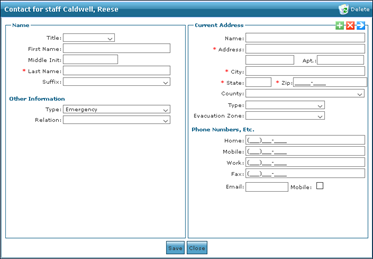
Click Add Contact. The Contacts window opens.
-
Use the fields to enter the contact information.
-
Click Save.
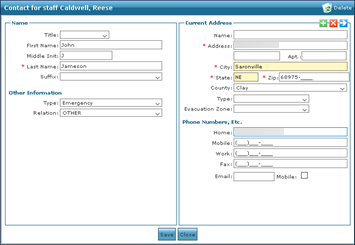
The contact is added to the staff member’s profile.
To edit a contact on a staff member's profile:
-
Go to Main Menu > Staff.
-
Locate and double click on the staff member using the search filters.
-
Click Contacts.
-
Double click on the contact to be edited.
-
Use the fields to edit the contact information.
-
Click Save.
To remove a contact from a staff member’s profile:
-
Go to Main Menu > Staff.
-
Locate and double click on the staff member using the search filters.
-
Click Contacts.
-
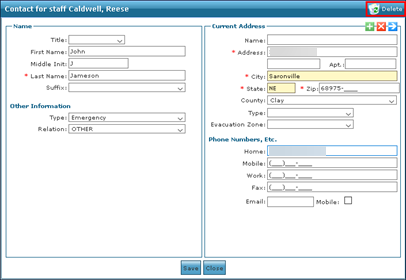
Double click on the contact to be deleted. This opens the Contacts window.
-
Click Delete.
-
Click Yes.
The contact is deleted from the staff member’s profile.