Class Roster Screen
The Class Roster screen contains everything needed to set up and run a training class. The screen allows users to register employees, take attendance, print sign-up sheets and certificates upon completion.
To open the Class Roster Screen, go to Main Menu > Staff > Training > Class Roster.
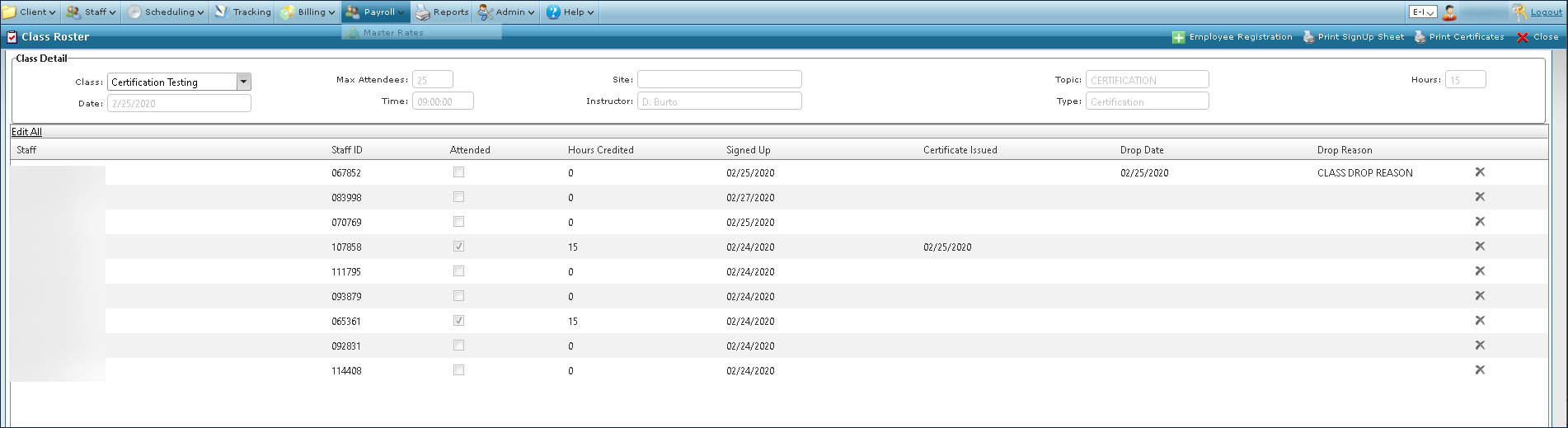
Current and upcoming classes can be viewed on the Class Roster screen, but cannot be edited. All changes must be done through the Class Master screen.
|
Field |
Description |
|---|---|
|
Class |
Use this drop down to select the class to view. |
|
Date |
Displays the starting date of the class. |
|
Max Attendees |
Displays the maximum number of participants for a class. |
|
Time |
Displays the starting time of the class. |
|
Site |
Displays the location of the class. |
|
Instructor |
Displays the instructor’s name. |
|
Topic |
Displays the topic of the class. |
|
Type |
Displays the category of the class. |
|
Hours |
Displays the total hours required for the class. |
|
Edit All |
Click this button to make any edits to the participants. |
|
Update All |
Click this button to save any changes made to the participants. |
|
Cancel All |
Click this button to cancel any changes made to the participants. |
|
Staff |
Displays the name of the participant. |
|
Staff ID |
Displays the staff member’s staff identification number. |
|
Attended |
Indicates if the staff member attended the class. |
|
Hours Credited |
Displays the number of hours the staff member receives credit for. |
|
Signed Up |
Displays the date the staff member was added to the class. |
|
Certificate Issued |
Displays the date the certificate of completion was issued. |
|
Drop Date |
Displays the date a staff member quit the class. |
|
Drop Reason |
Displays the reason the staff member quit the class. |
|
Employee Registration |
Click this button to open the Employee Registration window where staff members can be added or removed from the class. |
|
Print SignUp Sheet |
Click this button to open the Print SignUp Sheet window where sign up sheets can be printed. |
|
Print Certificates |
Click this button to open the Print Certificates window where certificates can be printed. |