Santrax Maintenance Screen
Santrax Maintenance is a tool for users to view and monitor call data as well as resolving exceptions on the visits., to ensure visits are being performed correctly.
To access the Santrax Maintenance screen, go to Main Menu > Scheduling > Santrax > Maintenance.
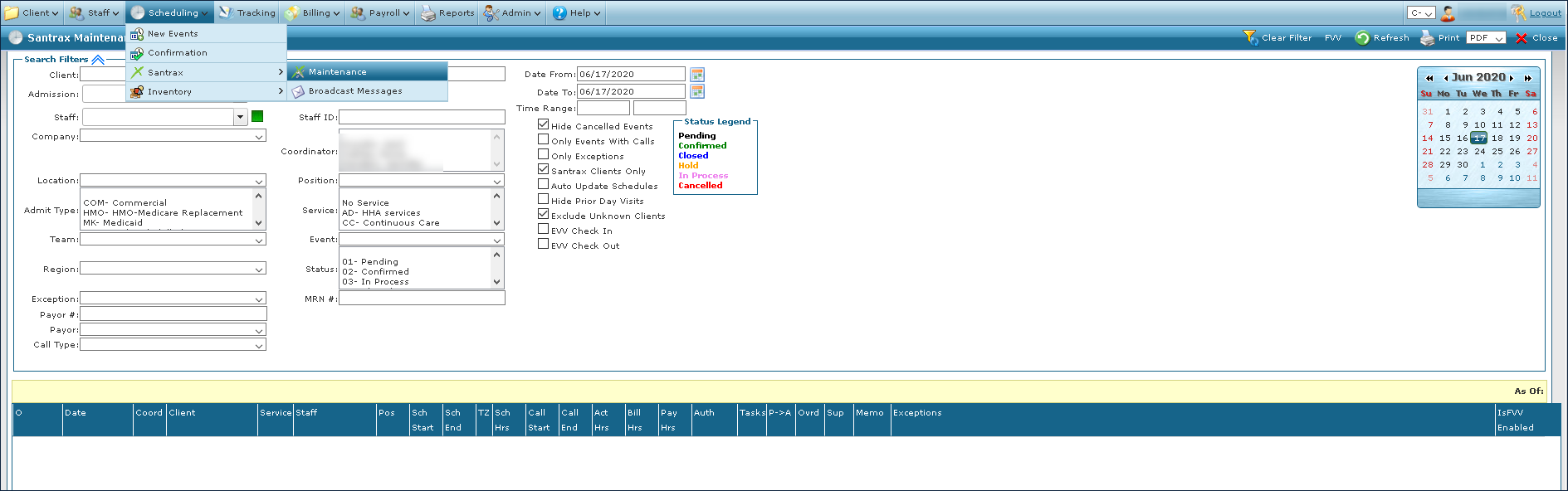
The Search Filters at the top of the screen allow you to narrow the Results List to meet specific criteria.
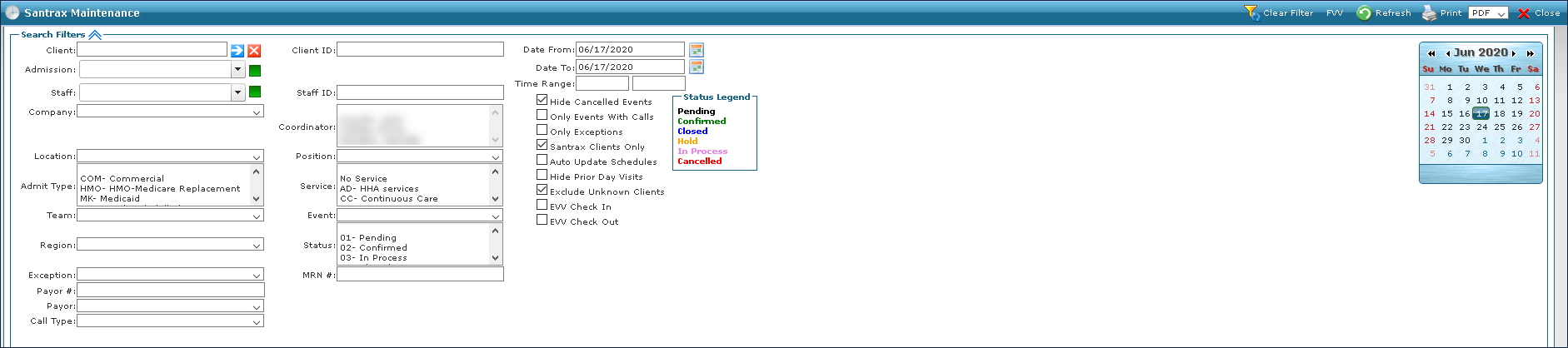
|
Field |
Description |
|---|---|
|
Client |
Use this field to filter schedules by the client’s admissions. |
|
Admission |
Use this field to filter schedules by a client’s specific admission. |
|
Staff |
Use this field to filter schedules by staff. |
|
Company |
Use this field to filter schedules by company. |
|
Location |
Use this field to filter schedules by location. |
|
Admit Type |
Use this field to filter schedules by admit type. |
|
Team |
Use this field to filter schedules by team. |
|
Region |
Use this filter to search for schedules by region. |
|
Exception |
Use this filter to search for schedules by exception. |
|
Payor # |
Use this filter to search for schedules by payer number. |
|
Call Type |
Use this field to filter schedules by call type. |
|
Client ID |
Use this field to filter schedules by client id number. |
|
Staff ID |
Use this field to filter schedules by staff id number. |
|
Coordinator |
Use this field to filter schedules by coordinator. |
|
Position |
Use this field to filter schedules by staff position. |
|
Service |
Use this field to filter schedules by service. |
|
Event |
Use this field to filter schedules by event code. |
|
Status |
Use this field to filter schedules by visit status. |
|
MRN # |
Use this field to filter schedules by medical record number. |
|
Date From |
Use this field to filter schedules in a range, beginning with this date. |
|
Date To |
Use this field to filter schedules in a range, ending with this date. |
|
Time Range |
Use this filter to search for schedules during this time range. |
|
Hide Cancelled Events |
Select this check box to hide schedules with cancelled events. |
|
Only Events With Calls |
Select this check box to filter for only visits with call data attached. |
|
Only Exceptions |
Select this check box to filter for only schedules with exceptions. |
|
Santrax Clients Only |
Select this check box to filter for only schedules with Santrax clients. |
|
Auto Update Schedules |
Select this check box to filter for schedules that were automatically updated by the system. |
|
Hide Prior Day Visits |
Select this check box to hide prior day visits.Visits that began overnight are not excluded. |
|
Exclude Unknown Clients |
Select this check box to exclude unknown client visits.These are visits where the system was not able to attach the calls to a client. |
|
EVV Check In |
Select this check box to filter for schedules by EVV Check In time. |
|
EVV Check Out |
Select this check box to filter schedules by EVV Check Out time. |
The Results List displays a list of schedules that match the criteria selected in the Search Filters.

|
Field |
Description |
|---|---|
|
O |
Displays various icons that apply to the visit, such as Mobile call, Verification Data, Overnight Visit, etc. |
|
Date |
Displays the date of the schedule. |
|
Coord |
Displays the coordinator associated with the schedule. |
|
Client |
Displays the client associated with the schedule. |
|
Service |
Displays the service associated with the schedule. |
|
Staff |
Displays the staff member associated with the schedule. |
|
Pos |
Displays the staff position for the associated schedule. |
|
Sch Start |
Displays the proposed scheduled start time. |
|
Sch End |
Displays the proposed scheduled end time. |
|
TZ |
Displays the time zone of the calls if not the same as the default time zone. |
|
Sch Hrs |
Displays the total proposed hours for the event. |
|
Call Start |
Displays the call start time. |
|
Call End |
Displays the call end time. |
|
Act Hrs |
Displays the call length based on the call times. |
|
Bill Hrs |
Displays for the billable hours for the visit. |
|
Pay Hrs |
Displays the payable hours for the visit. |
|
Auth |
Displays an icon when an auth is attached to this visit.N=limit by none, D=day, M=Month, W=Week, Y=year |
|
Tasks |
Displays the number of tasks on the visit |
|
P -> A (Proposed to Actual) |
Select this check box to adjust the bill and pay hours to match the proposed hours. |
|
Ovrd (Override) |
Select this check box to indicate a manual confirmation with the displayed values will be needed. |
|
Sup |
Displays the total number of supplies on the visit. |
|
Memo |
Displays the comments associated with the visit. |
|
Exceptions |
Displays any exceptions associated with the visit |