Staff Status History Report (CSV)
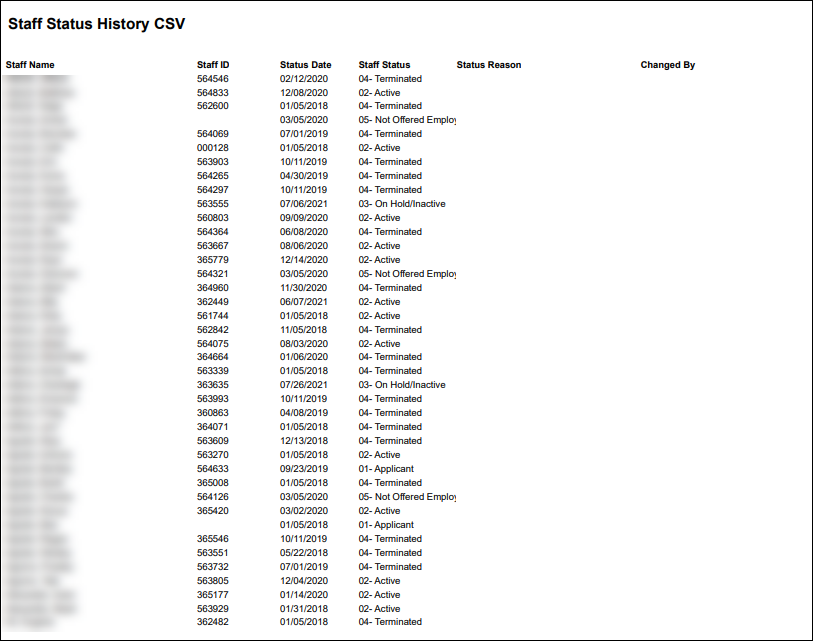
Description: This report displays the status of all staff members matching the terms selected by the filters. The report includes the staff member’s name and ID, the date of their most recent status change, what that status is and who changed or updated it.
Use: This report can be used to quickly reference the status of staff members at a location or by position.
Limitations: N/A
This report can be filtered by:
|
Field |
Description |
|---|---|
|
Company |
Use this dropdown to select the company. |
|
Location |
Use this dropdown to select the location. |
|
Team |
Use this dropdown to select the team. |
|
Staff Type |
Use this dropdown to select the staff type. |
|
Staff |
Use this field to select the staff member.Using a partial term returns all results matching the term. |
|
Positions |
Use this field to select the position(s) |
|
County |
Use this dropdown to select the county. |
|
Coordinator |
Use this dropdown to select the coordinator. |
|
Staff Manager |
Use this dropdown to select the staff manager. |
|
Staff Status |
Use this dropdown to select the staff status. |
Each column of the report displays:
|
Field |
Description |
|---|---|
|
Staff Name |
Displays the staff member’s name. |
|
Staff ID |
Displays the staff member’s ID. |
|
Status Date |
Displays the date of the most recent status change. |
|
Staff Status |
Displays the staff member’s status. |
|
Status Reason |
Displays the reason for the status change. |
|
Changed By |
Displays the name of the user who updated the staff member’s status. |