Staff Compliance Summary Report
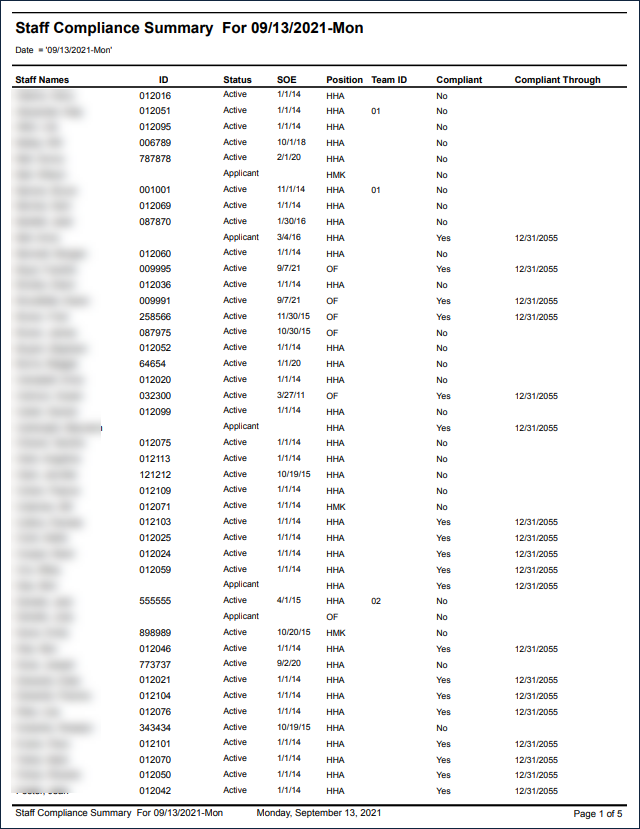
Description: This report displays the compliance status of all staff members matching the selected filters, as well as their employment status, position and start date. If a staff member is in compliance, their compliant through date is also displayed.
Use: This report can be used to quickly assess staff member compliance, identify non-compliant staff members, and review upcoming out of compliance dates.
Limitations: The report does not display how a staff member is out of compliance, only that they are.
This report can be filtered by:
|
Field |
Description |
|---|---|
|
Company |
The selected company. |
|
Location |
The selected location. |
|
Team |
The selected team. |
|
Staff Status |
The selected staff status. |
|
Position |
The selected position. |
|
Compliance |
The selected compliance status. |
|
Date |
The selected date. |
|
Staff Type |
The selected staff type. |
|
Contractor |
The selected contractor. |
Each column of the report displays:
|
Field |
Description |
|---|---|
|
Staff Names |
The staff member’s name. |
|
ID |
The staff member’s ID number. |
|
Status |
The staff member’s compliance status. |
|
SOE |
The staff member’s start of employment date. |
|
Position |
The staff member’s position. |
|
Team ID |
The staff member’s team ID number. |
|
Compliant |
The staff member’s compliance status. |
|
Compliant Through |
The last day the staff member is compliant through. |
|
Total Staff |
The total number of staff members. |