Admission List Report
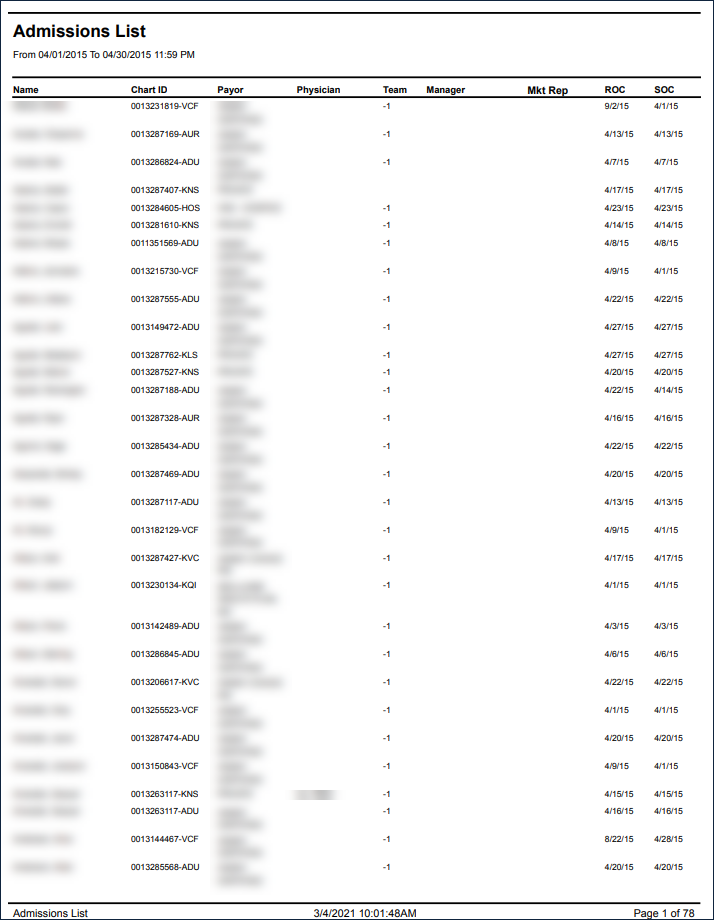
Description: This report lists all clients for the provider agency who were admitted within the selected date range.
Use: This report can be used by the agency to monitor the number of admissions.
This report can be filtered by:
|
Field |
Description |
|---|---|
|
Company |
The selected company. |
|
Location |
The selected location. |
|
Admit Type |
The code for the client's admission. |
|
Team |
The selected team. |
|
Marketer |
The selected marketing representative. |
|
Date From |
The first date of a selected range of dates. |
|
Date To |
The last date of a selected range of dates. |
This report can be sorted by:
|
Field |
Description |
|---|---|
|
Client Name |
Sorts the report by client name in ascending or descending order. Blank if unknown. |
|
Start of Care Date |
Sorts the report by the client's start of care date. |
Each column of the report displays:
|
Field |
Description |
|---|---|
|
Name |
The client's name. |
|
Chart ID |
The client's Chart ID number. |
|
Payor |
The client's payor. |
|
Physician |
The client's primary physician. |
|
Team |
The client's team number. |
|
Manager |
The client's manager. |
|
Mkt Rep |
The client's marketing representative. |
|
ROC |
The date of the client's referral of care. |
|
SOC |
The client's start of care date. |
|
Total Clients |
The total number of clients listed on the report. |