Active Client Roster with Visit Count Report
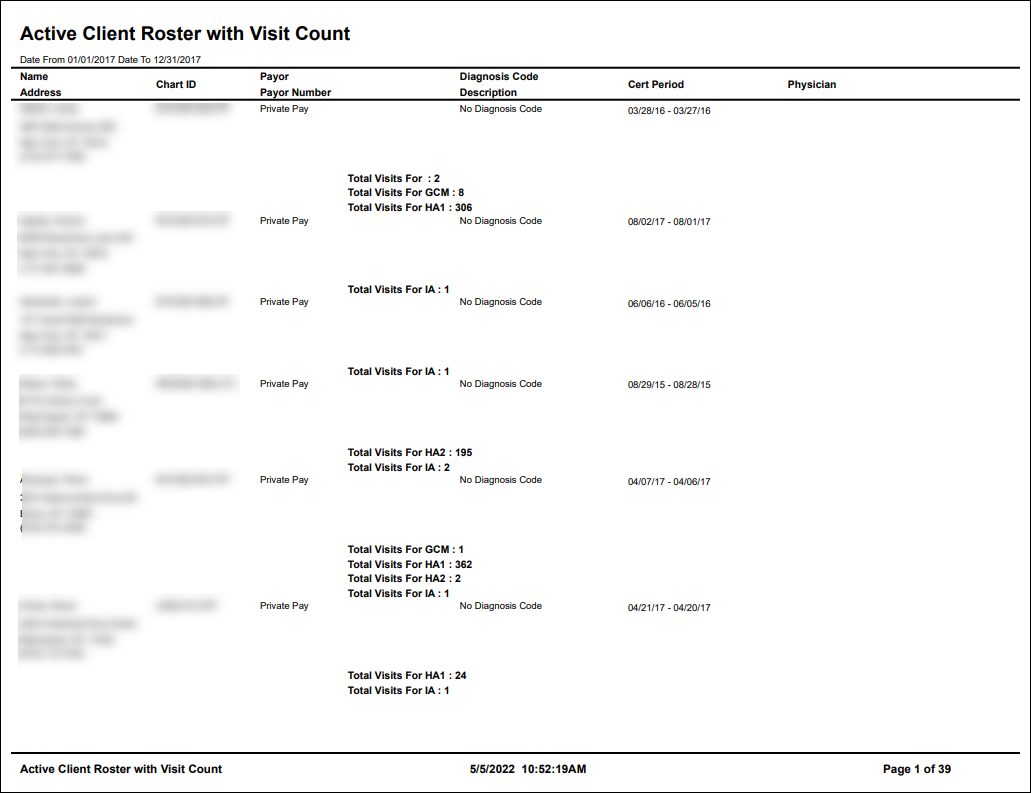
Description: This report displays active clients who received service during a selected date range. The report includes the client’s contact information, payor and physician names, and the number of visits performed by service code.
Use: This report can be used to review or confirm the number of times a client received a service over a specific date range.
Limitations: N/A
This report can be filtered by:
|
Field |
Description |
|---|---|
|
Company |
Use this dropdown to select the company. |
|
Location |
Use this dropdown to select the location. |
|
Admit Type |
Use this dropdown to select the admission type. |
|
Team |
Use this dropdown to select the team. |
|
Payor |
Use this dropdown to select the payor. |
|
Manager |
Use this dropdown to select the manager. |
|
Date From |
Use this field to search for clients beginning on this date. |
|
Date To |
Use this field to search for clients ending on this date. |
Each column of the report displays:
|
Field |
Description |
|---|---|
|
Name |
Displays the client’s name. |
|
Address |
Displays the client’s address. |
|
ChartID |
Displays the client’s ChartID |
|
Payor |
Displays the client’s associated payor. |
|
Payor Number |
Displays the client’s assigned payor number. |
|
Diagnosis Code |
Displays the client’s diagnosis code. |
|
Description |
Display’s the diagnosis code’s associated description. |
|
Cert Period |
Displays the client’s certification period. |
|
Physician |
Displays the client’s physician’s name. |
|
Total Visits For |
Displays the amount of visits for the associated service. |