Billing Entries Report
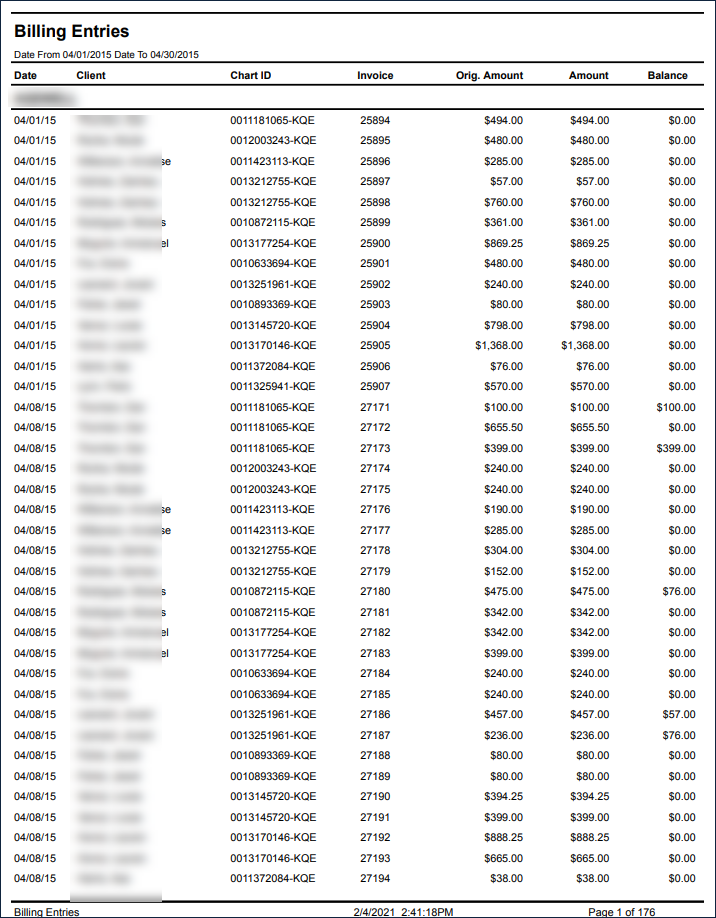
Description: This report displays a list of all invoices.
Use: This report can be used by accounting to view invoices and their current balance or status.
Limitations: N/A
This report can be filtered by:
|
Field |
Description |
|---|---|
|
Company |
The selected company. |
|
Location |
The selected location. |
|
Admit Type |
The code for the client's admission. |
|
Team |
The selected team. |
|
Staff Manager |
The selected staff manager. |
|
Coordinator |
The selected coordinator. |
|
County |
The selected county. |
|
Staff |
Staff member by name (last name, first name). When a partial name is entered the report displays results that begin with the entered characters. |
|
Payors |
The selected payor. |
|
Event Status |
The selected event status. |
|
Verifier |
The selected verifier. |
|
Service |
The selected service. |
|
Week Of |
The selected week of type. |
|
Date From |
The first date of a selected range of dates. |
|
Date To |
The last date of a selected range of dates. |
Each column of the report displays:
|
Field |
Description |
|---|---|
|
Payor |
The client's payor. |
|
Date |
The date of the invoice. |
|
Client |
The client's name (last, first). |
|
Chart ID |
The client's Chart ID Number. |
|
Invoice |
The number displayed on the invoice. |
|
Orig. Amount |
The original amount displayed on the invoice. |
|
Amount |
The actual amount billed. |
|
Balance |
The balance remaining on the invoice. |
|
Totals |
The total original amount, amount, and remaining balance for each payor. |